Printer Color, Hyperlinks, and Stats
The printer crate provides reusable output machinery for color specifications, hyperlink configuration, path printing, and search statistics.
This separation lets printer builders receive output configuration while writers decide whether terminal capabilities are available; statistics are enabled only when requested or required by JSON output.
Sources: crates/printer/src/color.rs:88-94, crates/printer/src/path.rs:142-146, crates/printer/src/stats.rs:13-21, crates/printer/src/path.rs:150-163, crates/core/flags/hiargs.rs:1286-1293
Core concepts
Color specifications
A color specification selects an output target and changes its foreground, background, style, or reset behavior.
ColorSpecs stores separate terminal styles for paths, line numbers, columns, matches, and highlights.
Sources: crates/printer/src/color.rs:171-176, crates/printer/src/color.rs:88-94
Hyperlink formats
A hyperlink format is a URL-like template made from literal bytes and variables such as {path}, {line}, and {column}.
HyperlinkConfig combines a parsed HyperlinkFormat with a HyperlinkEnvironment, which can provide host and WSL-prefix values.
Sources: crates/printer/src/hyperlink/mod.rs:513-530, crates/printer/src/hyperlink/mod.rs:28-31, crates/printer/src/hyperlink/mod.rs:251-254
Search statistics
Search statistics are elapsed time and counters accumulated in a Stats value.
| Field | Meaning exposed by the API |
|---|---|
elapsed | Time accumulated for the search |
searches | Number of searches |
searches_with_match | Searches that found a match |
bytes_searched | Bytes examined |
bytes_printed | Bytes written as output |
matched_lines | Matching lines |
matches | Matches found |
These are the fields stored by Stats, and accessors expose the corresponding values.
Sources: crates/printer/src/stats.rs:13-21
How color specifications reach terminal output
The command-line layer starts with default specifications, appends user-provided specifications, and constructs one merged ColorSpecs. The defaults color paths, lines, and matches, make matches bold, and choose magenta paths on Unix or cyan paths on Windows.
A specification is split on :. The first part selects an OutType; the second selects a SpecType; and color or style values are parsed only when the selected type requires a third part. Invalid shapes produce ColorError::InvalidFormat, while unknown output types, spec types, colors, and styles have distinct error cases.
The supported output targets are path, line, column, match, and highlight. The supported operations are fg, bg, style, and none; style names include bold, intense, underline, and italic variants with corresponding disabling forms.
ColorSpecs::new applies specifications in input order to the matching field, so later settings can modify the accumulated style for that target. Each value updates the underlying terminal ColorSpec: foreground and background set colors, style values toggle attributes, and None clears the specification.
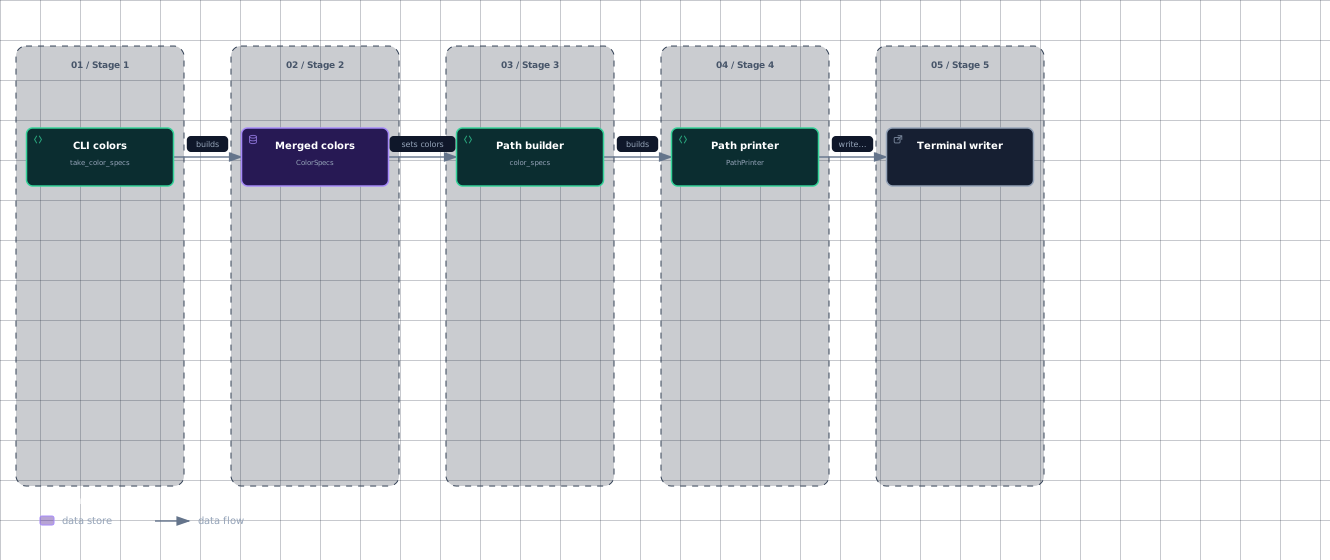
The resulting settings are placed in the path printer configuration through color_specs. When the builder creates a PathPrinter, it also creates an Interpolator for hyperlink handling. During write, the writer checks supports_color, applies the path color around the path bytes, and resets the writer afterward.
The color configuration moves through the printer pipeline as follows.
Evidence
- cli-colorscrates/core/flags/hiargs.rs:1296
- color-specscrates/printer/src/color.rs:88
- color-specscrates/printer/src/color.rs:213
- path-buildercrates/printer/src/path.rs:70
- path-printercrates/printer/src/path.rs:45
- path-printercrates/printer/src/path.rs:142
- terminal-writercrates/printer/src/path.rs:150
This diagram shows the hand-off from parsed specifications to the writer that applies them.
Sources: crates/core/flags/hiargs.rs:1296-1304, crates/printer/src/color.rs:10-20, crates/printer/src/color.rs:314-348, crates/printer/src/color.rs:24-35, crates/printer/src/color.rs:354-362, crates/printer/src/color.rs:369-377, crates/printer/src/color.rs:383-395, crates/printer/src/color.rs:213-225, crates/printer/src/color.rs:272-308, crates/printer/src/path.rs:70-76, crates/printer/src/path.rs:45-49, crates/printer/src/path.rs:150-163
How clickable file hyperlinks are generated
A hyperlink format can be an alias or an explicit template. from_str first looks up an alias, then parses literal text and braced variables with a state machine. Available aliases include default, file, none, kitty, vscode, and others; each alias expands to a stored format string. Alias lookup uses binary search over HYPERLINK_PATTERN_ALIASES.
The format builder accepts only host, wslprefix, path, line, and column. Unknown variables are rejected. Validation requires a path variable, requires a line variable when a column variable is present, and checks that the literal prefix begins with a valid URL scheme.
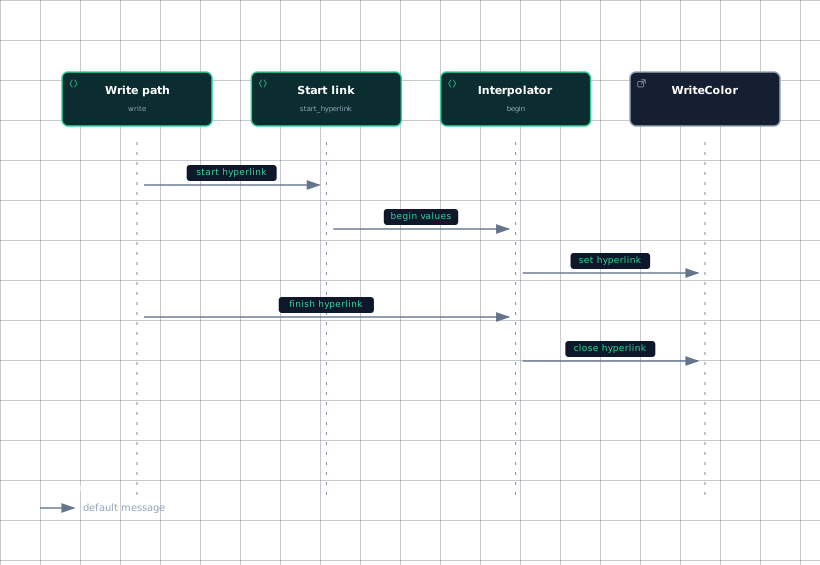
At write time, start_hyperlink converts the printable path into a HyperlinkPath, creates Values, and calls begin. On Unix, from_path canonicalizes the path, refuses a failed or relative result, and passes the resulting bytes to HyperlinkPath::encode. On Windows, it converts the path to an absolute string, handles verbatim and network prefixes, adds a leading slash, and passes the result to HyperlinkPath::encode. Unsupported platforms return no hyperlink path.
begin remains inactive when the format is empty, the writer lacks hyperlink support, or the writer lacks color support. Otherwise it interpolates each format part, opens a HyperlinkSpec, and sends it to the writer. finish closes the hyperlink only when the status is active.
The call order for a path write is:
Evidence
- path-writecrates/printer/src/path.rs:150
- start-linkcrates/printer/src/path.rs:166
- interpolatorcrates/printer/src/hyperlink/mod.rs:646
- interpolatorcrates/printer/src/hyperlink/mod.rs:675
- writercrates/printer/src/hyperlink/mod.rs:646
- writercrates/printer/src/hyperlink/mod.rs:675
Sources: crates/printer/src/hyperlink/mod.rs:102-174, crates/printer/src/hyperlink/aliases.rs:6-68, crates/printer/src/hyperlink/mod.rs:235-240, crates/printer/src/hyperlink/mod.rs:409-430, crates/printer/src/hyperlink/mod.rs:442-469, crates/printer/src/hyperlink/mod.rs:481-505, crates/printer/src/path.rs:166-175, crates/printer/src/hyperlink/mod.rs:715-764, crates/printer/src/hyperlink/mod.rs:768-877, crates/printer/src/hyperlink/mod.rs:881-884, crates/printer/src/hyperlink/mod.rs:646-665, crates/printer/src/hyperlink/mod.rs:675-684
How statistics are accumulated and aggregated
Stats::new returns Stats::default(). Search code creates statistics only for search mode when --stats is enabled, or when JSON search mode is selected. Statistics may require the search to continue after an otherwise early match.
Each tracked value has an additive update method: add_elapsed, add_searches, add_searches_with_match, add_bytes_searched, add_bytes_printed, add_matched_lines, and add_matches.
Aggregation is field-wise addition. add returns a new Stats whose elapsed time and counters are sums of the two inputs. add_assign performs the same operation in place.
The serialized statistics object contains elapsed time, searches, searches with matches, bytes searched, bytes printed, matched lines, and matches. The End JSON message includes a Stats value.
Sources: crates/printer/src/stats.rs:27-29, crates/core/flags/hiargs.rs:1286-1293, crates/printer/src/summary.rs:256-260, crates/printer/src/stats.rs:72-74, crates/printer/src/stats.rs:77-79, crates/printer/src/stats.rs:82-84, crates/printer/src/stats.rs:87-89, crates/printer/src/stats.rs:92-94, crates/printer/src/stats.rs:97-99, crates/printer/src/stats.rs:102-104, crates/printer/src/stats.rs:118-129, crates/printer/src/stats.rs:139-147, crates/printer/src/stats.rs:152-170, crates/printer/src/jsont.rs:65-69
How it connects
The CLI argument layer assembles color specifications before constructing printers. The printer crate re-exports ColorSpecs, HyperlinkConfig, PathPrinter, and Stats, along with the standard, summary, and JSON printer APIs.
For the broader search path, start with CLI Entry and Flag Parsing, then follow the worker and printer hand-off in Search Worker and I/O. Output-format behavior belongs in Output Printers, while this page covers supporting terminal configuration and statistics machinery.
Sources: crates/core/flags/hiargs.rs:1296-1304, crates/printer/src/lib.rs:63-76
Key takeaways
- Color specs are parsed as target, type, and value, merged in order, and applied only when the writer supports color.
- Hyperlink formats may use aliases or validated variables; links are emitted only when hyperlink and color support are available.
- File paths are normalized before being passed to
HyperlinkPath::encode. Statstracks elapsed time plus six search and output counters.- Statistics aggregate through field-wise addition and are serialized in JSON
Endmessages.