Build, Test, and Feature Flags
React’s repository turns one source tree into release-channel-specific artifacts. The root scripts expose builds, tests, linting, formatting, and validation as Yarn commands, while the build driver spawns a script under scripts/rollup/ for each channel.
This separation lets stable and experimental builds use different package lists, versions, and feature-flag values without maintaining separate source trees.
Sources: package.json:123-157, scripts/rollup/build-all-release-channels.js:158-177, ReactVersions.js:35-51, ReactVersions.js:56, packages/shared/ReactFeatureFlags.js:26, packages/shared/ReactFeatureFlags.js:78
Core concepts
Release channel
A release channel is the build selection passed as stable or experimental to the release scripts.
Sources: scripts/rollup/build-all-release-channels.js:56-109, scripts/rollup/build-all-release-channels.js:111-156
Feature flag
A feature flag is an exported constant whose value enables, disables, or parameterizes a behavior in shared React code.
Sources: packages/shared/ReactFeatureFlags.js:26, packages/shared/ReactFeatureFlags.js:282-286
Build artifact
A build artifact is a compiled package directory whose package versions and embedded React version strings are rewritten during post-processing.
Sources: scripts/rollup/build-all-release-channels.js:415-472, scripts/rollup/build-all-release-channels.js:474-505
Test entry point
A test entry point is the root Jest wrapper invoked through a package script, optionally with a release-channel selector.
Sources: package.json:138-143
How one source tree becomes two release builds
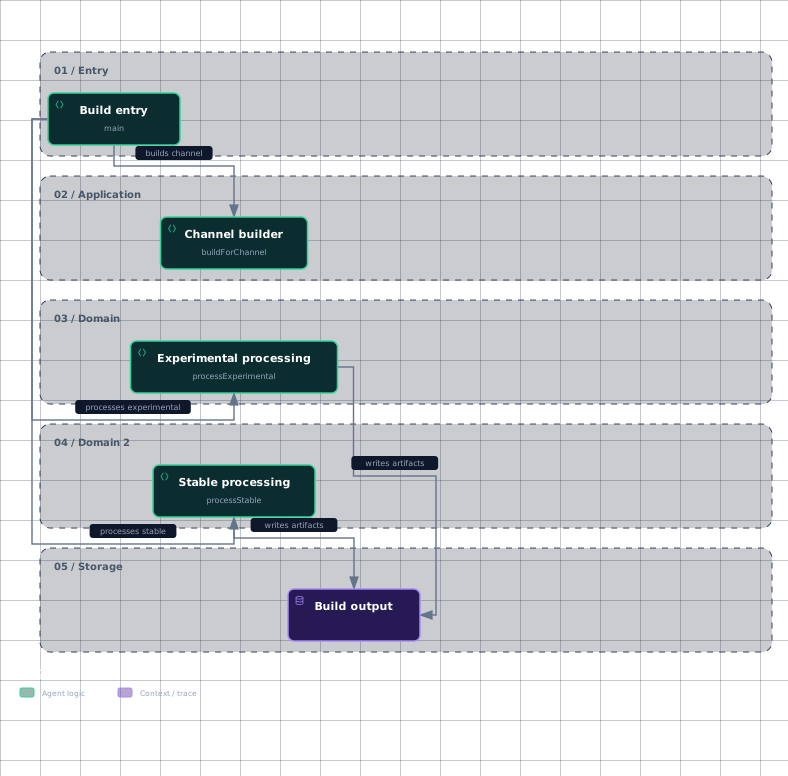
The repository’s root build script invokes build-all-release-channels.js, while channel-specific commands can invoke the same driver with an explicit release channel.
Evidence
- build-entryscripts/rollup/build-all-release-channels.js:111
- channel-builderscripts/rollup/build-all-release-channels.js:158
- stable-processingscripts/rollup/build-all-release-channels.js:179
- experimental-processingscripts/rollup/build-all-release-channels.js:304
- build-outputscripts/rollup/build-all-release-channels.js:179
- build-outputscripts/rollup/build-all-release-channels.js:304
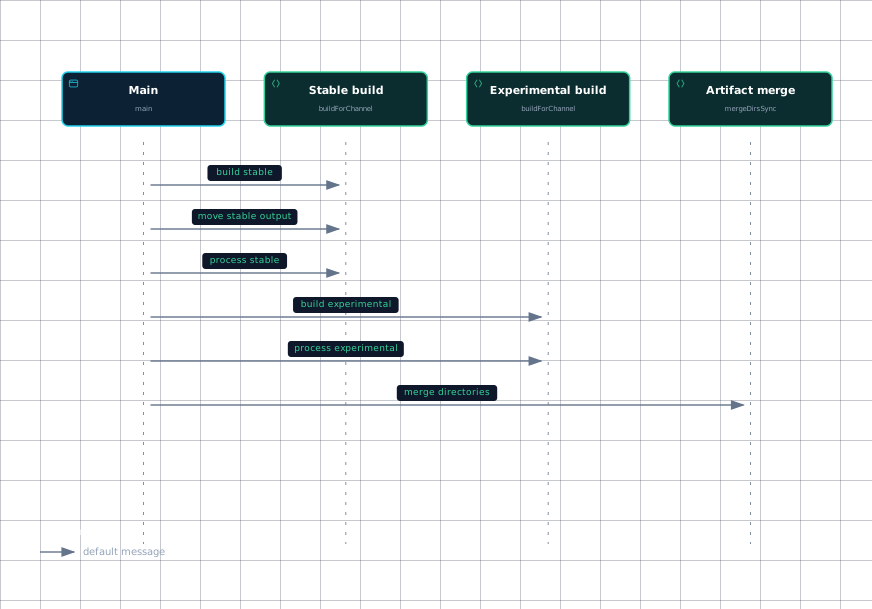
main chooses the channel path: in CI it builds the requested channel and then processes it; locally it builds stable, moves that output aside, processes stable, builds experimental, moves that output aside, processes experimental, merges the directories, and restores the combined output as ./build.
For each channel, buildForChannel starts ./scripts/rollup/build.js in a child process and adds RELEASE_CHANNEL, CI_TOTAL, and CI_INDEX to its environment. A non-zero child status terminates the wrapper with the same status.
Stable processing copies the initial node_modules output into oss-stable-semver, updates package versions, renames the working directory to oss-stable, and replaces the embedded placeholder React version. During an RC phase it also creates oss-stable-rc.
Experimental processing assigns versions to both stable and experimental package lists, renames the output to oss-experimental, replaces its embedded version, and removes artifacts not handled as experimental output.
The package lists explain the intended difference: stablePackages contains the regular release set, while experimentalPackages contains react-markup.
Sources: package.json:123-131, scripts/rollup/build-all-release-channels.js:111-156, scripts/rollup/build-all-release-channels.js:158-177, scripts/rollup/build-all-release-channels.js:179-302, scripts/rollup/build-all-release-channels.js:304-402, ReactVersions.js:35-51, ReactVersions.js:56
The call order that produces a local combined build
The local branch is sequential: stable is built and moved, stable is processed, experimental is built and moved, experimental is processed, and then mergeDirsSync copies experimental files into the stable directory structure.
Evidence
Sources: scripts/rollup/build-all-release-channels.js:111-156, scripts/rollup/build-all-release-channels.js:512-525
How feature flags vary behavior
The shared flag module contains ordinary boolean constants, experimental expressions, and profiling-dependent expressions. For example, enableBrowserAPI is enabled, enableSuspenseCallback is disabled, and enableLegacyCache follows __EXPERIMENTAL__.
| Flag | Source value | Plain-language role |
|---|---|---|
enableBrowserAPI | true | Enables the browser API path. |
enableSuspenseCallback | false | Disables the Suspense callback feature in this flag definition. |
enableLegacyCache | __EXPERIMENTAL__ | Follows the experimental build setting. |
enableAsyncIterableChildren | __EXPERIMENTAL__ | Follows the experimental build setting for async iterable children. |
enableProfilerTimer | __PROFILE__ | Follows the profiling build setting. |
enableSchedulingProfiler | !enableComponentPerformanceTrack && __PROFILE__ | Enables scheduling profiling only under a combined condition. |
The build process receives the release channel through the RELEASE_CHANNEL environment variable, so the channel-specific build machinery has the input needed to select channel behavior. The shown excerpts establish channel selection and flag definitions, but not the exact compiler step that physically removes disabled branches from production bundles.
For tests, TestFlags.js derives aliases from the selected release channel and whether tests run from source or a build. That lets the test harness describe conditions such as source, www, and fb alongside the channel.
Sources: packages/shared/ReactFeatureFlags.js:26, packages/shared/ReactFeatureFlags.js:53, packages/shared/ReactFeatureFlags.js:78, packages/shared/ReactFeatureFlags.js:80, packages/shared/ReactFeatureFlags.js:246, packages/shared/ReactFeatureFlags.js:261-262, scripts/rollup/build-all-release-channels.js:158-177, scripts/jest/TestFlags.js:75-93
How to run tests and checks
The repository-wide default test command is yarn test, which invokes node./scripts/jest/jest-cli.js. Channel-specific root commands include yarn test-stable, yarn test-www, and yarn test-classic; build-backed DevTools tests use yarn test-build-devtools.
The supplied package scripts do not show a package-name filter or a separate single-package test command. Therefore, this page can establish how to run the root suite and its channel variants, but not a repository-supported command for testing only one package from the shown material.
Other repository checks are exposed separately: yarn lint, yarn lint-build, yarn flow, yarn prettier-check, and yarn version-check. These are distinct commands rather than implicit steps of yarn test.
Sources: package.json:138-143, package.json:133-149
How it connects
Build orchestration belongs to the release and Rollup scripts described in Release, Build & Lint Scripts. The channel-to-artifact transformation here is the surrounding workflow for Rollup Bundles & Module Forks, where bundle definitions and module forks determine the concrete artifacts.
The root package layout and workspace boundary are introduced in React Overview and Repository Map. The test command delegates into Jest infrastructure covered by Jest Test Infrastructure, while manual application checks belong to Fixtures & Manual Test Apps.
Key takeaways
- One source tree is built separately for
stableandexperimental, then processed into channel-specific artifact directories. RELEASE_CHANNELis passed into the underlying build script.- Feature flags are exported constants whose values can be fixed, experimental, or profiling-dependent.
- The shown source proves channel selection and flag inputs, but not the exact dead-code-elimination implementation.
yarn testruns the root Jest wrapper; the supplied scripts do not document a single-package filter.