React DevTools Extension
This code packages the browser extension into separate background, content-script, page, and DevTools-panel entry points. The webpack configuration names those entry points explicitly, including background, backendManager, main, panel, proxy, and installHook.
It exists because those pieces run in different browser contexts. The extension registers content scripts in the page’s main world at document_start, allowing the React hook to be detected before page scripts run. Page-facing pieces communicate with window.postMessage, while the background and DevTools sides communicate through extension runtime ports.
Sources: packages/react-devtools-extensions/webpack.config.js:63-75, packages/react-devtools-extensions/src/background/dynamicallyInjectContentScripts.js:52-56, packages/react-devtools-extensions/src/contentScripts/backendManager.js:166-196, packages/react-devtools-extensions/src/background/index.js:145-248
Core concepts
Global hook
The global hook is the page-level registry through which React renderers and DevTools backends discover one another. setup adds the extension backend to hook.backends and emits devtools-backend-installed.
Sources: packages/react-devtools-extensions/src/backend.js:21-34
Backend manager
The backend manager is the content-side coordinator that registers renderers, activates compatible backends, and owns their shutdown callbacks. setup inspects existing hook entries and subscribes to later renderer and devtools-backend-installed events.
Sources: packages/react-devtools-extensions/src/contentScripts/backendManager.js:89-143
Bridge
A bridge is the event-and-payload channel used by the backend and frontend to exchange DevTools messages. activateBackend creates a bridge whose listener reads validated page messages and whose sender writes react-devtools-bridge messages with window.postMessage.
Sources: packages/react-devtools-extensions/src/contentScripts/backendManager.js:157-250
Runtime port pipe
The runtime port pipe is the background relay between the DevTools page and the content-script proxy for one inspected tab. ports stores the extension port, proxy port, and disconnect callback for each tab.
Sources: packages/react-devtools-extensions/src/background/index.js:28-35
How the hook reaches the page before React
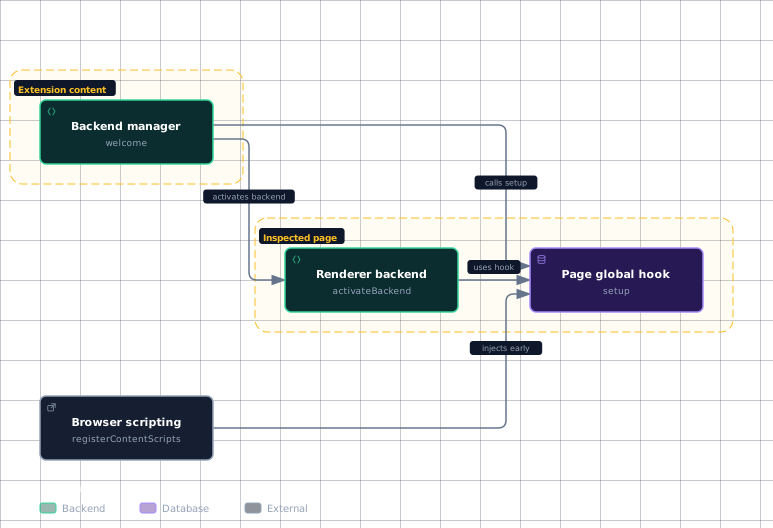
The extension first registers scripts directly in the page’s main world, rather than waiting for React to load. chrome.scripting.registerContentScripts is used with document_start, and the source explicitly identifies this timing as critical for detecting the hook. The execution helper also selects chrome.scripting.ExecutionWorld.MAIN, which places the injected files in the page’s main JavaScript world.
The hook installer and backend manager coordinate through page messages. messageListener accepts messages from the page window, answers a settings-injector handshake with a react-devtools-hook-installer message, and resolves the hook settings and component filters when the payload arrives. Later, welcome accepts a content-script welcome message, ignores duplicates, removes its listener, and calls setup(window.__REACT_DEVTOOLS_GLOBAL_HOOK__).
The backend entry point is deliberately tolerant of a missing hook: setup returns when its hook argument is null; otherwise it registers Agent, Bridge, initBackend, and setupNativeStyleEditor under COMPACT_VERSION_NAME, then emits the installation event. This lets the page-side hook exist before React initializes while still allowing the backend to be attached when the welcome handshake completes.
Evidence
- browser-scriptingpackages/react-devtools-extensions/src/background/dynamicallyInjectContentScripts.js:52
- page-hookpackages/react-devtools-extensions/src/backend.js:21
- backend-managerpackages/react-devtools-extensions/src/contentScripts/backendManager.js:57
- backend-managerpackages/react-devtools-extensions/src/contentScripts/backendManager.js:89
- renderer-backendpackages/react-devtools-extensions/src/contentScripts/backendManager.js:157
Sources: packages/react-devtools-extensions/src/background/dynamicallyInjectContentScripts.js:52-56, packages/react-devtools-extensions/src/background/executeScript.js:35-40, packages/react-devtools-extensions/src/contentScripts/installHook.js:18-38, packages/react-devtools-extensions/src/contentScripts/backendManager.js:57-87, packages/react-devtools-extensions/src/backend.js:21-34
What each extension context does
The background script is a per-tab connection broker. registerTab initializes a tab record, while registerExtensionPort and registerProxyPort store the two endpoints and attach disconnect handlers. connectExtensionAndProxyPorts then installs listeners in both directions, forwarding messages with postMessage. It reports disconnection to both endpoints, but sends the ready notification only to the proxy port so the proxy can flush its backend message queue.
The content-side backend manager adapts the page window to the backend API. When activateBackend creates its bridge, incoming messages are accepted only when they originate from the same window and carry the expected react-devtools-content-script source. Outgoing bridge events use window.postMessage with source react-devtools-bridge. send also refuses to send after shutdown has disabled messaging.
The DevTools main script owns the frontend instance, its browser connections, its message queue, and the panel containers. createDevToolsInstance creates the bridge and store, injects the backend manager into the inspected tab, creates a React root, and returns the bridge, store, renderer, and root. Its render function mounts DevTools with the bridge, store, portal containers, source-view callbacks, and the selected tab.
The panel factory creates the visible surfaces rather than the backend itself. createDevToolsPanels creates the Components, Profiler, Sources editor, Elements inspector, and Suspense panels. When the Components panel is shown, its portal container is cleared, the frontend is rendered with the components tab, and styles are injected. The other panels follow the same pattern for their respective containers and tabs.
| Context | Main responsibility |
|---|---|
| Background | Store per-tab ports and forward messages between extension and proxy ports. |
| Content backend manager | Register renderers, activate backends, and expose the bridge through page messages. |
| DevTools main script | Connect the inspected tab, queue bridge messages, create the store, and mount the frontend. |
| Panel UI | Provide portal containers and render DevTools into opened panels. |
These responsibilities are established by the port registry, backend activation, frontend construction, and panel creation paths.
Sources: packages/react-devtools-extensions/src/background/index.js:37-47, packages/react-devtools-extensions/src/background/index.js:49-61, packages/react-devtools-extensions/src/background/index.js:63-74, packages/react-devtools-extensions/src/background/index.js:145-248, packages/react-devtools-extensions/src/contentScripts/backendManager.js:157-250, packages/react-devtools-extensions/src/contentScripts/backendManager.js:183-196, packages/react-devtools-extensions/src/main/index.js:250-334, packages/react-devtools-extensions/src/main/index.js:305-331, packages/react-devtools-extensions/src/main/index.js:523-529, packages/react-devtools-extensions/src/main/index.js:347-383, packages/react-devtools-extensions/src/background/index.js:28-35
How a message travels to the panel
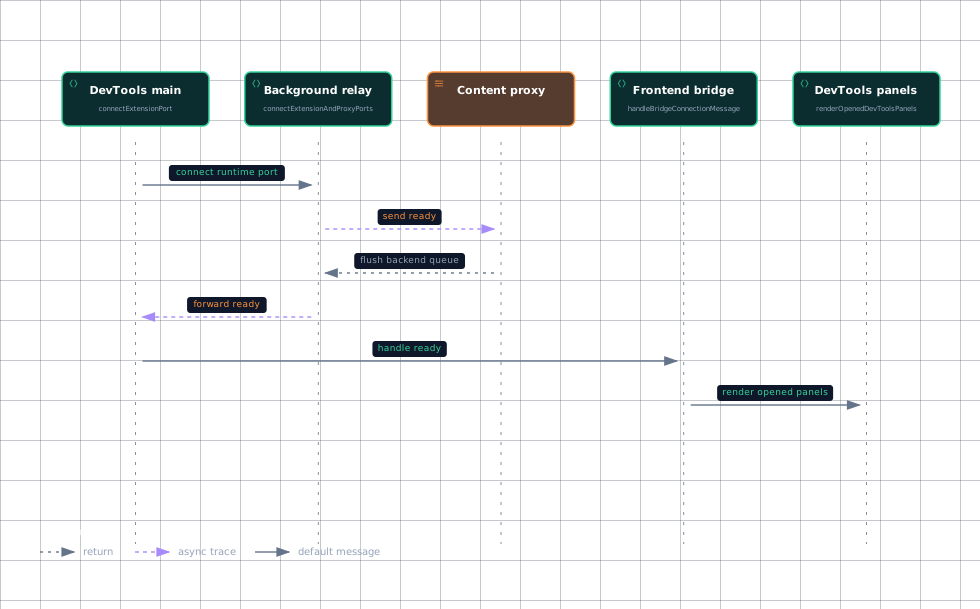
The message path has two transport sections: page-window messaging around the backend, then extension runtime messaging around the DevTools page. The background pipe forwards messages in both directions, reports disconnection to both endpoints, and sends readiness only to the proxy port.
Diagram omitted: missing
On the frontend side, createBridge queues every outgoing event in pendingBridgeMessages and calls flushPendingBridgeMessages. The flush function stops when the runtime port is absent or disconnected; otherwise it calls currentPort.postMessage({event, payload}, transferable) and removes successfully sent messages from the queue. handleBridgeConnectionMessage marks the bridge connected on the ready signal and immediately flushes queued messages.
The reverse direction is delivered to the bridge listener only while the subscribed port is current. addBridgePortListener installs a listener on the next runtime port, and removeBridgePortListener removes the old listener and clears the subscription state. Once the bridge delivers the event, the frontend store and DevTools tree can rerender through the render path.
Evidence
- frontendpackages/react-devtools-extensions/src/main/index.js:629
- backgroundpackages/react-devtools-extensions/src/background/index.js:145
- proxypackages/react-devtools-extensions/src/background/index.js:145
- bridgepackages/react-devtools-extensions/src/main/index.js:101
- panelspackages/react-devtools-extensions/src/main/index.js:531
Navigation and shutdown preserve the same boundary discipline. On in-tab navigation, performInTabNavigationCleanup stops polling, unmounts an already mounted root or shuts down the bridge, then clears the frontend instance and pending messages. Full cleanup additionally disconnects the runtime port and sets it to null. The content manager performs the corresponding backend shutdown on pagehide, removing listeners and deleting the injected manager marker.
Sources: packages/react-devtools-extensions/src/background/index.js:145-248, packages/react-devtools-extensions/src/main/index.js:139-248, packages/react-devtools-extensions/src/main/index.js:78-99, packages/react-devtools-extensions/src/main/index.js:101-111, packages/react-devtools-extensions/src/main/index.js:121-137, packages/react-devtools-extensions/src/main/index.js:113-119, packages/react-devtools-extensions/src/main/index.js:250-334, packages/react-devtools-extensions/src/main/index.js:305-331, packages/react-devtools-extensions/src/main/index.js:559-598, packages/react-devtools-extensions/src/main/index.js:600-627, packages/react-devtools-extensions/src/contentScripts/backendManager.js:29-43
How it connects
The extension’s hook is the browser-facing counterpart to DevTools Integration Hook, which explains how React reports renderer activity through the global hook. The extension consumes those hook entries through registerRenderer, activateBackend, and initBackend.
The bridge message transport is the browser-extension implementation of DevTools Bridge Protocol. Here, createBridge owns the frontend wall listener and outgoing queue, while the background pipe carries messages between the DevTools page and the content proxy.
The mounted panel is the extension-specific host for the shared DevTools UI described by React Overview and the renderer-facing behavior described by Fiber Architecture. The extension supplies bridge, store, portal containers, and source-navigation callbacks to DevTools.
Sources: packages/react-devtools-extensions/src/contentScripts/backendManager.js:89-143, packages/react-devtools-extensions/src/contentScripts/backendManager.js:145-155, packages/react-devtools-extensions/src/contentScripts/backendManager.js:157-250, packages/react-devtools-extensions/src/main/index.js:139-248, packages/react-devtools-extensions/src/background/index.js:145-248, packages/react-devtools-extensions/src/main/index.js:305-331
Key takeaways
- The extension injects main-world scripts at
document_start, so the hook can be present before React page scripts run. - The background script relays per-tab runtime ports; the content backend manager adapts page messages into backend bridges.
- The DevTools main script queues messages until the runtime connection reports ready, then delivers them to the frontend bridge.
- Opened panels provide portal containers, and
rendermounts the sharedDevToolsUI into those containers. - Navigation and pagehide paths shut down listeners, bridges, roots, and ports so a later page can reconnect cleanly.
Sources: packages/react-devtools-extensions/src/background/dynamicallyInjectContentScripts.js:52-56, packages/react-devtools-extensions/src/background/index.js:28-35, packages/react-devtools-extensions/src/contentScripts/backendManager.js:157-250, packages/react-devtools-extensions/src/main/index.js:78-99, packages/react-devtools-extensions/src/main/index.js:101-111, packages/react-devtools-extensions/src/main/index.js:347-383, packages/react-devtools-extensions/src/main/index.js:305-331, packages/react-devtools-extensions/src/contentScripts/backendManager.js:29-43, packages/react-devtools-extensions/src/main/index.js:559-598