Fixtures & Manual Test Apps
The shown fixtures/ material provides standalone surfaces for inspecting renderer behavior: the art entry point loads React, ReactDOM, and a local widget, while the attribute fixture records DOM and SSR outcomes.
These apps exist alongside automated checks because release tooling explicitly warns that local builds do not run every automated test and that manual testing is still expected before publishing.
Sources: fixtures/art/app.js:3, fixtures/art/app.js:4, fixtures/art/app.js:5, fixtures/attribute-behavior/AttributeTableSnapshot.md:1-24, scripts/release/build-release-locally.js:9-15
Core concepts
Fixture app
A fixture app is a small application that loads React through a concrete rendering setup. The art entry point requires React, ReactDOM, and VectorWidget.
Sources: fixtures/art/app.js:3, fixtures/art/app.js:4, fixtures/art/app.js:5
Local-build wiring
Local-build wiring is the package configuration that copies experimental build files into the fixture's dependencies and defines a webpack build.
Sources: fixtures/art/package.json:13-16
Attribute behavior snapshot
An attribute behavior snapshot is a table of test inputs, flags, and observed results. The snapshot includes strings, arrays, objects, numbers, booleans, symbols, functions, null, and undefined.
Sources: fixtures/attribute-behavior/AttributeTableSnapshot.md:1-24
Observation record
An observation record is the collected result for one attribute case, including client values, warnings, errors, server-rendered values, and client/server comparisons.
Sources: fixtures/attribute-behavior/src/App.js:412-428
How fixture apps complement automated tests
Automated tests provide repeatable pass/fail results, while manual fixtures expose behavior for direct inspection. The release scripts distinguish these activities by stating that a local build does not run all CI tests and that those checks should be performed manually before publishing.
The fixtures can therefore reveal details that a single assertion may not communicate as clearly, such as the exact rendered value, warning status, or SSR comparison. For example, the attribute snapshot records changed and initial cases, warnings, and SSR mismatches in the same result table.
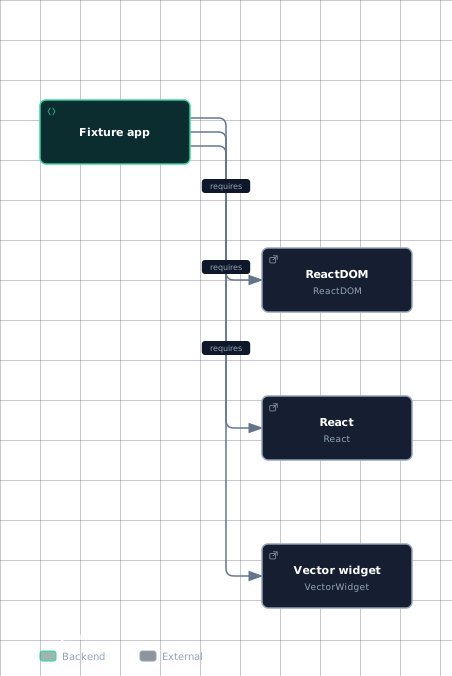
The art fixture checks a renderer-facing integration: its entry point loads the React runtime, the DOM renderer, and VectorWidget together.
This diagram shows the module hand-offs visible in the art fixture entry point.
Evidence
- art-appfixtures/art/app.js:3
- art-appfixtures/art/app.js:4
- art-appfixtures/art/app.js:5
- react-modulefixtures/art/app.js:3
- react-dom-modulefixtures/art/app.js:4
- vector-widgetfixtures/art/app.js:5
The important point is that the fixture exercises these dependencies as one application rather than examining only one isolated value.
Sources: scripts/release/build-release-locally.js:9-15, fixtures/attribute-behavior/AttributeTableSnapshot.md:1-24, fixtures/attribute-behavior/AttributeTableSnapshot.md:51-99, fixtures/art/app.js:3, fixtures/art/app.js:4, fixtures/art/app.js:5
How to run against a local React build
The fixtures/art manifest declares Babel, babel-loader, React, react-art, ReactDOM, and webpack as development dependencies. These dependencies provide the tooling and packages named by the fixture's build configuration.
The manifest defines a prebuild script that copies ../../build/oss-experimental/* into ./node_modules/, and a build script that invokes webpack app.js bundle.js. Thus, the documented local-build path is to use the package's declared build scripts, with the experimental build contents targeted at the fixture's node_modules/.
The excerpt does not show the package-manager command used to invoke either script, nor does it show a server or browser-launch command. Those operational details are not established by this manifest.
Sources: fixtures/art/package.json:2-11, fixtures/art/package.json:13-16
Why attribute behavior uses a table
fixtures/attribute-behavior covers a matrix of attributes and input values rather than one isolated assertion. The snapshot groups rows by attribute and records the test case, flags, and resulting value.
A table keeps the parallel dimensions visible together:
| Dimension | What the snapshot records |
|---|---|
| Input | Values such as strings, arrays, objects, numbers, booleans, symbols, and functions. |
| Transition | Whether the result is marked initial or changed. |
| Diagnostics | Whether a warning is recorded. |
| Rendered result | A string, an empty string, or <null>. |
| SSR comparison | Whether the case is marked as an SSR mismatch. |
The snapshot demonstrates why grouped comparison matters: accent-Height records SSR mismatches for string-like inputs, while accent-height records changed values without the same mismatch flag; the visible cases also vary by input type.
The fixture's observation state separately retains client results, warning and error indicators, server-rendered results, and client/server comparison fields. The table therefore preserves a reviewable summary of many related observations instead of reducing each case to an individual pass/fail outcome.
The fixture can also filter and sort the collected rows. getAttributes selects all, complete, or incomplete attributes using rowPatternHash, then enters a separate sorting phase. This organization supports manual investigation of groups of related cases.
Sources: fixtures/attribute-behavior/AttributeTableSnapshot.md:1-24, fixtures/attribute-behavior/AttributeTableSnapshot.md:51-99, fixtures/attribute-behavior/src/App.js:412-428, fixtures/attribute-behavior/src/App.js:884-908
How it connects
The fixture workflow connects repository build output to a standalone application: the prebuild script copies ../../build/oss-experimental/*, and the build script produces bundle.js from app.js. For the repository-wide build and package context, see Build, Test, and Feature Flags and Repository Map.
The manual-verification role connects to release preparation because local release scripts describe the local build as an escape hatch, note that it omits some automated tests, and expect manual checks before publishing. For the broader release process, see Release & Publishing Pipeline.
The attribute fixture connects renderer behavior to browser and server output through its rendered-value and SSR-comparison fields. For the implementation context behind those paths, see ReactDOM Host Config, Hydration, and Server Rendering (Fizz).
Sources: fixtures/art/package.json:13-16, scripts/release/build-release.js:9-15, fixtures/attribute-behavior/src/App.js:412-428
Key takeaways
- Fixture apps provide concrete behavior for manual inspection alongside automated tests.
- The
artfixture loadsReact,ReactDOM, andVectorWidget. - Its manifest copies experimental build files and defines a webpack bundle script.
- Attribute behavior is represented as a matrix of inputs, flags, results, and SSR comparisons.
- Grouped rows can be filtered and sorted for manual investigation.