REST & YAML Doc Generation
The doc package turns a Cobra command tree into reference documentation. ReStructuredText output is formatted for human-readable pages, while YAML output represents command metadata as structured fields.
Both formats support a single command or a complete command tree. Tree generation recursively visits available commands, writes one file per command, and lets callers prepend or customize generated content.
Sources: doc/rest_docs.go:62-130, doc/yaml_docs.go:93-147, doc/rest_docs.go:145-170, doc/yaml_docs.go:60-85
Core concepts
ReStructuredText generation
ReStructuredText generation emits headings, synopsis text, usage, examples, options, inherited options, related commands, and an auto-generation marker.
Sources: doc/rest_docs.go:62-130, doc/rest_docs.go:30-49
YAML generation
YAML generation serializes a cmdDoc value containing command descriptions, usage, options, inherited options, examples, and SeeAlso entries.
Sources: doc/yaml_docs.go:37-46, doc/yaml_docs.go:93-147
Single-command generation
Single-command generation writes only the selected command to an io.Writer, such as a buffer or file.
Sources: doc/rest_docs.go:57-59, doc/yaml_docs.go:88-90
Tree generation
Tree generation recursively processes available child commands and writes a separate .rst or .yaml file for every command.
Sources: doc/rest_docs.go:145-170, doc/yaml_docs.go:60-85
Customization callbacks
Customization callbacks control file prefixes and links: ReStructuredText receives a filePrepender plus a two-argument linkHandler, while YAML receives a filePrepender plus a one-argument linkHandler.
Sources: doc/rest_docs.go:62-130, doc/rest_docs.go:145-170, doc/yaml_docs.go:60-85
How generation chooses its shape
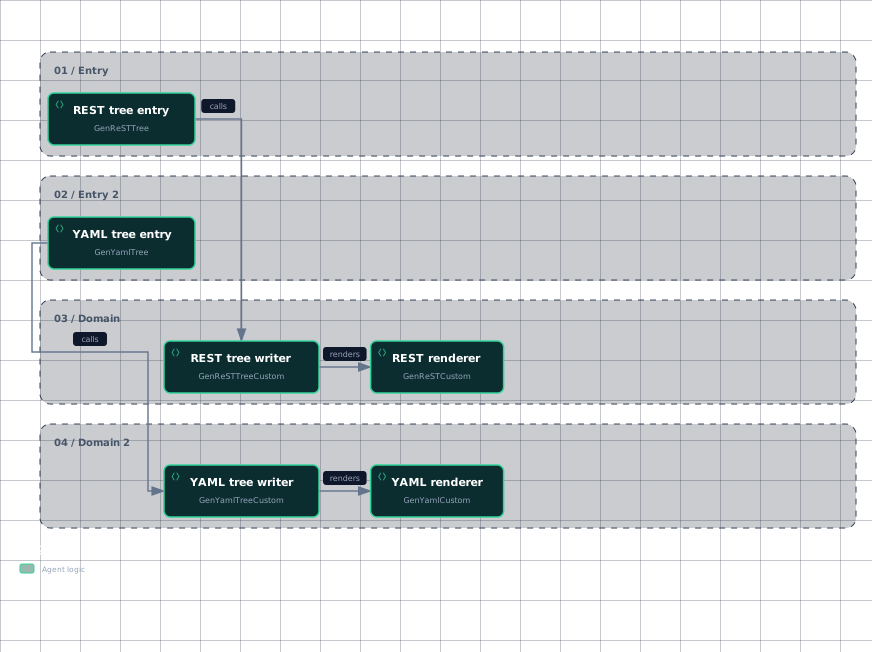
The public tree functions are thin wrappers around recursive custom functions, so the format-specific behavior is selected before traversal begins.
This workflow shows the separate tree paths and their format-specific renderers.
Evidence
- rest-tree-entrydoc/rest_docs.go:138
- rest-tree-writerdoc/rest_docs.go:145
- rest-rendererdoc/rest_docs.go:145
- rest-rendererdoc/rest_docs.go:62
- yaml-tree-entrydoc/yaml_docs.go:53
- yaml-tree-writerdoc/yaml_docs.go:60
- yaml-rendererdoc/yaml_docs.go:60
- yaml-rendererdoc/yaml_docs.go:93
The important structural difference is the renderer: GenReSTCustom writes formatted sections directly, whereas GenYamlCustom fills cmdDoc and marshals it.
For a single command, the usage is direct:
out := new(bytes.Buffer)
err := doc.GenReST(cmd, out)
if err != nil {
	log.Fatal(err)
}
This calls GenReSTCustom with defaultLinkHandler and writes only the selected command to the supplied writer.
The YAML equivalent calls GenYamlCustom with an identity link handler and writes only the selected command’s YAML document.
Sources: doc/rest_docs.go:138-141, doc/yaml_docs.go:53-57, doc/rest_docs.go:62-130, doc/yaml_docs.go:93-147, doc/rest_docs.go:57-59, doc/rest_docs.go:52-54, doc/yaml_docs.go:88-90
How recursive and single-command output differ
Use the single-command APIs when the caller already owns the output destination or wants one command only. GenReST and GenYaml both accept a command and an io.Writer; neither performs tree traversal.
Use the tree APIs when every available descendant should become a file. The recursive functions skip unavailable commands and additional help topics, recurse into remaining children, derive a filename from CommandPath, create the file, apply filePrepender, and invoke the format-specific renderer.
The resulting filename uses underscores instead of spaces and ends in .rst for ReStructuredText or .yaml for YAML.
A minimal tree call looks like this:
err := doc.GenReSTTree(cmd, "/tmp")
if err != nil {
	log.Fatal(err)
}
This produces a ReStructuredText file for the command and, through recursive traversal, files for its available descendants.
The YAML tree call has the same traversal model but produces .yaml files instead.
Sources: doc/rest_docs.go:57-59, doc/yaml_docs.go:88-90, doc/rest_docs.go:145-170, doc/yaml_docs.go:60-85, doc/rest_docs.go:138-141, doc/yaml_docs.go:53-57
What each format contains
ReStructuredText builds a page in presentation order. It initializes default help command and flag data, resolves the command path, falls back from Long to Short when needed, writes the title and synopsis, conditionally writes usage and examples, prints options, adds a SEE ALSO section, and finally adds the auto-generation marker unless disabled.
Its options section distinguishes local flags from inherited flags. printOptionsReST obtains NonInheritedFlags and InheritedFlags, directs their output into the document buffer, and prints defaults only when flags are available.
YAML instead stores fields in cmdDoc:
| Field | Contents |
|---|---|
Name | The command path |
Synopsis | The short description |
Description | The long description |
Usage | The usage line for runnable commands |
Options | Non-inherited flag metadata |
InheritedOptions | Inherited flag metadata |
Example | The command example |
SeeAlso | Parent and available child references |
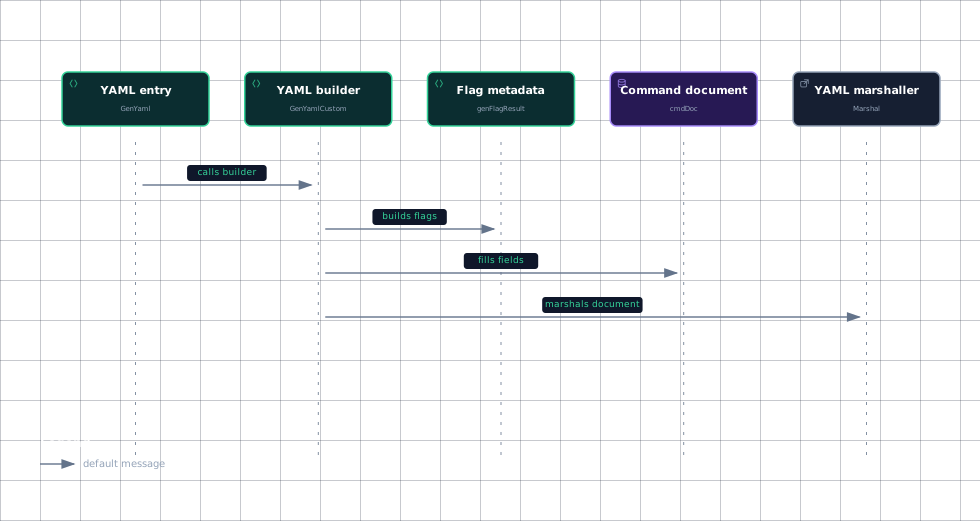
These fields are populated by GenYamlCustom, which then passes the completed cmdDoc to yaml.Marshal.
The YAML option records are cmdOption values. Each can contain a flag name, shorthand, default value, and usage text; empty YAML fields are omitted according to the struct tags.
genFlagResult visits every flag. When a non-deprecated shorthand is present, it preserves that shorthand and uses the raw flag.DefValue; when no shorthand is emitted, it applies forceMultiLine to the default value. Both branches apply forceMultiLine to usage text.
YAML SeeAlso data is a string slice containing the parent command first, followed by sorted available child commands. Additional help topics and unavailable commands are excluded.
This sequence shows why YAML output contains structured flag and relationship metadata rather than rendered option sections.
Evidence
- yaml-entrydoc/yaml_docs.go:88
- yaml-builderdoc/yaml_docs.go:93
- flag-builderdoc/yaml_docs.go:149
- yaml-documentdoc/yaml_docs.go:37
- yaml-documentdoc/yaml_docs.go:93
- yaml-marshallerdoc/yaml_docs.go:93
Sources: doc/rest_docs.go:62-130, doc/rest_docs.go:30-49, doc/yaml_docs.go:37-46, doc/yaml_docs.go:93-147, doc/yaml_docs.go:30-35, doc/yaml_docs.go:149-175
How it connects
The generated documents consume the same command metadata used by Cobra’s command and flag model: command paths, descriptions, examples, parent-child relationships, and local or inherited flags.
For broader command construction and traversal context, see Command Tree & Registration. For flag inheritance and merging behavior, see Flag Parsing & Persistent Flags.
The generated pages are one documentation output alongside Markdown and man-page generation. The tree-oriented design is consistent with other documentation generators that write pages for a command and its descendants.
ReStructuredText links default to .rst references through defaultLinkHandler, while YAML links default to the original name unless a custom handler changes them.
Custom handlers make the output suitable for site generators: ReStructuredText can receive a full filename-aware prepender and link formatter, while YAML can prepend content and map a filename to an internal URL.
Sources: doc/rest_docs.go:62-130, doc/yaml_docs.go:93-147, doc/rest_docs.go:30-49, doc/md_docs.go:119-132, doc/man_docs.go:46-48, doc/rest_docs.go:52-54, doc/rest_docs.go:57-59, doc/yaml_docs.go:88-90, site/content/docgen/rest.md:88-114, site/content/docgen/yaml.md:85-111
Key takeaways
- ReStructuredText is assembled as formatted sections; YAML is assembled as
cmdDocmetadata and marshaled. GenReSTandGenYamlgenerate one command into a writer; tree variants recurse and create one file per available command.- YAML records local and inherited flags separately, including names, shorthand values, defaults, and usage text.
- YAML
SeeAlsocontains the parent and sorted available children, while ReStructuredText renders those relationships as linked prose. - Custom callbacks control file prefixes and internal links for both formats.
Sources: doc/rest_docs.go:62-130, doc/yaml_docs.go:37-46, doc/yaml_docs.go:93-147, doc/rest_docs.go:57-59, doc/rest_docs.go:145-170, doc/yaml_docs.go:60-85, doc/yaml_docs.go:88-90, doc/yaml_docs.go:30-35, doc/yaml_docs.go:149-175