Testing Patterns
Cobra’s tests exercise command execution through small in-memory command trees, reusable execution helpers, and direct assertions on returned output and errors.
The same approach keeps tests focused: construct only the commands and flags needed for one behavior, execute with explicit arguments, then inspect captured output, the selected command, or the returned error.
Sources: command_test.go:32-35, command_test.go:88-111, command_test.go:48-57
Core concepts
Captured command output
Captured output is command text written into a bytes.Buffer instead of the process streams, so tests can compare help, usage, stdout, and stderr as strings.
Sources: command_test.go:48-57
Throwaway command tree
A throwaway command tree is a small Command hierarchy built inside a test and connected with AddCommand only for that scenario.
Sources: command_test.go:88-111, command_test.go:113-136
In-process completion request
An in-process completion request executes Cobra’s completion path with ShellCompNoDescRequestCmd rather than starting a shell.
Sources: active_help_test.go:29-82
Table-driven assertion
A table-driven assertion stores named inputs and expected outcomes, then runs each case with t.Run.
Sources: args_test.go:477-523
How tests capture execution output
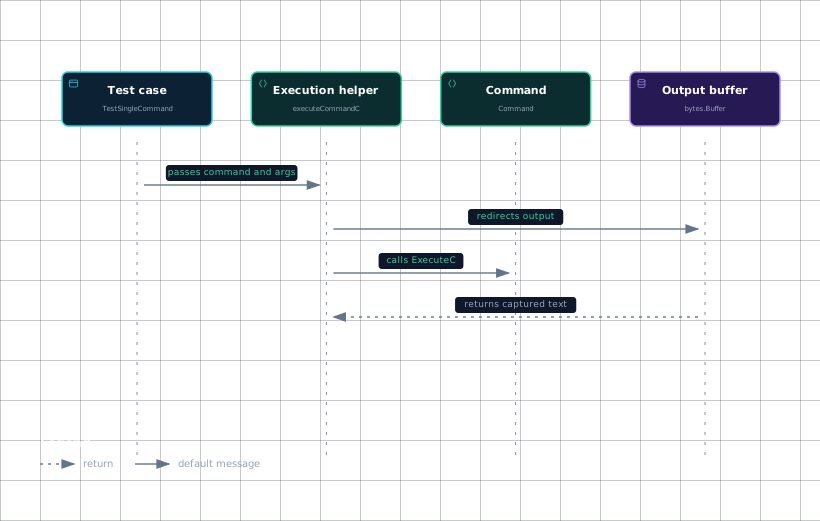
The common execution helpers create a buffer, redirect both output streams, install test arguments with SetArgs, and invoke an execution method.
| Helper | Execution method | Returned values |
|---|---|---|
executeCommand | executeCommandC | output and error |
executeCommandWithContext | ExecuteContext | output and error |
executeCommandC | ExecuteC | selected command, output, and error |
executeCommandWithContextC | ExecuteContextC | selected command, output, and error |
These helpers give tests one consistent way to inspect command output, errors, selected commands, and context-aware execution.
func executeCommandC(root *Command, args ...string) (c *Command, output string, err error) {
	buf := new(bytes.Buffer)
	root.SetOut(buf)
	root.SetErr(buf)
	root.SetArgs(args)

	c, err = root.ExecuteC()

	return c, buf.String(), err
}
The important detail is that SetOut and SetErr point at the same buffer, while ExecuteC also exposes which command was selected.
Evidence
- test-casecommand_test.go:88
- execution-helpercommand_test.go:48
- commandcommand_test.go:90
- output-buffercommand_test.go:49
For usage output, UsageString is tested with a custom usageFunc that writes through both Print and PrintErr; the expected value contains both streams in order. Help and usage tests then use checkStringContains or checkStringOmits instead of duplicating string-search logic.
Sources: command_test.go:37-46, command_test.go:48-57, command_test.go:59-68, command_test.go:32-35, command_test.go:2161-2175, command_test.go:74-78, command_test.go:80-84
How a throwaway command tree is built
A test normally creates a root Command, adds only the relevant children, assigns argument validation or a Run function, and executes the root with test arguments.
For a single command, getCommand packages this setup: it assigns Use, the supplied Args validator, Run: emptyRun, and optionally three ValidArgs values. This lets many validator tests vary only the validator, whether valid arguments exist, and the input arguments.
The command-tree pattern also tests routing. TestChildCommand adds child1 and child2 to a root, executes child1, and verifies that the child receives "one" and "two". A root can instead accept arbitrary arguments while still containing children, as shown by TestRootTakesArgs.
The calledAsTestcase.test helper stores the selected Command, redirects output, sets arguments, executes the parent, and compares Name() with CalledAs(). Tests that toggle global behavior such as EnablePrefixMatching restore the previous value with defer.
Sources: command_test.go:88-111, command_test.go:113-136, args_test.go:23-33, args_test.go:438-447, command_test.go:2442-2475
Reusing table-driven cases
TestMatchAll builds one combined validator with MatchAll and ExactArgs, defines named cases in a map, and runs each case with t.Run. Each case supplies arguments and a boolean indicating whether failure is expected; the test then checks the error presence against that expectation.
This structure is useful when the behavior is the same but inputs differ. The argument-validator tests apply it through focused test functions such as TestMinimumNArgs, TestMaximumNArgs, TestExactArgs, and TestRangeArgs, with shared helpers checking success or exact error text.
Sources: args_test.go:477-523, args_test.go:221-225, args_test.go:271-275, args_test.go:321-325, args_test.go:371-375, args_test.go:35-42, args_test.go:66-75, args_test.go:88-97, args_test.go:99-108
How completions are tested without a shell
Completion tests call executeCommand directly with ShellCompNoDescRequestCmd, the command path, and the partial argument. A ValidArgsFunction can return ordinary completions plus values from AppendActiveHelp; the test compares the resulting lines and directive text.
Completion behavior is tested in several positions: active help may appear alone, before, after, or between ordinary completions. Multiple active-help messages can also be interleaved with completions, and the returned directive is asserted as ShellCompDirectiveNoFileComp.
Flag completion follows the same in-process pattern. The test declares a flag with Flags().String, registers a callback with RegisterFlagCompletionFunc, executes a completion request containing --flag, and checks the returned output.
Environment-controlled behavior is tested without a shell as well. TestConfigActiveHelp sets the value returned by activeHelpEnvVar, executes completion, and checks the callback’s GetActiveHelpConfig value. TestDisableActiveHelp sets the disable value, executes the same request, and verifies that the active-help line is absent from the output.
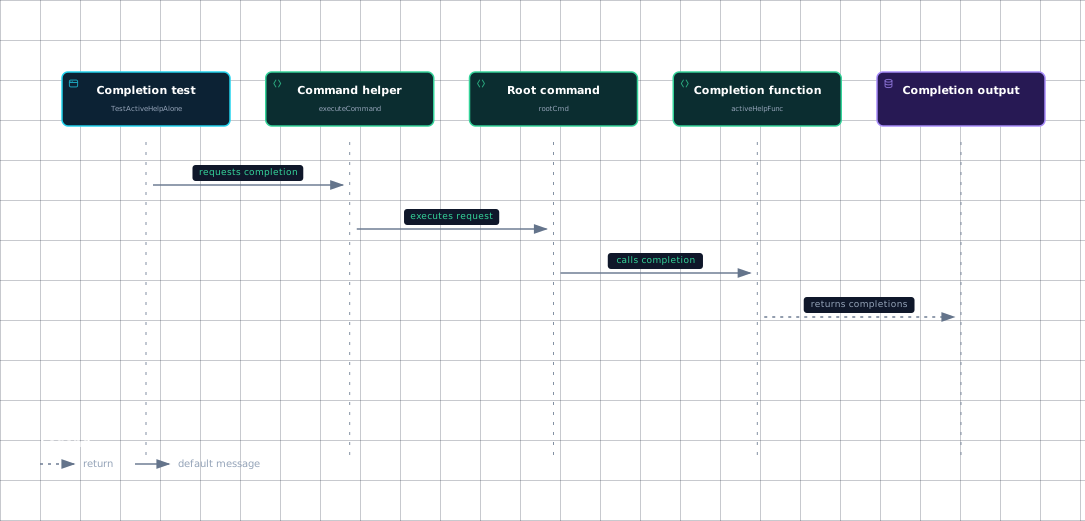
Evidence
- completion-testactive_help_test.go:29
- command-helperactive_help_test.go:43
- root-commandactive_help_test.go:30
- completion-functionactive_help_test.go:35
- completion-outputactive_help_test.go:48
Shell-script generation is tested separately: TestValidArgsFuncInBashScript calls GenBashCompletion, while TestCompleteCmdInZshScript calls GenZshCompletion and checks the generated script.
Sources: active_help_test.go:29-82, active_help_test.go:84-167, active_help_test.go:169-229, active_help_test.go:231-264, active_help_test.go:266-317, active_help_test.go:319-400, completions_test.go:1544-1558, completions_test.go:1607-1622
How it connects
Execution helpers sit at the boundary between tests and Cobra’s execution APIs: context tests use ExecuteContext or ExecuteContextC, while tests that need the selected command use ExecuteC or ExecuteContextC.
The output assertions described here verify behavior documented in Help, Usage & Templates, while command construction and AddCommand routing align with Command Tree & Registration.
In-process completion tests exercise the request path described in Dynamic Completion Engine, while script-generation tests cover the shell adapters described in Bash Completion Scripts (V1 & V2) and Zsh, Fish & PowerShell Completions.
Sources: command_test.go:37-46, command_test.go:48-57, command_test.go:59-68, command_test.go:88-111, command_test.go:113-136, active_help_test.go:29-82, completions_test.go:1544-1558, completions_test.go:1607-1622
Key takeaways
- Redirect both
SetOutandSetErrto a bytes.Buffer when asserting command text. - Build the smallest possible
Commandtree inside each test and connect children withAddCommand. - Use
getCommandand shared assertion helpers for repetitive positional-argument tests. - Use named cases with t.Run when one validator or execution path has many input variants.
- Test completions by calling
executeCommandwithShellCompNoDescRequestCmd, not by launching a shell.
Sources: command_test.go:48-57, command_test.go:88-111, args_test.go:23-33, args_test.go:35-42, args_test.go:477-523, active_help_test.go:29-82