Windows Platform Support & Mousetrap
Cobra includes a Windows-specific guard for commands started by double-clicking them in Windows Explorer. Instead of immediately terminating after a console window flashes open, it prints guidance explaining that the command should be run from cmd.exe.
The guard is optional: an empty MousetrapHelpText disables it, while MousetrapDisplayDuration controls whether the message remains visible for a timed interval or waits for user input.
Sources: cobra.go:72-75, command_win.go:30-41, cobra.go:81
Core concepts
Mousetrap help text
The Mousetrap help text is the message printed when Cobra detects that the process was started by Windows Explorer. Its default text tells the user to open cmd.exe and run the command there.
Sources: cobra.go:72-75
Mousetrap display duration
The display duration is the amount of time Cobra keeps the message visible before exiting. The default is five seconds.
Sources: cobra.go:81
Pre-execution hook
The pre-execution hook is a function that receives a *Command and performs the Windows Explorer check before the command continues.
Sources: command_win.go:30-41
Platform-specific hook binding
The platform split provides the same preExecHookFn variable from two files: command_win.go binds it to preExecHook, while command_notwin.go leaves it as a function variable without that Windows implementation.
Sources: command_notwin.go:20, command_win.go:28
How Windows Mousetrap works
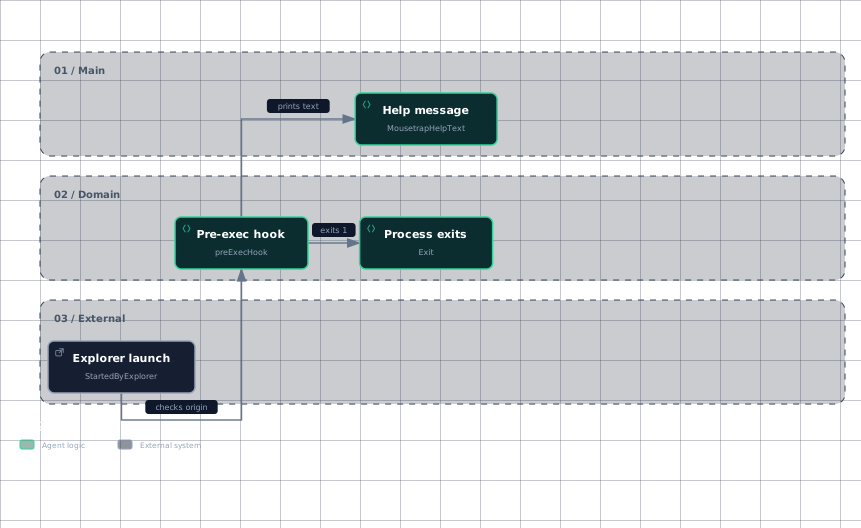
When preExecHook runs, it first checks both whether MousetrapHelpText is non-empty and whether mousetrap.StartedByExplorer() reports that Windows Explorer started the process. If either condition is false, the shown function does nothing.
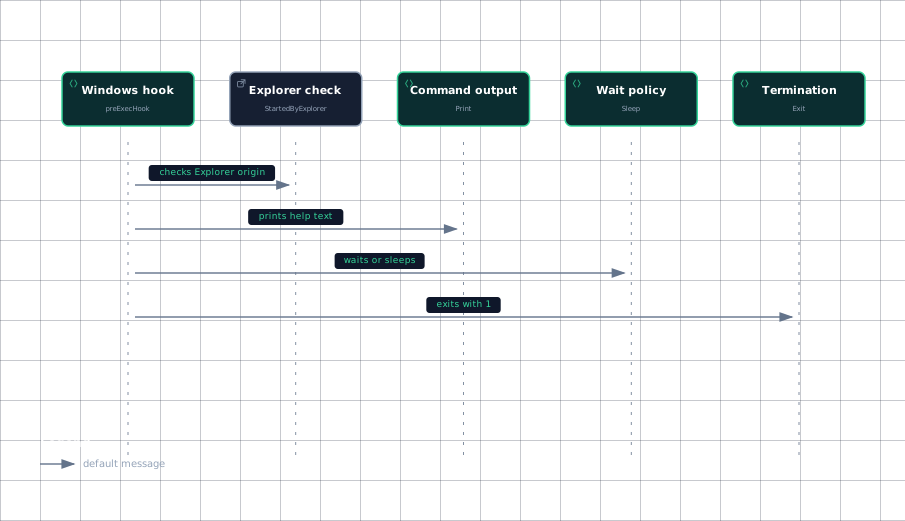
When both conditions are true, the hook prints MousetrapHelpText. It then either sleeps for MousetrapDisplayDuration when the duration is positive, or prints a continuation prompt and waits for input when the duration is zero or negative. Finally, it exits with status 1.
func preExecHook(c *Command) {
	if MousetrapHelpText != "" && mousetrap.StartedByExplorer() {
		c.Print(MousetrapHelpText)
		if MousetrapDisplayDuration > 0 {
			time.Sleep(MousetrapDisplayDuration)
		} else {
			c.Println("Press return to continue...")
			fmt.Scanln()
		}
		os.Exit(1)
	}
}
The important detail is that the hook is deliberately a stop path: the Explorer-launched process displays guidance, waits according to the configured policy, and then terminates rather than executing the command.
This workflow shows the observable branch from Explorer detection to either no action or the Mousetrap message and exit.
Evidence
- explorer-launchcommand_win.go:30
- pre-exec-hookcommand_win.go:30
- help-messagecobra.go:72
- help-messagecommand_win.go:30
- process-exitcommand_win.go:30
Sources: command_win.go:30-41
How platform files select behavior
The platform-specific behavior is represented by two definitions of preExecHookFn. In command_win.go, the variable is initialized to preExecHook, enabling the Windows Mousetrap implementation. In command_notwin.go, the variable is only declared as func(*Command), so the non-Windows file does not bind it to the Windows hook.
The build-tag-separated files therefore preserve one shared variable name while allowing the platform-specific implementation to differ at compile time. The excerpts show the two resulting declarations, but not the build-tag lines themselves.
The binding difference is small but important: Windows has a concrete hook function, while the non-Windows variant does not install that implementation. This keeps the Mousetrap behavior isolated to the Windows build instead of embedding Windows detection into every command path.
The available evidence does not show the call site that invokes preExecHookFn, so this page should not assume whether that invocation occurs during Execute, ExecuteC, or another command path. What is established is the platform-specific binding and the behavior of the Windows hook itself.
This sequence captures the calls visible inside the Windows hook: detect the launch origin, print the message, choose the wait behavior, and exit.
Evidence
- hookcommand_win.go:30
- explorer-checkcommand_win.go:30
- command-outputcommand_win.go:30
- wait-policycommand_win.go:30
- terminationcommand_win.go:30
Sources: command_notwin.go:20, command_win.go:28, command_win.go:30-41
How to customize or disable Mousetrap
To customize the message, assign your CLI’s preferred text to MousetrapHelpText. The hook prints that value directly, so the replacement should explain how users should launch the command from a terminal.
To disable the Mousetrap response, set MousetrapHelpText to an empty string. The first condition in preExecHook then fails, preventing the message, wait, and exit path.
To change the timing, assign a positive value to MousetrapDisplayDuration; the hook sleeps for that duration. Setting it to zero or a negative value switches to the prompt-and-input path, which prints Press return to continue... and waits for fmt.Scanln().
| Setting | Positive or non-empty value | Empty, zero, or negative value |
|---|---|---|
MousetrapHelpText | Enables the Explorer check’s message path. | Disables the hook’s guarded path when empty. |
MousetrapDisplayDuration | Sleeps for the configured duration. | Prompts and waits for input when the message is enabled. |
preExecHookFn | On Windows, points to preExecHook. | On non-Windows, remains only a function variable declaration. |
These settings are global variables, so customization changes the values read by the Windows hook rather than changing the hook’s control flow.
Sources: cobra.go:72-75, command_win.go:30-41, cobra.go:81, command_notwin.go:20, command_win.go:28
How it connects
The Mousetrap path belongs beside Cobra’s command execution machinery, but the supplied excerpts do not show the invocation of preExecHookFn; consult Command Execution Flow for the broader execution sequence and verify where this hook is called in the repository.
The hook receives a *Command and uses that command to print output, so its output participates in Cobra’s command-facing I/O rather than using a separate message abstraction. For command construction and command ownership, see Command Tree & Registration.
The platform files are part of the repository’s implementation layout rather than user-facing command registration. See Repository Layout & Development Setup for how platform-specific files fit into local builds and tests.
Sources: command_notwin.go:20, command_win.go:28, command_win.go:30-41
Key takeaways
- Windows binds
preExecHookFntopreExecHook; the non-Windows file does not. - Explorer-launched commands print
MousetrapHelpText, wait, and exit with status1. - Set
MousetrapHelpTextto an empty string to disable the guarded path. - Positive
MousetrapDisplayDurationvalues sleep; zero or negative values wait for Return.
Sources: command_notwin.go:20, command_win.go:28, command_win.go:30-41, cobra.go:81