Examples: Content Negotiation & Files
These examples show how Express applications turn request preferences and file paths into HTTP responses. The set includes content negotiation, downloads, static files, search initialization, and a small web service.
They exist as focused demonstrations: each application creates an Express app, then exercises one narrow response or integration pattern. The available excerpts expose the setup and selected implementation details, while some route registrations are outside the shown source lines.
Sources: examples/content-negotiation/index.js:3, examples/search/index.js:14, examples/static-files/index.js:7, examples/content-negotiation/index.js:4, examples/search/index.js:19, examples/web-service/index.js:9
Core concepts
Content negotiation
Content negotiation selects a response callback from the formats acceptable to the request. Express exposes this through res.format(), which uses the request’s accepted types, chooses the first match, and returns 406 when no match exists.
The content-negotiation example creates an Express application and loads user data from a local database module.
Sources: lib/response.js:516-529, examples/content-negotiation/index.js:3, examples/content-negotiation/index.js:4
File download
A download is a file transfer marked as an attachment so the browser treats it as a downloadable file. Express’s res.download() sets Content-Disposition, can apply an alternate filename, and uses res.sendFile() underneath.
The downloads example builds a filesystem directory from the current module directory and a files child directory.
Sources: lib/response.js:419-432, examples/downloads/index.js:13
Static-file middleware
Static-file middleware requires a root path and serves matching files, including nested paths, from that root. Express exposes express.static as the serve-static middleware.
The static-files example imports Express, Morgan as logger, and Node’s path module before creating its application. The shown excerpt does not include the later express.static() call or the directory argument, so the exact public-directory configuration is not visible here.
Sources: test/express.static.js:17-40, lib/express.js:73-80, examples/static-files/index.js:7, examples/static-files/index.js:8, examples/static-files/index.js:9
Simple JSON web service
A simple web service is an Express application backed by in-memory records and API-oriented routes. The web-service example exports an Express app and defines API keys, repositories, users, and user-to-repository relationships.
Sources: examples/web-service/index.js:9, examples/web-service/index.js:49, examples/web-service/index.js:53-57, examples/web-service/index.js:59-63, examples/web-service/index.js:65-69
How the examples choose response formats
The content-negotiation helper accepts a module path, requires that module, and returns a request handler. When the handler runs, it passes the loaded object to res.format().
function format(path) {
  var obj = require(path);
  return function(req, res){
    res.format(obj);
  };
}
The important boundary is that the example supplies the format callbacks while Express performs the negotiation. If the request has no Accept header, Express invokes the first callback; otherwise it uses the first matching accepted type. Express sets Content-Type for the selected response, and an unmatched request produces 406 Not Acceptable.
The application itself is created with express(), so the example has the normal Express response methods available on its response object. The acceptance test imports this example application directly, which is how the example is exercised as an HTTP endpoint.
This sequence shows the demonstrated setup and the handler’s format-object hand-off; the negotiation decision itself is implemented by res.format().
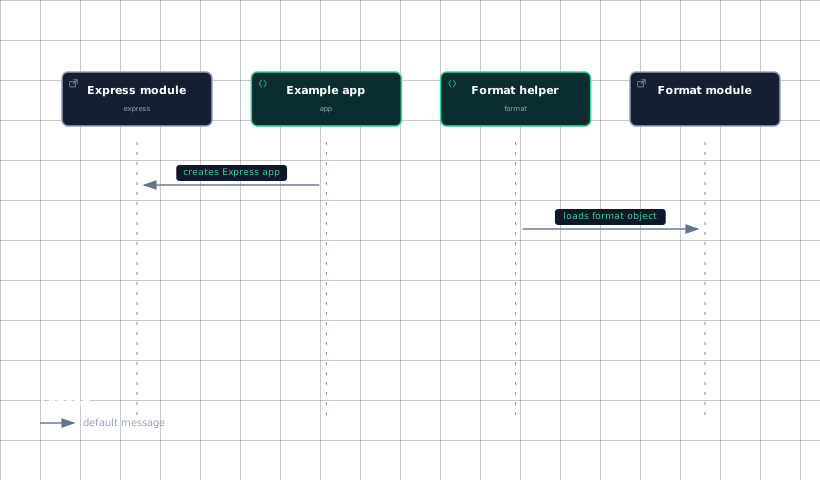
Evidence
- express-moduleexamples/content-negotiation/index.js:3
- example-appexamples/content-negotiation/index.js:4
- format-helperexamples/content-negotiation/index.js:33
- format-moduleexamples/content-negotiation/index.js:33
Sources: examples/content-negotiation/index.js:33-38, lib/response.js:516-529, examples/content-negotiation/index.js:3, examples/content-negotiation/index.js:4, test/acceptance/content-negotiation.js:2-5
How downloads and static files differ
The downloads example establishes a reusable filesystem root with path.join(__dirname, 'files'). The shown lines do not include the route that consumes FILES_DIR, so this page cannot identify the example’s URL pattern or filename argument without exceeding the source pack.
The response API defines the browser-facing download behavior: res.download() transfers the selected file as an attachment and overrides any supplied Content-Disposition header so the attachment disposition and filename win. A test demonstrates the resulting header as attachment; filename=document, even when the supplied headers request inline; it also preserves a custom content type. Therefore, the header that forces download is Content-Disposition with an attachment value, not Content-Type.
Static serving is a middleware boundary rather than an attachment-specific response helper. Express assigns express.static to the serve-static package. The middleware requires a string root path and serves matching files, including nested paths, as shown by its tests. The static-files example’s import section confirms that path is available for path construction, but the provided excerpt does not show the actual root path or middleware registration.
Sources: examples/downloads/index.js:13, lib/response.js:419-432, test/res.download.js:433-450, lib/express.js:73-80, test/express.static.js:17-40, examples/static-files/index.js:7, examples/static-files/index.js:9
How the supporting examples are structured
The search example also follows the application-factory pattern: it imports Express, creates an app, and initializes a Redis client as db. Its initializeRedis function connects to Redis, adds members to the ferret and cat sets, logs initialization errors, and exits with status 1 on failure.
The web-service example keeps its sample data in arrays and an object. apiKeys contains three keys; repos maps names to GitHub URLs; users contains three names; and userRepos maps each user to repository entries. The example app is exported from the module, and its acceptance test imports that app before exercising GET /api/users.
Sources: examples/search/index.js:14, examples/search/index.js:18, examples/search/index.js:19, examples/search/index.js:29-46, examples/web-service/index.js:49, examples/web-service/index.js:53-57, examples/web-service/index.js:59-63, examples/web-service/index.js:65-69, examples/web-service/index.js:9, test/acceptance/web-service.js:2-6
How it connects
These examples rely on the application and response behavior described in App Routing & Request Dispatch and Response: Sending Data. The content-negotiation example specifically depends on request acceptance data and response negotiation behavior covered by The Request Object.
For middleware exports and static-file behavior, continue with Built-in Middleware. For header semantics, including Content-Disposition and Content-Type, see Response: Headers, Cookies & Redirects. The examples are verified through the acceptance infrastructure described in Acceptance Test Suite.
Sources: lib/response.js:516-529, lib/express.js:73-80, test/acceptance/content-negotiation.js:2-5, test/acceptance/web-service.js:2-6
Key takeaways
res.format()receives a format-callback object and selects the first acceptable response format.res.download()forces attachment behavior throughContent-Disposition.- The downloads example constructs its file root with
path.join(__dirname, 'files'). - Express exposes express.static as
serve-static; the exact static-files root is not shown in the supplied excerpt. - The web-service example uses in-memory API keys, users, repositories, and user-to-repository mappings.