Repository Layout & Contributing
This repository contains the Express package, its runnable examples, and automated tests. The package metadata identifies the published entry points as index.js, Readme.md, and lib/, while the example catalog lives under examples/.
A change starts as code, documentation, tests, or another constructive contribution, then should be checked with the repository’s test and lint tooling. Release history is recorded separately in History.md, first under Unreleased Changes and later under versioned release headings.
Sources: package.json:85-90, Readme.md:149-157, package.json:91-98, History.md:1-5, History.md:53-66
Core concepts
Core library
The core library is the published implementation behind the package entry point: index.js delegates to ./lib/express, and package.json includes both index.js and lib/ in the published files.
Sources: index.js:9-11, package.json:85-90
Example applications
Example applications are small, focused programs under examples/ that demonstrate Express features such as routing, sessions, views, static files, and APIs.
Sources: Readme.md:129-147, examples/README.md:5-29
Test suite
The test suite is the code exercised by the test script, which runs both test/ and test/acceptance/ with Mocha and shared environment setup.
Sources: package.json:91-97
Contribution
A contribution can be a bug fix, enhancement, documentation change, additional test, or help with triaging pull requests and issues.
Sources: Readme.md:149-153
Release entry
A release entry is a dated section in History.md containing categorized change bullets, often with the contributor and pull request reference.
Sources: History.md:1-5, History.md:53-66
How the repository is laid out
At the root, package.json describes the package named express, its dependencies, development dependencies, supported Node.js version, published files, and repository scripts.
The implementation boundary is straightforward: consumers load index.js, and that file exports the implementation from ./lib/express. The published package explicitly includes Readme.md, index.js, and lib/, so those are the primary package-facing locations.
The examples are grouped by behavior rather than by internal library module. The catalog includes introductory applications such as hello-world, request-parameter and resource examples such as params and resource, and larger organization examples such as mvc, route-separation, and vhost.
The test locations are named directly by the test command: unit-style tests are discovered under test/, while acceptance tests are under test/acceptance/. The same command loads test/support/env, checks for leaks, and uses Mocha’s specification reporter.
If you want to add an example app, look first at examples/README.md: it is the index of existing example directories and their intended topics. Then inspect the closest existing example by behavior—for example, hello-world for a minimal handler, mvc for controller organization, or view-constructor for dynamic view rendering.
The view-constructor example also shows that an example may demonstrate repository-relative rendering and still use ordinary Express application code: it registers routes with app.get, calls res.render, and starts a server when run directly.
Sources: package.json:1-17, package.json:34-63, package.json:64-99, index.js:1-11, package.json:85-90, examples/README.md:5-29, package.json:91-97, examples/view-constructor/index.js:32-48
How an example is run
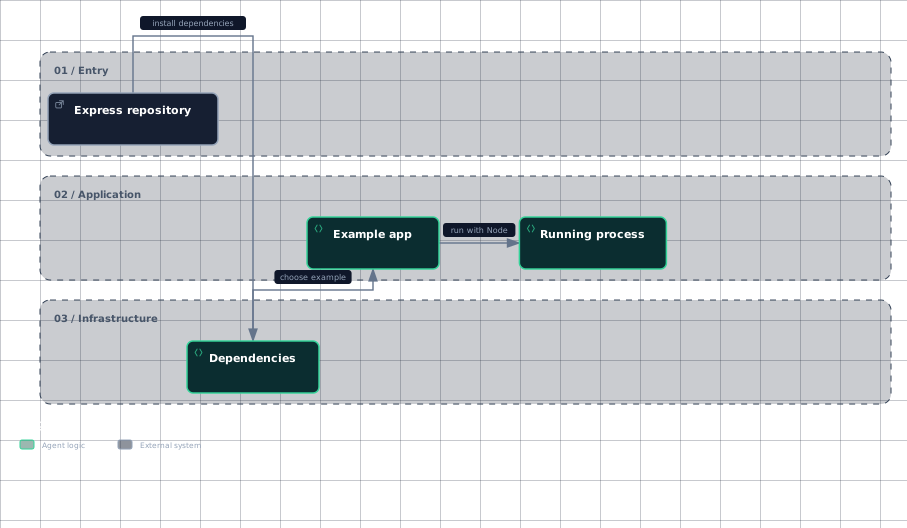
The documented example workflow is: clone the repository, install dependencies, choose an example, and run it with Node. The README uses examples/content-negotiation as the concrete example path.
git clone https://github.com/expressjs/express.git --depth 1 && cd express
npm install
node examples/content-negotiation
These commands show why examples/ is the first place to look for a new example app: the repository is cloned as a whole, dependencies are installed at the repository root, and the selected application is launched by its path under examples/.
The following workflow diagram captures the documented hand-offs from repository checkout to a running example.
Evidence
- repositoryReadme.md:131
- dependenciesReadme.md:137
- example-appReadme.md:143
- running-processReadme.md:143
Sources: Readme.md:129-147, Readme.md:131-147
How a change is tested and recorded
The repository defines lint, lint:fix, test, test-ci, test-cov, and test-tap scripts. The ordinary test script runs Mocha across both test/ and test/acceptance/; the CI and coverage variants wrap that test command with additional reporting or exclusions.
The README’s contribution instructions explicitly direct contributors to install dependencies before running npm test. This gives a minimal local verification path for a change: install the repository dependencies, then run the test suite.
The contribution scope is broader than implementation code. The project explicitly welcomes documentation updates, additional tests, bug fixes, enhancements, and triage work, so the appropriate changed location depends on the contribution itself.
The shown material does not specify an automated merge hook or release command that writes History.md. What it does show is the recorded format: current work appears under # Unreleased Changes, grouped into headings such as 🐞 Bug fixes, 🚀 Improvements, and ⚡ Performance.
An unreleased bullet may describe the change and identify both the contributor and pull request, as in the res.send bug-fix entry. Later, a release section records a version and date, followed by its released changes, such as 5.2.1 / 2025-12-01 and 5.2.0 / 2025-12-01.
Therefore, the evidence-backed release path is: make and verify the contribution, record the change in the appropriate Unreleased Changes category with its attribution and pull request when available, and later place released changes under a versioned heading. The excerpts do not establish who performs that final promotion or whether tooling automates it.
Sources: package.json:91-98, Readme.md:163-175, Readme.md:149-153, History.md:1-3, History.md:49-51, History.md:3-8, History.md:53-64, History.md:1-12, History.md:53-66
How it connects
For package bootstrapping and the first implementation reading path, continue to Express Overview The package boundary here is index.js → ./lib/express.
For detailed test organization, continue to Test Suite Structure The repository’s test command names test/, test/acceptance/, and test/support/env.
For the release and CI mechanics beyond the scripts shown here, continue to CI, Linting & Release This page establishes the available package scripts and the History.md entry format.
For example-specific behavior, consult the example index examples/README.md.
Sources: index.js:9-11, package.json:91-97, package.json:91-98, History.md:1-12, examples/README.md:1-29
Key takeaways
- index.js delegates to
./lib/express; the published implementation includeslib/. - Example applications live under
examples/, with examples/README.md as the starting index. - The main test command covers both
test/andtest/acceptance/. - Contributions include code, documentation, tests, and triage work.
- Changes are recorded under
Unreleased Changesbefore appearing under a versioned History.md release heading.