Examples: Views & Templating
These examples show several ways an Express application can prepare views: starting an application, supplying data for templates, and replacing the default view-construction behavior.
They exist because view rendering has more than one extension point: Express can load an engine from a file extension, merge locals into render options, and construct views through a configurable view class.
Sources: examples/ejs/index.js:10, examples/markdown/index.js:13, examples/view-constructor/index.js:11, examples/view-locals/index.js:10, lib/view.js:75-95, lib/application.js:549-575
Core concepts
Express application
An Express application is created by requiring the package and calling express().
Sources: examples/ejs/index.js:7, examples/ejs/index.js:10, examples/markdown/index.js:8, examples/markdown/index.js:13, examples/view-constructor/index.js:7, examples/view-constructor/index.js:11, examples/view-locals/index.js:7, examples/view-locals/index.js:10
View engine
A view engine is the function Express uses to turn a view file into rendered output; when no engine is registered for an extension, Express derives the module name from that extension and reads its __express export.
Sources: lib/application.js:260-280, lib/view.js:75-87
View locals
View locals are values placed on res.locals so res.render can merge them into the options passed to app.render.
Sources: examples/view-locals/index.js:86-92, examples/view-locals/index.js:94-100, lib/response.js:909-920
Custom view constructor
A custom view constructor changes how a view object stores its engine and resolves its path before rendering.
Sources: examples/view-constructor/github-view.js:23-30
How the examples start and select view support
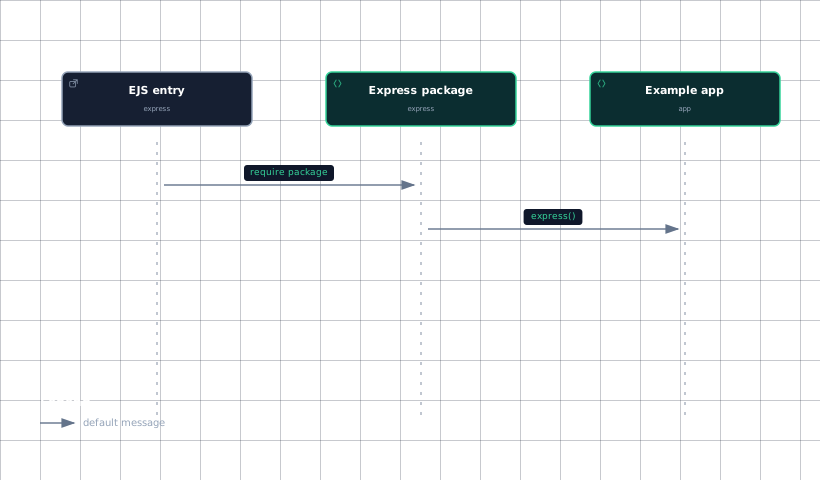
The EJS example loads Express from the repository entry point, imports Node’s path module, and creates an exported application with express(). Its shown data includes three user records with name and email fields, giving a template structured values to display.
The excerpt for the EJS example does not include the application’s engine-registration call, so the exact configuration statement cannot be established from this context pack. The Express view mechanism does establish the relevant rule: an engine may be registered for an extension, and the default behavior for a file such as foo.ejs is to load the engine module and use its __express function.
The Markdown example similarly imports helpers for HTML escaping, Express, filesystem access, Markdown parsing, and path handling before creating its application. The shown lines do not include the Markdown application’s engine registration or render route, so those details should not be inferred from the imports alone.
The engine-selection boundary is the View object: it keeps the loaded engine in this.engine, then looks up the requested file and stores the result in this.path. When app.render needs a new view, it supplies the default engine, the configured views root, and the engine cache to the configured view constructor.
The following sequence shows the evidence-backed startup path visible in the EJS excerpt.
Evidence
- ejs-entryexamples/ejs/index.js:7
- express-packageexamples/ejs/index.js:10
- example-appexamples/ejs/index.js:10
The diagram covers only the calls shown in the excerpt; engine registration is documented by the general Express implementation, not by the displayed EJS lines.
Sources: examples/ejs/index.js:7, examples/ejs/index.js:8, examples/ejs/index.js:10, examples/ejs/index.js:39-43, lib/application.js:260-280, lib/view.js:75-87, examples/markdown/index.js:7, examples/markdown/index.js:8, examples/markdown/index.js:9, examples/markdown/index.js:10, examples/markdown/index.js:11, examples/markdown/index.js:13, lib/view.js:87-95, lib/application.js:549-557
How view locals reach a template
The view-locals example imports Express, path, and a User module, then creates an application object. Its first pair of middleware functions demonstrates request mutation: count calls User.count, stores the result as req.count, and calls next, while users calls User.all, stores the result as req.users, and calls next.
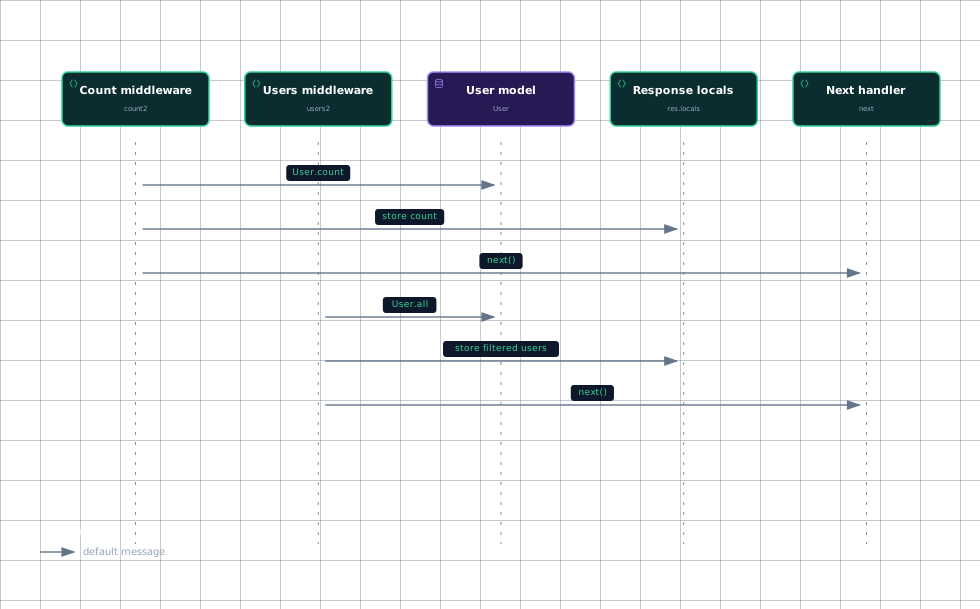
A second pair demonstrates response locals instead. count2 calls User.count, assigns the result to res.locals.count, and continues with next. users2 calls User.all, filters the returned collection with ferrets, assigns the filtered result to res.locals.users, and continues. The helper ferrets keeps users whose species is exactly 'ferret'.
The important difference is ownership of the data: req.count and req.users are request properties that later code would need to copy into render options, while res.locals.count and res.locals.users are placed directly on the response’s locals collection. The second path is connected to rendering because res.render assigns self.locals to opts._locals before calling app.render.
This sequence shows the calls and data preparation that are visible in the locals example.
Evidence
- count-middlewareexamples/view-locals/index.js:86
- users-middlewareexamples/view-locals/index.js:94
- user-modelexamples/view-locals/index.js:86
- user-modelexamples/view-locals/index.js:94
- response-localsexamples/view-locals/index.js:86
- response-localsexamples/view-locals/index.js:94
- next-handlerexamples/view-locals/index.js:86
- next-handlerexamples/view-locals/index.js:94
The render hand-off after these middleware functions is the standard response path: res.render merges locals and delegates to app.render, which creates or reuses a view and then renders it.
Sources: examples/view-locals/index.js:7, examples/view-locals/index.js:8, examples/view-locals/index.js:9, examples/view-locals/index.js:10, examples/view-locals/index.js:48-54, examples/view-locals/index.js:56-62, examples/view-locals/index.js:86-92, examples/view-locals/index.js:94-100, examples/view-locals/index.js:17-19, lib/response.js:909-920, lib/application.js:549-575
How the custom view constructor resolves views
The view-constructor example loads Express, GithubView, and the Markdown parser function md, then creates and exports an application. The shown application file does not display the statement that installs GithubView as the configured view class, so the exact registration call is not established here.
GithubView overrides construction rather than the ordinary application render entry point. It records the requested name, reads the engine associated with the name’s extension from options.engines, and sets this.path to a GitHub-style URL assembled from options.root and the view name. The implementation comment explicitly identifies this as a way to fetch and render templates from a remote source such as GitHub or a database.
This differs from the default constructor, which receives defaultEngine, engines, and root as view options and uses those inputs for engine selection and lookup. The custom constructor keeps the engine lookup but changes path resolution, so the later render operation can use a remote-style path instead of the ordinary local lookup result.
Sources: examples/view-constructor/index.js:7, examples/view-constructor/index.js:8, examples/view-constructor/index.js:9, examples/view-constructor/index.js:11, examples/view-constructor/github-view.js:23-30, examples/view-constructor/github-view.js:17-21, lib/view.js:38-52, lib/application.js:549-557, lib/view.js:87-95
How it connects
These examples connect to App Configuration & Settings, where application settings and engine registration are configured through the app API. The engine behavior shown here is the implementation behind that configuration boundary.
They connect to Rendering Views, which explains the complete res.render to app.render path, including locals merging, view construction, engine selection, lookup, and rendering.
They also connect to Examples: Getting Started, because each example begins by requiring Express and creating an application before adding its example-specific behavior.
Sources: lib/application.js:549-575, lib/view.js:75-95, examples/ejs/index.js:7, examples/ejs/index.js:10, examples/markdown/index.js:8, examples/markdown/index.js:13, examples/view-constructor/index.js:7, examples/view-constructor/index.js:11, examples/view-locals/index.js:7, examples/view-locals/index.js:10
Key takeaways
- The shown EJS example creates an Express application and defines user data; its exact engine-registration statement is not included.
- Express selects an engine from the view extension and stores the loaded function on the view.
- res.locals.count and res.locals.users are merged into render options by res.render.
GithubViewchanges path resolution by building a GitHub-style path from the view name and configured root.
Sources: examples/ejs/index.js:7, examples/ejs/index.js:10, examples/ejs/index.js:39-43, lib/view.js:75-95, examples/view-locals/index.js:86-92, examples/view-locals/index.js:94-100, lib/response.js:909-920, examples/view-constructor/github-view.js:23-30