Response: Sending Data
Express adds response methods for producing a response body, returning a status, choosing a representation, and transferring a file. The supplied source evidence centers on the response object, the send dependency, JSON serialization support, and the internal file-transfer helper.
This page separates what the excerpts prove from what they do not expose. The shown material proves the file-streaming path and several observable response behaviors, but it does not include the method bodies for res.send(), res.jsonp(), res.download(), or res.format().
Sources: lib/response.js:43, lib/response.js:31, lib/response.js:1025-1049, lib/response.js:923-1011, test/res.format.js:231-248
Core concepts
Response object
The response object is an object created from Node's http.ServerResponse prototype, which gives Express a place to add response methods.
Sources: lib/response.js:43
Body sender
A body sender converts or transfers application data into the HTTP response; the catalog identifies the external send package as a dependency, but the supplied excerpts do not show the res.send() method body or its type branches.
Sources: lib/response.js:31
JSON serialization
JSON serialization turns a value into a JSON string, optionally applying a replacer, indentation spaces, and escaping for <, >, and &.
Sources: lib/response.js:1025-1049
File transfer
A file transfer connects a file-like stream to the response and coordinates completion, errors, aborts, and response headers.
Sources: lib/response.js:923-1011
Content negotiation
Content negotiation chooses a representation from the request's Accept header; the shown tests establish a first-callback fallback when Accept is absent and a 406 response when no representation matches.
Sources: test/res.format.js:231-248
How response bodies are prepared
The response module imports the send package, while its local stringify helper delegates to JSON.stringify and may escape three HTML-significant characters in the resulting string. This is the evidence available for the body-sending and JSON paths.
| Concern | Shown mechanism | Why it matters |
|---|---|---|
| General sending | send package dependency | The implementation delegates some response-body work outside the shown file. |
| JSON conversion | stringify | Values can be serialized with optional replacer and spacing arguments. |
| JSON escaping | escape branch in stringify | <, >, and & can be rewritten as Unicode escapes. |
| Response base | res | Express extends Node's server response prototype. |
The supplied excerpts do not show the dispatch logic that distinguishes a string, object, or buffer passed to res.send(). Therefore, this pack cannot prove the exact header or conversion behavior for each of those three input types; documenting those branches would require the missing res.send() implementation or its corresponding tests.
The same boundary applies to JSON and JSONP response methods: the available evidence establishes the shared stringify helper, including its optional escaping behavior, but does not show how either public method calls it or sets response headers.
function stringify (value, replacer, spaces, escape) {
  var json = replacer || spaces
    ? JSON.stringify(value, replacer, spaces)
    : JSON.stringify(value);

  if (escape && typeof json === 'string') {
    json = json.replace(/[<>&]/g, function (c) {
      switch (c.charCodeAt(0)) {
        case 0x3c:
          return '\\u003c'
        case 0x3e:
          return '\\u003e'
This excerpt shows that serialization first chooses the simple or parameterized JSON.stringify form, then conditionally replaces the three listed characters.
Sources: lib/response.js:31, lib/response.js:1025-1049, lib/response.js:43
How a file response streams and finishes
The internal sendfile helper receives a response, a file object, options, and a callback. It attaches listeners for directory errors, end, errors, file detection, and stream detection, registers onfinish with onFinished, applies optional headers on the file's headers event, and finally pipes the file into the response.
  file.on('directory', ondirectory);
  file.on('end', onend);
  file.on('error', onerror);
  file.on('file', onfile);
  file.on('stream', onstream);
  onFinished(res, onfinish);

  if (options.headers) {
    file.on('headers', function headers(res) {
      var obj = options.headers;
      var keys = Object.keys(obj);
The important state is done and streaming: done prevents duplicate callback completion, while streaming lets onfinish distinguish a completed file transfer from a response that finished before streaming was observed.
The transfer path can be read as a sequence of stream events and completion callbacks.
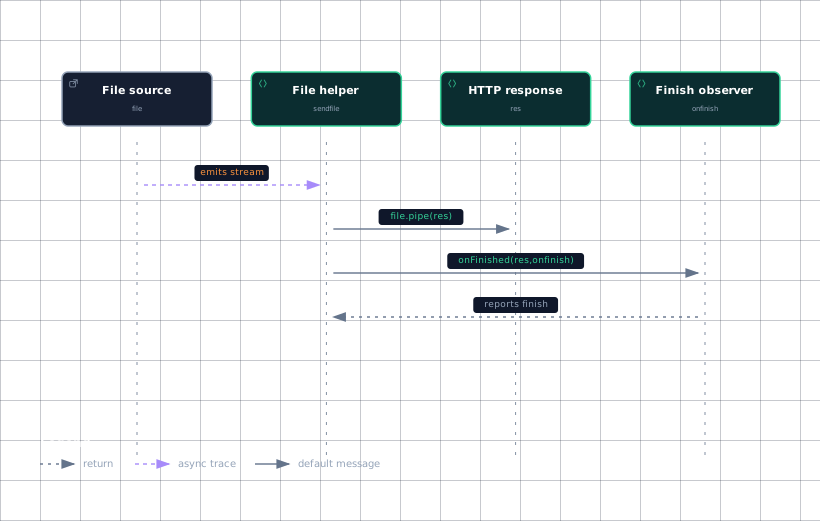
Evidence
- file-sourcelib/response.js:923
- sendfile-helperlib/response.js:923
- responselib/response.js:43
- responselib/response.js:923
- finish-observerlib/response.js:923
The sequence is grounded in the visible file.on, file.pipe(res), and onFinished(res, onfinish) calls; it does not assume an unseen public-method call path.
Sources: lib/response.js:923-1011, lib/response.js:21
How sendFile, download, and format differ
res.sendFile() is observable here through a wrapper test that passes a path, options, and callback to the method, while the internal helper shows the resulting stream, header, and completion mechanics.
res.download() is shown as accepting file options that affect the transfer: the test passes dotfiles and maxAge: '4h', then expects an attachment Content-Disposition, a four-hour-derived cache-control value, and the file body. This demonstrates that the public download operation adds download-oriented response behavior around file sending.
The excerpts do not show the res.download() implementation, so they cannot establish whether it calls res.sendFile() directly or how it constructs the attachment header internally. The observable distinction is the tested result: download-oriented disposition and cache behavior versus the lower-level stream and header machinery shown for sendfile.
res.format() selects the first callback when the request has no Accept header. When the header is foo/bar and none of the offered types match, the response is 406 and advertises the supported types through the Supports header.
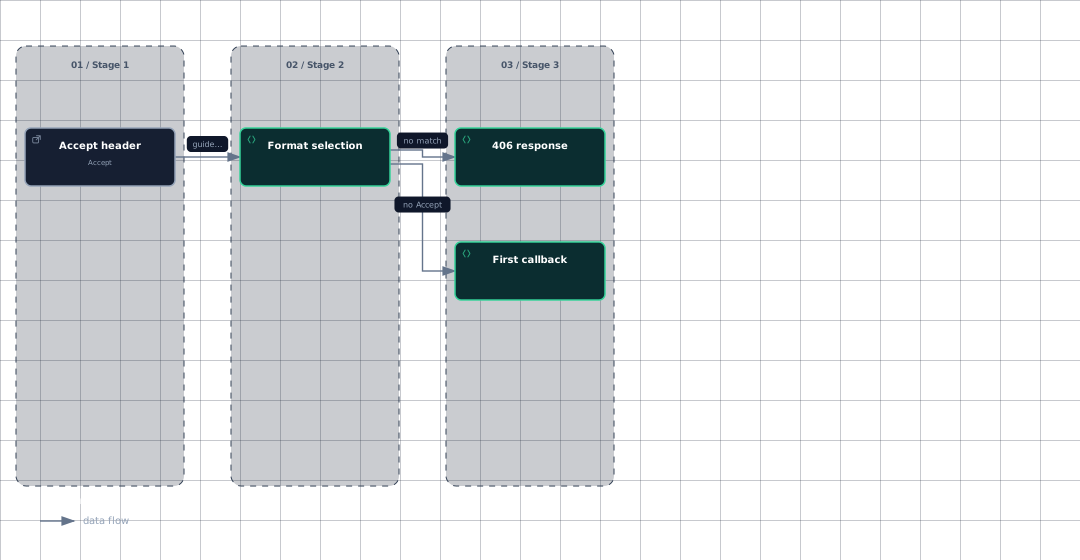
Evidence
- accept-headertest/res.format.js:239
- format-selectiontest/res.format.js:231
- first-callbacktest/res.format.js:231
- not-acceptabletest/res.format.js:239
The selection diagram captures only the two tested outcomes; the supplied material does not reveal the internal negotiation algorithm or callback ordering beyond those cases.
Sources: test/res.sendFile.js:905-913, lib/response.js:923-1011, test/res.download.js:393-409, test/res.format.js:231-248
How it connects
The response module builds on Node's http.ServerResponse and external packages for sending, completion observation, content disposition, MIME handling, path operations, status lookup, cookies, and variance handling.
For request-side negotiation, the request object exposes req.accepts, which delegates to an accepts object and its types method; this is the neighboring request-side capability relevant to understanding representation selection.
Continue with The Request Object for request negotiation, Response: Headers, Cookies & Redirects for response metadata helpers, Utility Helpers for shared utilities, and Examples: Content Negotiation & Files for application-level examples.
Sources: lib/response.js:15, lib/response.js:20, lib/response.js:21, lib/response.js:22, lib/response.js:23, lib/response.js:25, lib/response.js:30, lib/response.js:31, lib/response.js:35, lib/request.js:127-130
Key takeaways
- The shown evidence does not include the type-specific body branches of
res.send(). stringifysupports ordinary or parameterized JSON serialization and optional HTML-character escaping.sendfilelistens for transfer events, applies optional headers, pipes the file, and guards completion withdone.res.download()is tested as an attachment-oriented file response with four-hour cache options.res.format()uses the first callback withoutAcceptand returns406when no offered type matches.