Arguments and Options in Practice
Use arguments for positional input that is part of the command’s required shape, and use options for named inputs that may be omitted or configured independently. Arguments are declared with click.argument, while options are added with the option decorator.
This distinction matters because arguments are positional, while options are named command-line values with capabilities such as flags, repetition, and prompting.
Sources: docs/arguments.md:32-39, docs/options.md:9-11
Core concepts
Argument
An Argument is positional input declared with click.argument, normally required and represented as a string when no other type or default is supplied.
Sources: docs/arguments.md:24-29, docs/arguments.md:32-39
Option
An Option is named command-line input declared with click.option; by default it is optional, expects a str, and supplies None when omitted.
Sources: docs/options.md:26-30, docs/options.md:98-104
Flag
A flag is an option whose flag behavior is forced with is_flag=True; single-character flags can also be combined into one argument.
Sources: src/click/core.py:2991-2995, docs/options.md:233-249
Multi-value option
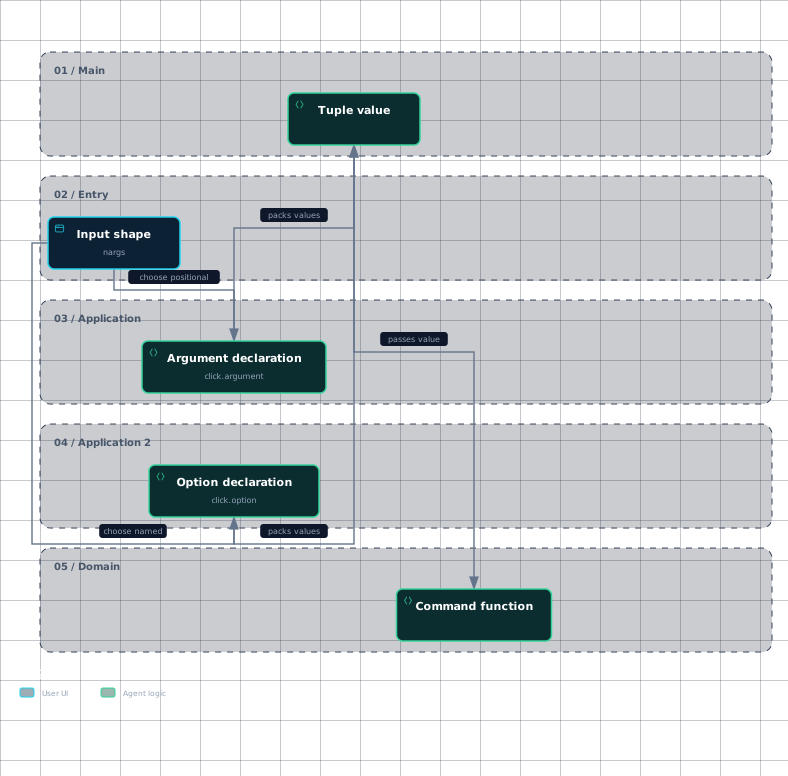
A multi-value option consumes a fixed number of values and passes them as a tuple. Its nargs must be a positive integer, not -1.
Sources: docs/options.md:145-164
Variadic input
Variadic input accepts an arbitrary number of values. An argument becomes variadic with nargs=-1; an option uses multiple=True and can be supplied repeatedly.
Sources: docs/arguments.md:66-70, docs/options.md:211-216
Prompted option
A prompted option obtains its value interactively when prompt is enabled, with related settings for confirmation, hidden input, and flag behavior.
Sources: src/click/core.py:2979-2990, src/click/core.py:3729-3742
Choosing the input shape
Choose an Argument when the value is naturally positional, such as a filename or source followed by destinations. Choose an Option when the value should be named, optional, repeated, or independently discoverable in help.
| Input need | Declaration | Result |
|---|---|---|
| One positional value | click.argument('filename') | Required string argument by default |
| Named optional value | click.option('--text') | Optional value, with None if omitted |
| Required named value | click.option('--name', required=True) | Option must be supplied |
| Fixed group of values | click.option('--pos', nargs=2, type=float) | Tuple of two converted values |
| Repeated named values | click.option('--message', '-m', multiple=True) | Tuple containing each occurrence |
These declarations correspond to the documented defaults and option keyword arguments: default, help, nargs, required, and type.
The option decorator can infer the decorated function argument name from the option declaration. For example, --string-to-echo maps to string_to_echo when no destination name is supplied.
Sources: docs/options.md:13-19, docs/arguments.md:24-29, docs/options.md:98-104, docs/options.md:145-164, docs/options.md:211-231, docs/options.md:45-61
Declaring flags, fixed groups, and repeated values
A flag is declared by forcing is_flag=True; short flags can be combined, so -abc is equivalent to -a -b -c when each option is a single-character flag.
A fixed multi-value option uses nargs to state exactly how many values follow the option. The values arrive as one tuple, and a tuple literal such as (str, int) can define different types for each position while automatically setting the tuple length.
A repeated option uses multiple=True, which allows the option to appear an arbitrary number of times and records the values as a tuple. If such an option has a default, that default must be a list or tuple rather than a string.
@click.command()
@click.option('--message', '-m', multiple=True)
def commit(message):
    click.echo(message)
    for m in message:
        click.echo(m)
This pattern is for repeated named occurrences such as -m foo -m bar, whereas nargs is for the fixed number of values attached to one occurrence.
The following workflow shows how the input shape determines the declaration and the value received by the command function.
Evidence
- input-shapedocs/arguments.md:18
- input-shapedocs/options.md:13
- argument-declarationdocs/arguments.md:32
- argument-declarationdocs/arguments.md:66
- option-declarationdocs/options.md:26
- option-declarationdocs/options.md:145
- tuple-valuedocs/arguments.md:66
- tuple-valuedocs/options.md:145
- tuple-valuedocs/options.md:211
- command-functiondocs/arguments.md:74
- command-functiondocs/options.md:153
- command-functiondocs/options.md:221
Sources: src/click/core.py:2991-2995, docs/options.md:233-249, docs/options.md:145-164, docs/options.md:168-207, docs/options.md:211-231
Handling variadic arguments and prompting
For a variadic argument, set nargs=-1; Click packs all remaining argument values into a tuple, and only one argument may use this setting. The command can then iterate over that tuple, as the copy example does with dsts.
Values that look like options require special handling when they are intended to be arguments. The -- separator tells Click to stop treating following values as options; after it appears, only arguments may be passed. If the command instead enables ignore_unknown_options, unknown option-looking values can continue through as arguments.
Prompting is implemented in Option value consumption: set prompt=True or provide a non-empty prompt string to request input; confirmation_prompt can request the value again, while hide_input=True hides the entered text for cases such as passwords. The password_option helper combines these defaults by enabling prompting, confirmation, and hidden input.
If prompt_required=False, prompting occurs only when the option was specified as a flag without a value. When a flag is allowed to omit its value, option value consumption resolves either to the prompt or to the activation value.
Required options are declared with required=True; the option keyword is listed alongside default, help, nargs, and type. If a required option or argument is missing, Click raises its missing-parameter exception.
Sources: docs/arguments.md:66-70, docs/arguments.md:74-88, docs/arguments.md:98-103, docs/arguments.md:124-142, src/click/parser.py:244-258, src/click/core.py:2979-2990, src/click/core.py:3729-3742, src/click/decorators.py:404-418, docs/options.md:13-19, src/click/exceptions.py:160-168
How it connects
The decorator layer turns click.option and click.argument declarations into command parameters, while the Option and Argument classes provide their distinct runtime behavior. Continue with The Decorator API for construction details and The Parameter Model for shared parameter resolution.
After declaration, command-line tokens are parsed into option values, positional arguments, and leftover arguments. The parser also controls whether unknown options are rejected or shifted into the remaining arguments. See The Low-Level Parser for tokenization and Parameter Types for conversion rules.
Prompting is implemented in Option value consumption. See Prompts and Confirmation for terminal interaction and Help Text Formatting for how declarations appear in help.
Sources: docs/options.md:9-11, docs/arguments.md:24-29, src/click/parser.py:301-314, src/click/parser.py:244-258, src/click/core.py:3729-3742
Key takeaways
- Use click.argument for positional input and click.option for named input.
- Use
is_flag=Truefor flags,nargsfor fixed groups, andmultiple=Truefor repeated options. - Use
nargs=-1for one variadic argument; options do not usenargs=-1. - Use
prompt,confirmation_prompt, andhide_inputwhen an option should collect interactive input. - Use
--when argument values may look like options.