Parameter Types
Click parameter types turn command-line text into values that command callbacks can use, while also supplying validation, help metadata, and environment-variable splitting. Types apply to both options and arguments.
They exist so setting type can make parameter handling easier, including adding type information to help pages and converting input into the expected Python value.
Sources: docs/parameter-types.md:8-9, src/click/types.py:65-239, src/click/types.py:179-203
Core concepts
Parameter type
A parameter type validates and converts command-line or Python input into the correct value type; ParamType is the generic base class for this contract.
Sources: src/click/types.py:65-239
Conversion wrapper
A type instance is callable: ParamType.__call__ sends non-None values to ParamType.convert and returns None for missing values.
Sources: src/click/types.py:159-167
Built-in type
A built-in type is a ready-made ParamType implementation for common values such as strings, numbers, choices, dates, files, paths, and UUIDs.
Sources: src/click/init.py:56-69
Composite type
A composite type converts several values as one structured value; Tuple stores one converted type per item and reports its number of items through arity.
Sources: src/click/types.py:1258-1308
What Click ships
The following built-ins cover scalar conversion, constrained values, filesystem values, and multi-value parameters.
| Type | Plain-language behavior |
|---|---|
STRING | Converts values to text, decoding bytes when necessary. |
INT | Converts values to integers and reports invalid numbers. |
FLOAT | Converts values to floating-point numbers. |
BOOL | Recognizes configured true and false strings, including 1, 0, yes, no, true, false, on, and off. |
UUID | Converts strings into uuid.UUID values. |
Choice | Matches normalized input against fixed choices and returns the original choice. |
DateTime | Tries configured date formats in order and returns a datetime. |
IntRange | Converts an integer and checks it against optional bounds. |
FloatRange | Converts a float and checks it against optional bounds. |
File | Opens a file for reading or writing and returns a file object. |
Path | Validates a path and returns the path rather than opening it. |
Tuple | Converts each item with its corresponding member type. |
The table’s scalar conversion behavior is implemented by StringParamType.convert, _NumberParamTypeBase.convert, and the built-in boolean converter; the public exports and singleton instances identify the supported names.
Choice accepts any iterable, optionally normalizes case, and returns one of the originally supplied choices rather than the input string. Its convert method normalizes the input, searches the normalized mapping, and calls fail when no choice matches.
DateTime tries each configured format using datetime.strptime; its defaults are %Y-%m-%d, %Y-%m-%dT%H:%M:%S, and %Y-%m-%d %H:%M:%S. Invalid values produce a format-specific failure.
IntRange and FloatRange accept omitted bounds as unbounded sides, support open boundaries, and can clamp out-of-range values instead of failing. FloatRange rejects clamp=True when either boundary is open.
File recognizes file-like values, opens ordinary values, and registers close or flush behavior with the context when one is available. Path can resolve paths, require existence, restrict file or directory kinds, check permissions, and coerce the result to a configured path type.
Sources: docs/parameter-types.md:109-155, src/click/types.py:307-323, src/click/types.py:598-610, src/click/types.py:870-882, src/click/init.py:56-69, src/click/types.py:342-515, src/click/types.py:454-476, src/click/types.py:547-552, src/click/types.py:566-587, docs/parameter-types.md:81-92, src/click/types.py:776-816, src/click/types.py:794-807, src/click/types.py:915-1043, src/click/types.py:1059-1251
How raw input becomes a Python value
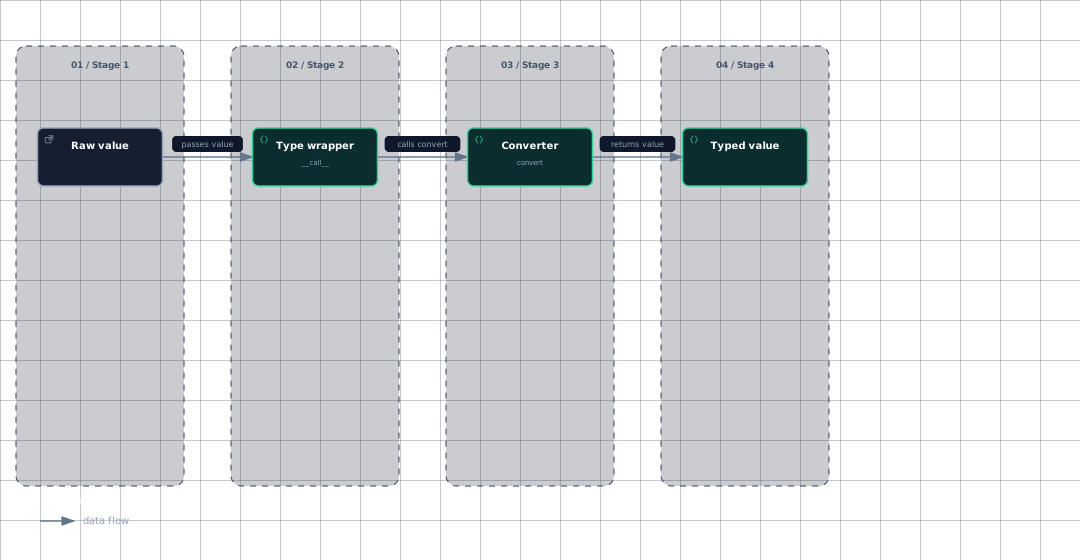
The conversion path is deliberately small: the callable type wrapper checks for a missing value, then delegates present values to the type-specific converter.
This dataflow shows the central hand-off shared by built-in and custom types.
Evidence
- raw-valuedocs/parameter-types.md:248
- type-wrappersrc/click/types.py:159
- convertersrc/click/types.py:179
- typed-valuesrc/click/types.py:179
User input normally arrives as strings, but defaults and Python arguments may already have the correct type, so a converter should pass valid values through rather than assuming every input is text. The base ParamType.convert returns its input unchanged, which lets subclasses customize only metadata when conversion is unnecessary.
Built-ins specialize this behavior. StringParamType.convert decodes bytes using available encodings and otherwise calls str; numeric conversion calls the configured number constructor and reports ValueError; BoolParamType.convert uses str_to_bool and rejects unknown states.
Tuple.convert first checks that the number of supplied values equals the number of member types, then calls each member type on its corresponding value. This is why a tuple type can apply different conversions to different positions.
Sources: src/click/types.py:159-167, docs/parameter-types.md:248-250, src/click/types.py:179-203, src/click/types.py:307-323, src/click/types.py:598-610, src/click/types.py:870-882, src/click/types.py:1289-1308, src/click/types.py:1258-1308
How validation and inference work
A failed conversion should call ParamType.fail, which raises BadParameter with the parameter and context when available. convert may receive None for param and ctx, including during prompt conversion, so custom implementations must not require either object.
When type is omitted, Click infers a type from default; empty sequences and unrecognized defaults fall through to STRING, while integer, float, and boolean defaults select INT, FLOAT, and BOOL. The implementation performs this selection in convert_type, returning Tuple for tuple type descriptions, known singleton types for built-in Python classes, and FuncParamType for an unrecognized callable.
A callable can be used as a simple converter, but a container callable can behave unexpectedly: applying set to the string "git" produces {"g", "i", "t"}. Passing a ParamType avoids that container-splitting behavior. FuncParamType.convert reports a caught ValueError through fail.
Sources: src/click/types.py:179-203, docs/parameter-types.md:158-178, src/click/types.py:1356-1397, docs/parameter-types.md:202-206, src/click/types.py:275-289
How to write a custom type
Subclass ParamType, set a descriptive name, implement convert, accept already-correct values, and use fail for invalid input. Parameterizing the class, such as ParamType[int], communicates the converted value type to consumers and type checkers.
This example accepts decimal, hexadecimal, and octal integer text while preserving existing integers.
class BasedIntParamType(click.ParamType[int]):
    name = "integer"

    def convert(self, value, param, ctx) -> int:
        if isinstance(value, int):
            return value

        try:
            if value[:2].lower() == "0x":
                return int(value[2:], 16)
            elif value[:1] == "0":
                return int(value, 8)
            return int(value, 10)
        except ValueError:
            self.fail(f"{value!r} is not a valid integer", param, ctx)
Notice that the converter checks existing integers first, returns a converted integer for supported spellings, and delegates error construction to fail. The name attribute is used for documentation and metadata; to_info_dict can derive a fallback name for subclasses that do not set one.
Custom types can override shell_complete to return completion items; the base implementation returns no completions. Built-in completion implementations can return choice suggestions or shell markers for file and path completion.
Sources: src/click/types.py:65-239, docs/parameter-types.md:225-239, src/click/types.py:122-141, src/click/types.py:224-239, src/click/types.py:495-515, src/click/types.py:1029-1043, src/click/types.py:1235-1251
How it connects
Parameters accept either a ParamType or a Python type, with supported Python types converted automatically. For the surrounding option-and-argument model, continue to The Parameter Model.
Decorators choose and attach parameter types while building commands, so type selection is part of the decorator-driven command construction described in The Decorator API.
The parser collects parameter values and stores them in parser state. See The Low-Level Parser for token collection and Commands and Groups for command dispatch.
Help metadata and shell completion can consume type information: to_info_dict exposes type-specific fields, and parameter completion delegates to the type when no custom completion function is supplied. See Help Text Formatting and Shell Completion.
Sources: src/click/core.py:2248-2251, src/click/parser.py:196-212, src/click/types.py:122-141, src/click/core.py:2940-2948
Key takeaways
ParamType.__call__sends present values toconvertand preserves missing values asNone.- Built-ins cover scalar values, choices, dates, ranges, files, paths, UUIDs, and tuples.
Choicereturns the original matched choice, while ranges either reject or clamp values according to their bounds.- Custom types should subclass
ParamType, preserve already-valid values, and callfailfor invalid input. convert_typemaps Python types and defaults to Click parameter types.
Sources: src/click/types.py:159-167, src/click/init.py:56-69, src/click/types.py:454-476, src/click/types.py:666-697, src/click/types.py:65-239, src/click/types.py:1356-1397