The Parameter Model
Click has one shared parameter model beneath both command-line options and positional arguments. The base Parameter class owns the common concerns: names, types, defaults, environment variables, callbacks, cardinality, and whether the resolved value is exposed to the command.
This shared layer exists so parsing can treat Option and Argument consistently while still allowing each subtype to add its own behavior. Option adds prompting and flag semantics; Argument adds positional-argument rules and automatic requiredness.
Sources: src/click/core.py:2237-2960, src/click/core.py:3800-3905
Core concepts
Parameter
A parameter is a named input definition that converts, validates, and optionally exposes one value to a command callback.
The base constructor records the parameter name and declarations, converts the configured type, derives nargs, and stores required, callback, multiple, default, expose_value, envvar, and related metadata. Its to_info_dict representation exposes the name, parameter kind, options, type, requiredness, cardinality, default, environment variable, and help metadata for introspection.
Sources: src/click/core.py:2237-2960, src/click/core.py:2356-2415, src/click/core.py:2448-2472
Option
An option is usually an optional command-line value with behavior that arguments do not have. It extends Parameter with prompting, confirmation prompts, flags, flag values, repeated values, counting, automatic environment-variable lookup, and help-display controls.
Sources: src/click/core.py:2963-3007
Argument
An argument is a positional parameter with fewer features than an option, but it can accept unlimited nargs and is required by default when it has no explicit default and matches at least one value. Its constructor computes that requiredness before delegating the shared setup to Parameter.__init__.
Sources: src/click/core.py:3800-3905, src/click/core.py:3815-3835
ParameterSource
A parameter source records where a value came from, allowing the context to distinguish command-line input from defaults and other sources. Context.get_parameter_source returns the recorded source and returns None when no source was recorded.
Sources: src/click/core.py:195-231, src/click/core.py:966-982
How a parameter becomes a callback value
A command stores its parameters in Command.params; the list determines the parameters available for parsing and the order used for help and execution. Command.make_context creates a Context, enters a temporary scope, and calls parse_args; it does not invoke the command callback itself.
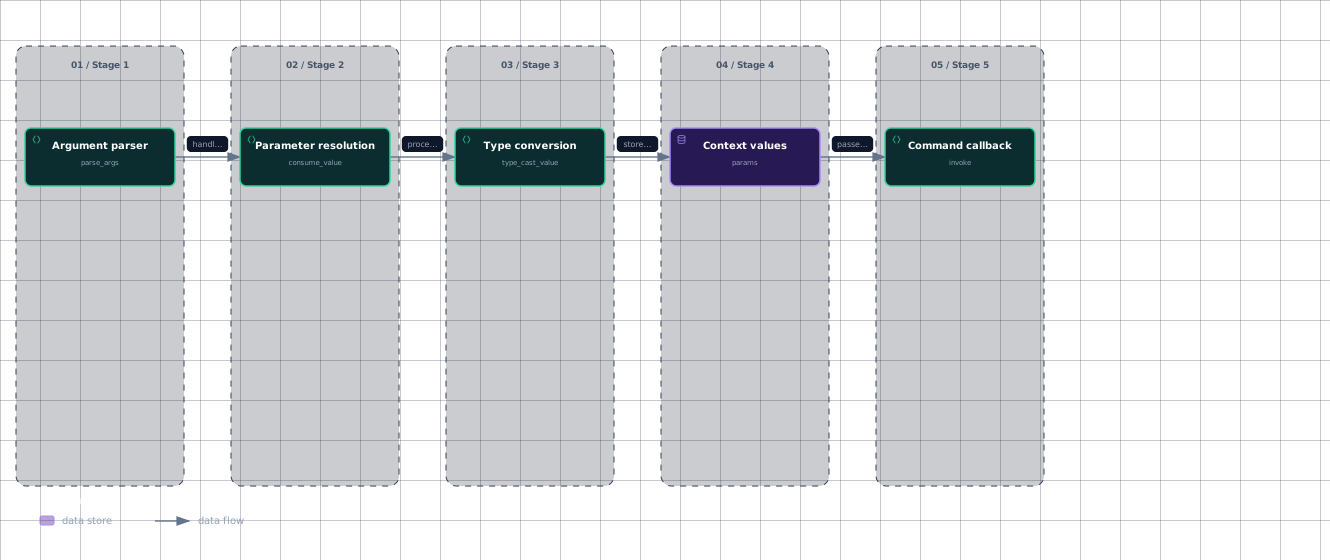
The following dataflow shows the main hand-offs from command-line text to the callback.
The value moves from the command parser through parameter resolution and conversion before Context invokes the callback.
Evidence
- argv-parsersrc/click/core.py:1392
- parameter-resolutionsrc/click/core.py:2586
- parameter-conversionsrc/click/core.py:2634
- context-valuessrc/click/core.py:366
- command-callbacksrc/click/core.py:883
parse_args obtains parser results and processes parameters using iter_params_for_processing; each parameter handles its parse result, and the resulting values are placed in ctx.params. Processing first type-casts the value, checks whether a required value is missing, and then invokes the parameter callback if one exists.
Finally, Command.invoke calls ctx.invoke(self.callback, **ctx.params). Context.invoke forwards those keyword arguments to the callback; when it invokes a command object directly, it fills missing exposed parameters from defaults and type-casts them first.
expose_value controls whether a parameter participates in this hand-off: the context stores only parameters whose value is exposed. The parameter callback runs for all sources, including prompted values, and its return value replaces the processed value.
Sources: src/click/core.py:1061-1103, src/click/core.py:1355-1390, src/click/core.py:1392-1413, src/click/core.py:2708-2772, src/click/core.py:883-935, src/click/core.py:1428-1442, src/click/core.py:366-540, src/click/core.py:2237-2960
How missing values are resolved
When the parser did not produce a command-line value, Parameter.consume_value checks sources in a fixed order: the environment, the context's default map, and the parameter's default. The following table summarizes the fallback stages.
| Source | When it is used | Recorded source |
|---|---|---|
| ParameterSource.COMMANDLINE | The parser produced a value for the parameter. | Command-line input |
| ParameterSource.ENVIRONMENT | No command-line value exists and an environment value is non-empty. | Environment |
ParameterSource.DEFAULT_MAP | No earlier value exists and ctx.default_map contains the parameter. | Context default map |
| ParameterSource.DEFAULT | No earlier value exists and get_default returns a value. | Parameter default |
Environment lookup returns raw strings and ignores missing or empty variables; with multiple names, it returns the first non-empty value. Type normalization happens later through the parameter's type. Option.resolve_envvar_value first uses the base lookup and can then derive a name from Context.auto_envvar_prefix when allow_from_autoenv is enabled.
The default map is checked for an actual value rather than merely a key: _default_map_has rejects an absent map, a missing name, and the internal UNSET sentinel. Parameter.get_default consults Context.lookup_default first, falls back to the local default, and invokes a callable default when requested. Option.get_default adds lazy flag-default resolution before invoking a callable that remains callable.
Options add one more missing-value path: if a flag needs a value and has a prompt, Option.consume_value prompts and records ParameterSource.PROMPT; otherwise it uses the flag activation value. An option can also prompt when its value is unset or came from a default and prompting is enabled. Arguments do not add this prompt path in the shown implementation; their subtype-specific behavior is positional parsing and requiredness.
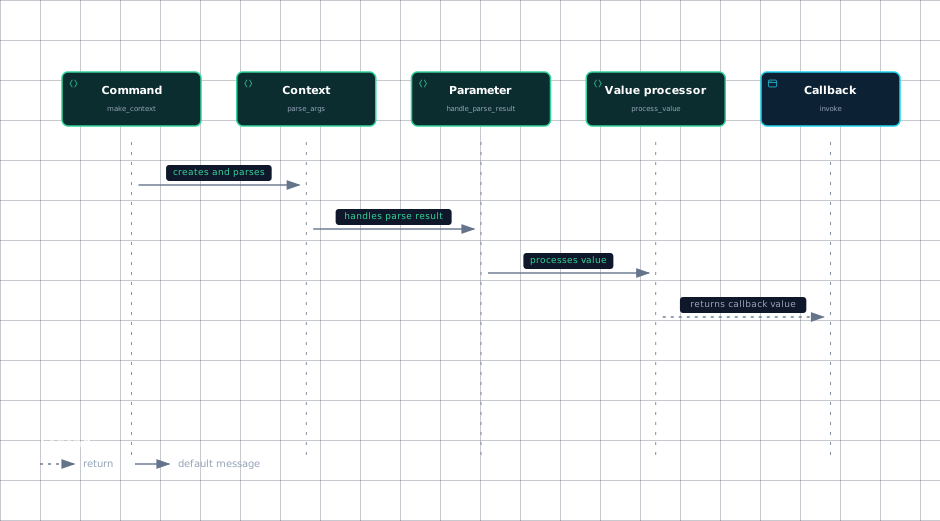
This sequence captures the order from context creation to callback invocation.
The sequence is: create a context, parse arguments, resolve each parameter, process its value, then invoke the callback with context parameters.
Evidence
- commandsrc/click/core.py:1355
- contextsrc/click/core.py:1392
- parametersrc/click/core.py:2835
- processorsrc/click/core.py:2708
- callbacksrc/click/core.py:1428
Sources: src/click/core.py:2586-2632, src/click/core.py:2599-2632, src/click/core.py:2774-2817, src/click/core.py:3654-3676, src/click/core.py:787-799, src/click/core.py:2550-2581, src/click/core.py:3295-3327, src/click/core.py:3726-3780, src/click/core.py:3815-3835, src/click/core.py:1355-1390, src/click/core.py:1392-1400, src/click/core.py:2708-2772, src/click/core.py:1428-1442
How it connects
The low-level parser supplies parser results, while Command and Parameter determine how those results become typed application values. Command.make_parser registers every parameter with the parser through add_to_parser, keeping tokenization below the parameter model. See The Low-Level Parser for that lower layer.
Decorators construct and attach Option and Argument objects to a command; the argument decorator forwards declarations and attributes to Argument, which then delegates shared settings to Parameter. See The Decorator API and Commands and Groups.
Types perform the actual conversion and validation used by Parameter.type_cast_value. See Parameter Types. Prompt interaction belongs to the option path and connects to the terminal prompt facilities. See Prompts and Confirmation.
Sources: src/click/core.py:1252-1257, src/click/decorators.py:327-341, src/click/core.py:2634-2688, src/click/core.py:3726-3778
Key takeaways
Parametercentralizes naming, typing, defaults, environment lookup, callbacks, cardinality, and exposure.Optionadds prompts, flags, and option-specific environment behavior;Argumentadds positional and requiredness rules.- Missing values resolve from environment, default map, then parameter default after command-line input has been checked.
- Values are type-cast, validated, callback-processed, stored in Context.params, and passed as callback keyword arguments.
Sources: src/click/core.py:2237-2960, src/click/core.py:3800-3905, src/click/core.py:2586-2632, src/click/core.py:2708-2772, src/click/core.py:883-935