Progress Bars, Pagers, and Editors
Click’s terminal UI helpers manage interactive progress displays, long-output paging, external editors, URL launchers, and raw terminal input. Their shared implementation lives in src/click/_termui_impl.py, where each feature adapts its behavior to the platform and whether the stream is attached to a terminal.
These details exist so command code can use consistent helpers without owning redraw timing, temporary files, subprocess cleanup, ANSI handling, or platform-specific launch commands.
Sources: src/click/_termui_impl.py:43-380, src/click/_termui_impl.py:451-493, src/click/_termui_impl.py:683-796, src/click/_termui_impl.py:799-866, src/click/_termui_impl.py:250-294, src/click/_termui_impl.py:383-420, src/click/_termui_impl.py:549-632, src/click/_termui_impl.py:636-667
Core concepts
Progress bar
A progress bar tracks an iterable or an explicit length, position, timing samples, terminal width, and whether output is attached to a TTY.
ProgressBar requires an iterable or length, defaults its output to standard text output, and records update_min_steps as the minimum number of completed steps before rendering.
Sources: src/click/_termui_impl.py:43-380
Pager
A pager is a writable text stream backed by a pipe, temporary file, or unchanged standard output, selected according to terminal state and platform.
get_pager_file wraps the selected stream in _PagerWriter, which strips ANSI styling when colors are disabled while leaving stream ownership to the pager strategy.
Sources: src/click/_termui_impl.py:451-493, src/click/_termui_impl.py:549-632, src/click/_termui_impl.py:636-667, src/click/_termui_impl.py:671-680, src/click/_termui_impl.py:497-517, src/click/_termui_impl.py:383-420
Editor session
An editor session writes initial text to a temporary file, launches the selected editor, then reads the file back if it was saved.
Editor selects an explicit editor, VISUAL, EDITOR, a platform default, or a discovered fallback before spawning it with subprocess.Popen.
Sources: src/click/_termui_impl.py:751-796, src/click/_termui_impl.py:683-796
URL launcher
A URL launcher chooses an operating-system command or API for opening a URL or file, optionally waiting for completion or locating a file.
open_url uses open, explorer, os.startfile, cygstart, or xdg-open, with a webbrowser fallback for HTTP and HTTPS URLs when the normal Unix launch fails.
Sources: src/click/_termui_impl.py:799-866
How a progress bar decides when to redraw
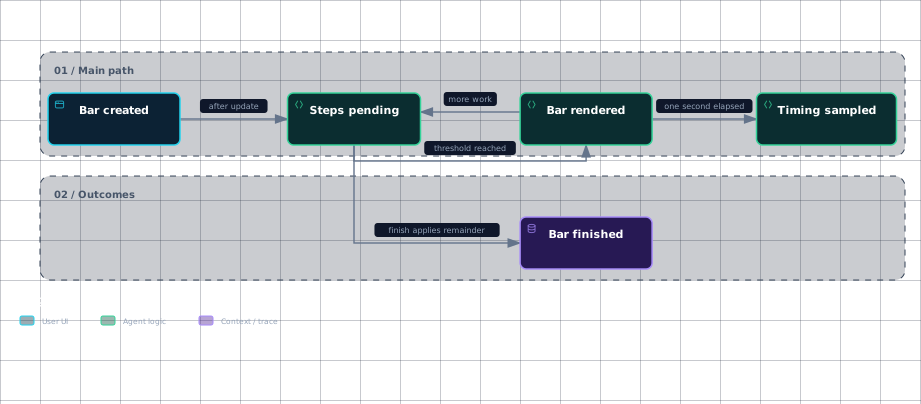
Entering a progress-bar context marks it entered and renders once; iteration then renders before yielding an item and updates after the yielded block returns.
The redraw threshold is update_min_steps: update accumulates steps in _completed_intervals, and only when that count reaches the threshold does it advance the position, render, and reset the pending count.
There is a second timing rule for estimates rather than redraw eligibility. make_step refreshes the rolling timing sample only when at least one second has elapsed since last_eta; it retains at most six previous samples plus the newest one.
The displayed ETA is the average time per iteration multiplied by the remaining length, while percentage is derived from the current position and total length.
Evidence
- bar-createdsrc/click/_termui_impl.py:43
- steps-pendingsrc/click/_termui_impl.py:318
- bar-renderedsrc/click/_termui_impl.py:318
- bar-renderedsrc/click/_termui_impl.py:250
- timing-sampledsrc/click/_termui_impl.py:296
- bar-finishedsrc/click/_termui_impl.py:142
- bar-finishedsrc/click/_termui_impl.py:344
The diagram separates redraw frequency from ETA sampling: reaching update_min_steps controls rendering, while the one-second check controls when timing data changes.
Rendering also depends on the output stream. For non-TTY output, render_progress emits the label only once; for a TTY, it recalculates automatic width, avoids writing an unchanged line, and flushes after a changed line.
At completion, render_finish applies any sub-threshold remainder before rendering and then writes the terminal cleanup sequence only for visible TTY output.
Sources: src/click/_termui_impl.py:43-380, src/click/_termui_impl.py:349-380, src/click/_termui_impl.py:318-342, src/click/_termui_impl.py:296-316, src/click/_termui_impl.py:157-160, src/click/_termui_impl.py:169-172, src/click/_termui_impl.py:250-294, src/click/_termui_impl.py:142-154
How editors and URL launchers spawn external processes
When Editor.edit receives text, it creates an editor- temporary file with the configured extension, writes UTF-8 data on non-Windows systems, and converts text to UTF-8 with a signature and CRLF endings on Windows.
It records the file timestamp, calls edit_files, and then treats an unchanged timestamp as “not saved” when require_save is enabled. Otherwise it reads the file, preserves bytes for byte-oriented input, or decodes text and normalizes CRLF to LF. The temporary file is always unlinked in the finally block.
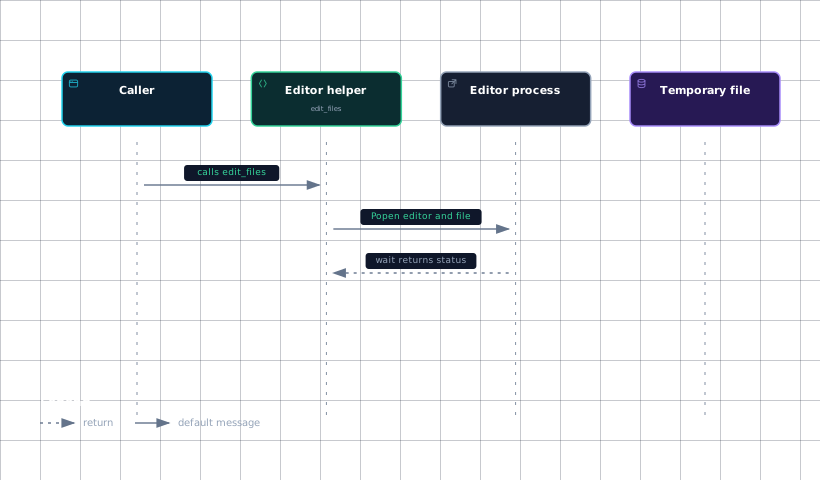
edit_files builds the process arguments by splitting the selected editor command and appending the temporary filename, starts it with subprocess.Popen, waits for it, and raises a ClickException if the process exits unsuccessfully or cannot be started.
Evidence
- callersrc/click/_termui_impl.py:683
- editor-helpersrc/click/_termui_impl.py:683
- editor-processsrc/click/_termui_impl.py:683
- temporary-filesrc/click/_termui_impl.py:751
The editor process is therefore the configured editor command, not a fixed Click-owned editor: selection starts with an explicit value, then checks VISUAL and EDITOR, uses notepad on Windows, searches for sensible-editor, vim, and nano, and finally falls back to vi.
URL launching follows platform branches. On macOS it invokes open and can add -W or -R; on Windows it uses explorer /select, for locating or os.startfile otherwise; on Cygwin it uses cygstart; and on other platforms it invokes xdg-open, optionally waiting for it.
| Platform or case | External operation | Waiting or locating behavior |
|---|---|---|
| macOS | open | -W waits; -R locates |
| Windows | explorer or os.startfile | explorer /select, locates |
| Cygwin | cygstart | -w waits |
| Other platforms | xdg-open | wait waits for the child |
| Unix fallback | webbrowser.open | HTTP(S) only, without waiting or locating |
These branches return the launched application's status where available, use 127 for selected launch failures, and return 1 when the Unix fallback also cannot handle the URL.
Sources: src/click/_termui_impl.py:751-796, src/click/_termui_impl.py:683-796, src/click/_termui_impl.py:799-866
How long output reaches the system pager
The public paging flow can accept a generator, string, or iterable; generators are invoked, strings become a one-element iterable, and other iterables are consumed as text input.
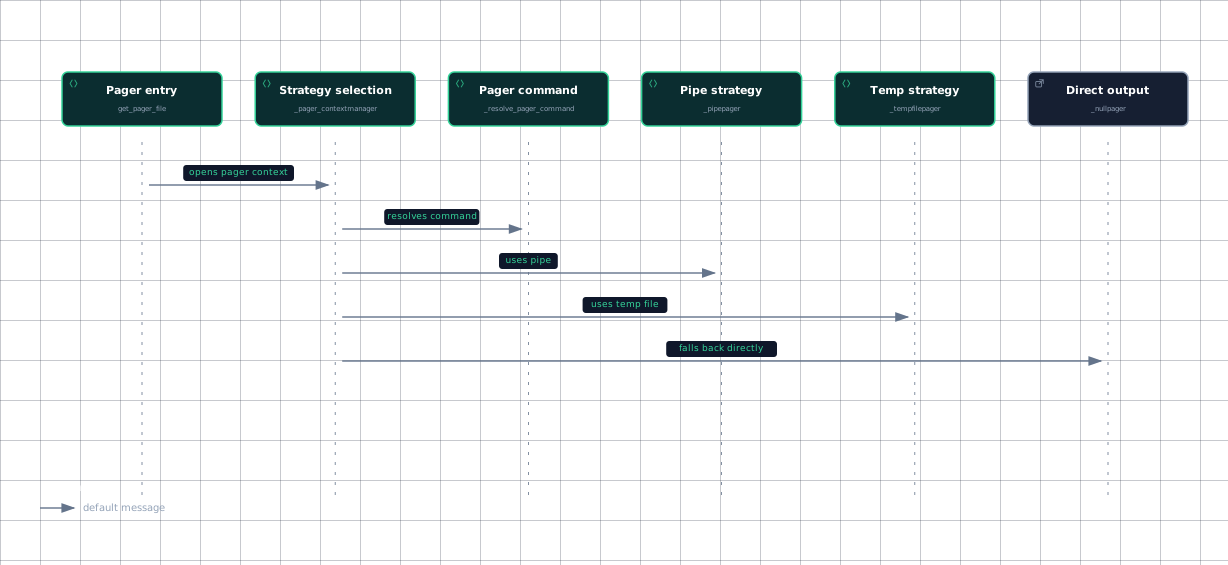
_pager_contextmanager first checks whether standard input and output are TTYs. If either is not, it selects _nullpager and writes directly to the existing output stream.
For interactive output, Click reads PAGER. If it is unset, it uses more for Windows or OS/2 and less elsewhere, unless TERM is dumb or emacs, in which case it again selects _nullpager. The command must resolve through _resolve_pager_command; otherwise direct output is the fallback.
| Strategy | How output moves | Stream ownership |
|---|---|---|
_pipepager | subprocess.Popen receives text through stdin | Closes the pipe and waits |
_tempfilepager | Writes a temporary file, then calls the pager with its name | Closes and unlinks the file |
_nullpager | Writes directly to the supplied stream | Leaves the external stream open |
The selected strategy owns cleanup: _pipepager closes its pipe and waits for the pager, _tempfilepager removes its temporary file, and _nullpager leaves standard output untouched.
Evidence
- pager-entrysrc/click/_termui_impl.py:497
- pager-selectionsrc/click/_termui_impl.py:451
- pager-commandsrc/click/_termui_impl.py:423
- pipe-strategysrc/click/_termui_impl.py:549
- temp-strategysrc/click/_termui_impl.py:636
- direct-outputsrc/click/_termui_impl.py:671
When piping to less with color autodetection, Click recognizes raw-control-character options or injects LESS=-R for the default invocation, allowing ANSI color to pass through.
Sources: src/click/termui.py:371-390, src/click/_termui_impl.py:451-493, src/click/_termui_impl.py:423-448, src/click/_termui_impl.py:383-420, src/click/_termui_impl.py:549-632, src/click/_termui_impl.py:636-667, src/click/_termui_impl.py:671-680
How it connects
The public progress-bar helper creates the ProgressBar context described here, while command output uses the pager context through the terminal UI layer.
The pager’s _PagerWriter cooperates with should_strip_ansi, which detects the wrapper’s color attribute so ANSI sequences are not stripped twice.
For surrounding repository orientation, start with Click Overview, then follow terminal output behavior in Echo and Output Handling and platform differences in Cross-Platform Compatibility. The command-facing context for these helpers is covered by Context and Execution.
Sources: src/click/termui.py:461-501, src/click/termui.py:371-390, src/click/_termui_impl.py:383-420, src/click/_compat.py:502-513
Key takeaways
update_min_stepscontrols progress redraw eligibility, whilemake_steprefreshes ETA samples no more than once per second.click.edit()uses a temporary file and spawns the selected editor with subprocess.Popen.click.launch()selects platform-specific commands such asopen,explorer,cygstart, andxdg-open.- Paging chooses a pipe, temporary file, or direct-output strategy based on TTY state, platform,
PAGER, and command availability.
Sources: src/click/_termui_impl.py:296-316, src/click/_termui_impl.py:318-342, src/click/_termui_impl.py:683-796, src/click/_termui_impl.py:751-796, src/click/_termui_impl.py:799-866, src/click/_termui_impl.py:451-493, src/click/_termui_impl.py:549-632, src/click/_termui_impl.py:636-667, src/click/_termui_impl.py:671-680