Echo and Output Handling
Click’s output layer gives commands a consistent way to write text, bytes, colors, and newlines to standard streams or files. Its main entry point is echo, which accepts arbitrary objects, supports text and binary destinations, and flushes after writing.
This exists because ordinary print does not handle every CLI environment consistently: Click accounts for stream encoding, Windows Unicode behavior, ANSI styling, binary output, and non-interactive destinations.
Sources: src/click/utils.py:240-334, src/click/utils.py:247-259
Core concepts
echo
echo is Click’s output function for writing a message to stdout, stderr, or an explicitly supplied file.
Sources: src/click/utils.py:240-334
Text stream
A text stream is a wrapper configured with an encoding and error policy so Click can write Unicode reliably even when the underlying stream is binary or misconfigured.
Sources: src/click/_compat.py:241-284
ANSI styling
ANSI styling is terminal color or style escape text that Click removes when the destination is not an interactive terminal, unless color is explicitly forced.
Sources: src/click/_compat.py:502-513, src/click/_compat.py:491-492
_LazyFile
_LazyFile is a file-like wrapper that delays opening an ordinary file until the wrapper is first used, while performing limited early validation for reads.
Sources: src/click/utils.py:103-196
open_file
open_file is the public helper that opens regular files or maps "-" to standard input or output, with optional lazy and atomic behavior.
Sources: src/click/utils.py:381-427
How echo differs from print
echo first chooses a default text stream: stdout normally, or stderr when err=True; if no standard stream exists, it returns without writing. It converts non-string objects with str, treats None as an empty message, and appends either a text or byte newline when nl=True.
The important difference from print is that Click explicitly handles several output boundaries:
| Capability | Click behavior | Why it matters |
|---|---|---|
| Encoding | Repairs or wraps streams with suitable encoding behavior | Unicode output can work across configured and misconfigured streams |
| Binary data | Finds a binary writer and writes bytes directly | Commands can emit bytes without forcing text conversion |
| ANSI styles | Strips styles when the destination is not interactive | Redirected output does not retain terminal escape codes |
| Flushing | Flushes after output, including an empty message | Output becomes visible and pipe behavior is more predictable |
For byte messages, echo searches the supplied stream itself and then its .buffer for a binary writer; if one exists, it flushes, writes the bytes, flushes again, and returns. Text messages instead pass through ANSI handling before the final write and flush.
This is why Click prefers echo: the command author uses one API while Click adapts the write to the destination rather than assuming that the destination behaves like a normal terminal.
The following data flow shows the main output decision points.
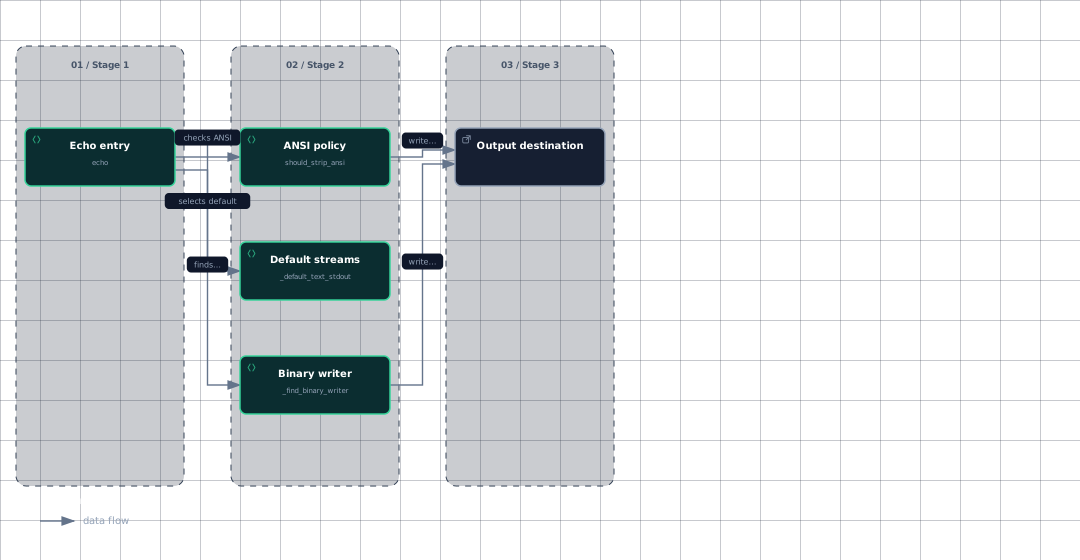
Evidence
- echo-entrysrc/click/utils.py:240
- default-streamssrc/click/_compat.py:576
- default-streamssrc/click/_compat.py:577
- binary-writersrc/click/_compat.py:194
- ansi-policysrc/click/_compat.py:502
- destinationsrc/click/utils.py:320
Sources: src/click/utils.py:287-297, src/click/utils.py:298-310, src/click/utils.py:247-259, src/click/utils.py:312-334, src/click/_compat.py:194-209, src/click/utils.py:316-325, src/click/utils.py:328-334
How encoding and color adapt to the terminal
Click treats ASCII encoding as a warning sign. get_best_encoding uses the stream’s declared encoding or Python’s default, but substitutes UTF-8 when the result is ASCII. A stream is considered misconfigured when its encoding is ASCII or absent, because an absent encoding is treated as ASCII for this check.
When a text stream is unsuitable, _force_correct_text_stream checks whether its encoding and error mode are compatible. If not, it finds the underlying binary reader or writer and wraps it with the requested encoding; unspecified errors default to "replace". The wrapper is line-buffered and does not close the underlying stream when it is garbage-collected.
Standard streams use separate text and binary accessors:
| Stream | Binary accessor | Text accessor |
|---|---|---|
| stdin | get_binary_stdin | get_text_stdin |
| stdout | get_binary_stdout | get_text_stdout |
| stderr | get_binary_stderr | get_text_stderr |
The text accessors first allow a Windows console-specific stream, then correct the corresponding system stream with readable or writable behavior. The default stdout and stderr functions cache their wrappers by source stream, so repeated echo calls can reuse the adapted stream.
Color decisions are separate from encoding. should_strip_ansi strips by default when the stream is not a TTY and is not recognized as Jupyter kernel output; an explicit color value reverses that default. strip_ansi removes matching escape sequences using _ansi_re.
echo applies this policy only to text messages, then writes the resulting text and flushes. A pager-owned stream can expose a color attribute so should_strip_ansi leaves stripping to the pager instead of doing it twice.
Sources: src/click/_compat.py:51-56, src/click/_compat.py:212-218, src/click/_compat.py:250-284, src/click/_compat.py:29-40, src/click/_compat.py:59-78, src/click/_compat.py:319-323, src/click/_compat.py:326-330, src/click/_compat.py:333-337, src/click/_compat.py:340-344, src/click/_compat.py:347-351, src/click/_compat.py:354-358, src/click/_compat.py:551-570, src/click/_compat.py:502-513, src/click/_compat.py:491-492, src/click/utils.py:328-334, src/click/_termui_impl.py:384-395
How lazy and standard-file handles are managed
open_file has three key modes: it can return a lazy wrapper, open immediately, or protect a borrowed standard stream. With lazy=True, it returns _LazyFile; otherwise it calls open_stream immediately.
For an ordinary lazy file, _LazyFile stores the filename and opening parameters without retaining an open handle. For read mode it briefly opens and closes the file to catch some errors early, then leaves _f unset until actual use. Attribute access, iteration, or an explicit open call opens the file through open_stream; an operating-system error becomes FileError.
close_intelligently closes only handles opened by the lazy wrapper. This prevents a borrowed stream such as stdin from being closed when the wrapper’s context exits. A direct close still closes the underlying file whenever it has been opened.
The following sequence contrasts the lazy and eager branches.
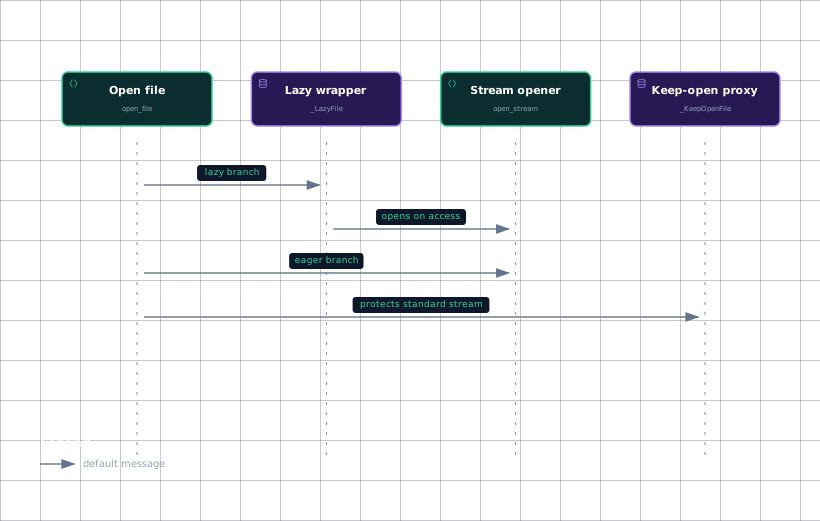
Evidence
- open-filesrc/click/utils.py:381
- lazy-wrappersrc/click/utils.py:103
- stream-openersrc/click/_compat.py:374
- keep-opensrc/click/utils.py:199
open_stream recognizes "-" before normal paths. In write-like modes it returns stdout, and in read modes it returns stdin; text and binary modes select the corresponding accessor, and the returned False indicates that the standard stream should not be closed.
When open_file receives such a borrowed stream, it wraps it in _KeepOpenFile so leaving a with block does not close stdin or stdout. An explicit close still passes through to the wrapped object.
With atomic=True, open_stream creates a temporary file in the destination directory and wraps it in _AtomicFile; closing the wrapper closes the temporary handle and replaces the real destination. This keeps incomplete writes in the temporary file until close performs the replacement.
Sources: src/click/utils.py:381-427, src/click/utils.py:417-423, src/click/utils.py:120-143, src/click/utils.py:145-169, src/click/utils.py:176-181, src/click/utils.py:171-174, src/click/_compat.py:381-397, src/click/utils.py:422-426, src/click/utils.py:199-205, src/click/utils.py:203-205, src/click/_compat.py:412-451, src/click/_compat.py:466-485, src/click/_compat.py:466-471
How it connects
Command code typically reaches this layer through click.echo for output and through open_file or the file parameter type for file options. The file parameter type describes "-" as stdin or stdout, supports text and binary modes, and uses lazy opening mainly for writes.
The standard-stream adapters live in the compatibility layer, while echo, _LazyFile, _KeepOpenFile, and open_file live in the utility layer. For broader command construction, see Click Overview and Commands and Groups. For parameter-driven files, see The Parameter Model and Parameter Types. For terminal interaction that also depends on color policy, see Prompts and Confirmation and Progress Bars, Pagers, and Editors. For captured output, see Testing with CliRunner. Cross-platform stream behavior is part of Cross-Platform Compatibility.
Sources: src/click/types.py:916-937, src/click/utils.py:103-196, src/click/utils.py:199-237, src/click/utils.py:240-334, src/click/utils.py:381-427
Key takeaways
echois preferred overprintbecause it handles encoding, binary output, ANSI stripping, and flushing.- Text streams are corrected around their underlying binary streams when their encoding or error policy is unsuitable.
- ANSI styles are stripped by default for non-interactive destinations, unless color is forced or another component owns the decision.
open_filecan open immediately, defer opening through_LazyFile, or preserve borrowed standard streams with_KeepOpenFile.- Atomic writes use a temporary file and replace the destination only when the wrapper closes.