Exceptions and Error Handling
Click uses exceptions as the internal signal for user-caused problems, especially incorrect command usage. The main handling boundary is Command.main, which handles ClickException, EOFError, and KeyboardInterrupt.
This design separates raising an error from deciding how the CLI should display it and terminate. A ClickException formats an error for standard error and carries the exit code that standalone execution uses.
Sources: docs/exceptions.md:9-22, src/click/exceptions.py:35-65, docs/exceptions.md:24-42
Core concepts
ClickException
A ClickException is the base for errors that Click can show to the user, with a default exit_code of 1.
Its show method writes Error:... to the selected file, defaulting to text standard error, and obtains the displayed text from format_message. The base format_message returns the stored message, while __str__ also returns that message.
Sources: src/click/exceptions.py:35-49, src/click/exceptions.py:35-65, src/click/exceptions.py:51-52, src/click/exceptions.py:54-55
UsageError
A UsageError represents incorrect command usage and changes the default exit code to 2. It extends ClickException, so it uses the same general display path while adding command usage and help guidance.
Sources: src/click/exceptions.py:68-111
Abort and Exit
Abort is Click’s internal signal for aborting execution, whereas Exit carries an explicit status code for exiting the application. Context.abort raises Abort, and Context.exit closes the context before raising Exit(code).
Sources: src/click/exceptions.py:362-363, src/click/exceptions.py:366-378, src/click/core.py:833-853
Context and parameter attachment
A UsageError may receive a Context; when it does, its constructor stores the context and caches ctx.command in cmd. This lets the error render the command path, usage text, help option, and color settings associated with that context.
BadParameter and MissingParameter add parameter information so errors can identify the offending option or argument.
Sources: src/click/exceptions.py:68-85, src/click/exceptions.py:87-111, src/click/exceptions.py:114-156, src/click/exceptions.py:159-229
The exception hierarchy and its user-facing roles
Click documents two principal exception bases: ClickException for errors intended for the user and Abort for aborting execution. The common subclasses below refine either the usage message or the stored context.
| Exception | Family | User-facing purpose |
|---|---|---|
ClickException | Base error | Displays a formatted error and has a default exit code of 1. |
UsageError | ClickException | Reports incorrect command usage and has a default exit code of 2. |
BadParameter | UsageError | Identifies an invalid parameter value. |
MissingParameter | BadParameter | Reports a required argument or option that was not supplied. |
NoSuchOption | UsageError | Reports an unknown option and may suggest close matches. |
NoSuchCommand | UsageError | Reports an unknown command and may suggest close matches. |
BadOptionUsage | UsageError | Reports incorrect use of an otherwise recognized option. |
BadArgumentUsage | UsageError | Reports incorrect use or cardinality of an argument. |
FileError | ClickException | Reports that a file could not be opened. |
Abort | Abort signal | Requests that Click stop execution and report an abort. |
Exit | Runtime exit signal | Carries an explicit application status code. |
The usage-related subclasses preserve the command context by passing ctx to UsageError. NoSuchOption, NoSuchCommand, BadOptionUsage, and BadArgumentUsage therefore participate in the same usage rendering path.
NoSuchOption and NoSuchCommand optionally calculate close matches with get_close_matches; their format_message methods append a suggestion generated by _format_possibilities. _format_possibilities sorts the candidates and chooses singular or plural wording.
Sources: docs/exceptions.md:90-99, src/click/exceptions.py:35-65, src/click/exceptions.py:68-111, src/click/exceptions.py:114-156, src/click/exceptions.py:159-229, src/click/exceptions.py:232-265, src/click/exceptions.py:268-301, src/click/exceptions.py:304-320, src/click/exceptions.py:323-329, src/click/exceptions.py:342-359, src/click/exceptions.py:362-363, src/click/exceptions.py:366-378, src/click/exceptions.py:241-260, src/click/exceptions.py:277-296, src/click/exceptions.py:316-320, src/click/exceptions.py:262-265, src/click/exceptions.py:298-301, src/click/exceptions.py:26-32
How a raised exception becomes output and an exit code
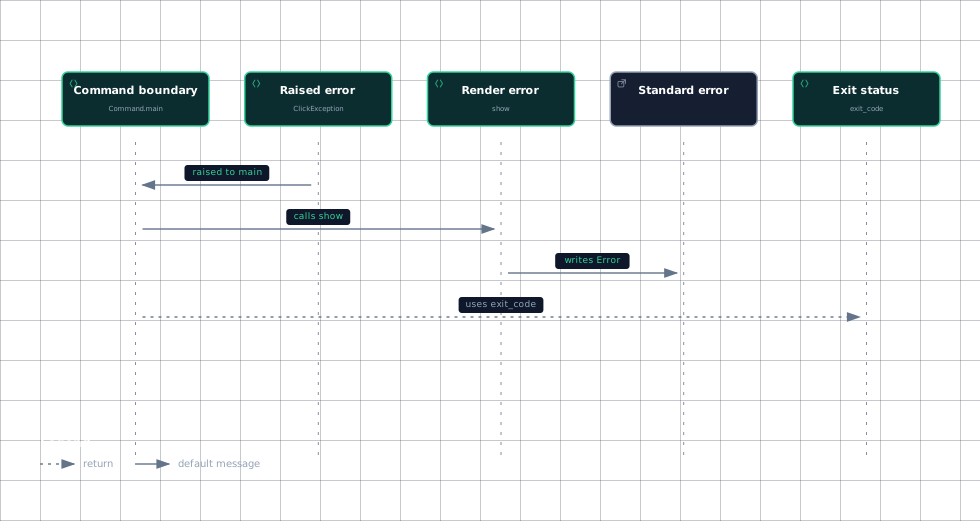
In standalone mode, Command.main handles a raised ClickException by calling ClickException.show and then exiting with ClickException.exit_code. With standalone_mode=False, it propagates the exception instead.
This sequence shows the normal ClickException path from the command boundary to the user-visible result.
Evidence
- command-maindocs/exceptions.md:18
- raised-errorsrc/click/exceptions.py:35
- show-errorsrc/click/exceptions.py:57
- stderrsrc/click/exceptions.py:57
- exit-statussrc/click/exceptions.py:35
The important distinction is that show produces the message, while exit_code determines the process result. In the base implementation, show uses get_text_stderr() when no file is supplied, then calls echo with the formatted message.
UsageError.show adds the command-specific usage line and, when available, a hint to invoke the longest help option name, such as --help. It then writes the usage, hint, and formatted error message to the selected output.
FileError follows the ordinary ClickException path but specializes the text as Could not open file...; it stores both the original filename and a display-oriented filename.
Sources: docs/exceptions.md:18-38, src/click/exceptions.py:35-65, src/click/exceptions.py:57-65, src/click/exceptions.py:87-111, src/click/exceptions.py:342-359, src/click/exceptions.py:356-359
How usage errors attach to the right command
A usage error becomes command-specific when it is constructed with a Context. UsageError.__init__ stores that context and sets cmd to ctx.command, or to None when no context was supplied.
When displayed, UsageError.show reads the context’s help option, obtains the available help option names, chooses the longest name, and prefixes the error with ctx.get_usage() and a help hint. This is why the message can refer to the actual command path rather than only showing a generic failure.
BadParameter carries either a Parameter or an explicit param_hint. Its format_message checks param_hint first, uses it directly when present, and otherwise asks param.get_error_hint(self.ctx) when a parameter is available; only when neither is set does it emit a generic invalid-value message. A sequence of hints is normalized by _join_param_hints, which joins multiple quoted names with " / ".
MissingParameter extends this behavior by determining whether the missing item is an argument, option, or parameter and by asking the parameter type for additional missing-value text when available. Its __str__ method also provides a compact fallback such as Missing parameter:... when no message was supplied.
The parser imports BadArgumentUsage, BadOptionUsage, NoSuchOption, and UsageError from the exceptions module. During parsing, a UsageError is re-raised unless the context enables resilient parsing.
Context.fail is the direct context-level helper for raising UsageError(message, self), which attaches the current command automatically.
Sources: src/click/exceptions.py:68-85, src/click/exceptions.py:87-111, src/click/exceptions.py:114-156, src/click/exceptions.py:135-144, src/click/exceptions.py:146-156, src/click/exceptions.py:19-23, src/click/exceptions.py:159-229, src/click/exceptions.py:224-229, src/click/parser.py:33-38, src/click/parser.py:301-314, src/click/core.py:833-840
How standalone mode changes control flow
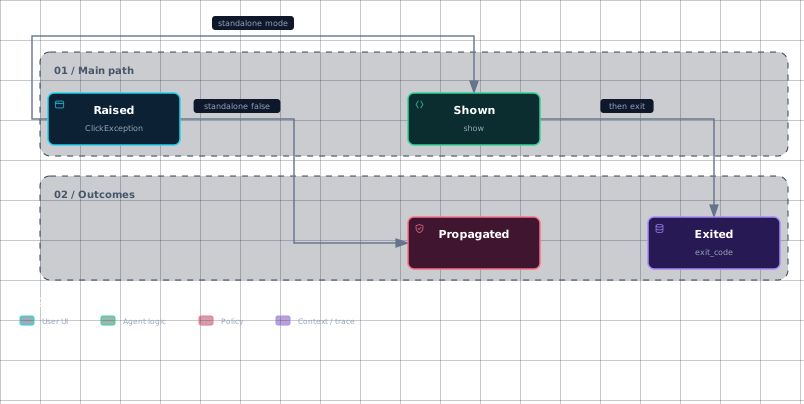
Standalone mode converts handled conditions into CLI behavior: normal return means exit code 0, Context.exit uses its supplied code, ClickException is shown and exits with its exception code, and Abort prints Aborted! before exiting with code 1.
With standalone_mode=False, Click disables exception handling and the implicit sys.exit; callers receive returned values or propagated exceptions instead. This mode allows an application to catch Abort or ClickException, customize the output, and choose its own termination behavior.
The lifecycle is therefore determined by both the exception family and the invocation mode.
Evidence
- raisedsrc/click/exceptions.py:35
- shownsrc/click/exceptions.py:57
- exitedsrc/click/exceptions.py:35
- propagateddocs/exceptions.md:29
Sources: docs/exceptions.md:24-38, docs/exceptions.md:44-61, docs/exceptions.md:72-88
How it connects
The command and context layer creates and routes these signals: Context.fail raises a contextual UsageError, Context.abort raises Abort, and Context.exit raises Exit. Read this alongside Context and Execution for the context lifecycle and Commands and Groups for command dispatch.
The parser imports several usage-error subclasses used by command-line parsing. For parameter-specific failures, see The Parameter Model and Parameter Types.
File-opening utilities translate an OSError into FileError, leaving Click’s normal error handler to display it. Output and test behavior are covered by Echo and Output Handling and Testing with CliRunner.
Sources: src/click/core.py:833-853, src/click/parser.py:33-38, src/click/utils.py:153-169
Key takeaways
ClickExceptionis the displayable error base;UsageErrorspecializes it for bad usage and exit code2.- Command.main shows
ClickExceptionin standalone mode, then exits withexit_code; non-standalone mode propagates it. - Passing a
ContexttoUsageErrorattaches the error to ctx.command, enabling command-specific usage and help hints. BadParameterandMissingParameterpreserve parameter identity and improve invalid or missing-value messages.AbortandExitare control-flow signals rather than ordinary user-facingClickExceptionsubclasses.
Sources: src/click/exceptions.py:35-65, src/click/exceptions.py:68-111, docs/exceptions.md:18-38, src/click/exceptions.py:114-156, src/click/exceptions.py:159-229, src/click/exceptions.py:362-363, src/click/exceptions.py:366-378