Testing with CliRunner
CliRunner lets tests invoke a Click command as a Python call and inspect a Result instead of launching a separate command-line process.
It exists to make command behavior—arguments, prompts, streams, exit codes, and exceptions—testable in one controlled interpreter environment. Because it replaces process-global streams and related state, it is intended for single-threaded tests.
Sources: src/click/testing.py:317-798, src/click/testing.py:596-739
Core concepts
The runner
A runner is the test object that configures input, environment overrides, exception handling, and output capture before invoking a command. CliRunner stores charset, env, echo_stdin, catch_exceptions, and capture during construction.
Sources: src/click/testing.py:317-798, src/click/testing.py:360-380
In-process invocation
In-process invocation means that invoke prepares isolation and calls the command’s main method directly rather than spawning a subprocess. Arguments may be a sequence or a shell-like string, and extra keyword arguments are forwarded to main.
Sources: src/click/testing.py:596-739
Isolated streams
Isolated streams are temporary replacements for sys.stdin, sys.stdout, and sys.stderr, backed by in-memory buffers and restored when the isolation context exits. isolation also applies environment overrides and patches Click internals used by prompts.
Sources: src/click/testing.py:399-594
Result
A result is the structured record returned by invoke, containing captured byte streams, the command return value, exit code, exception, and exception information.
The main result views differ by purpose:
| Property | What it represents | Conversion |
|---|---|---|
output_bytes | Mixed stdout and stderr in terminal write order | Raw bytes |
stdout_bytes | Standard output only | Raw bytes |
stderr_bytes | Standard error only | Raw bytes |
output | Mixed terminal output for assertions | Decoded and newline-normalized |
stdout | Standard output for assertions | Decoded and newline-normalized |
stderr | Standard error for assertions | Decoded and newline-normalized |
output, stdout, and stderr decode with the runner charset, replace carriage-return/newline pairs, and expose the corresponding byte streams.
Sources: src/click/testing.py:231-314, src/click/testing.py:262-280, src/click/testing.py:283-292, src/click/testing.py:295-299, src/click/testing.py:302-310
How invoke runs a command in-process
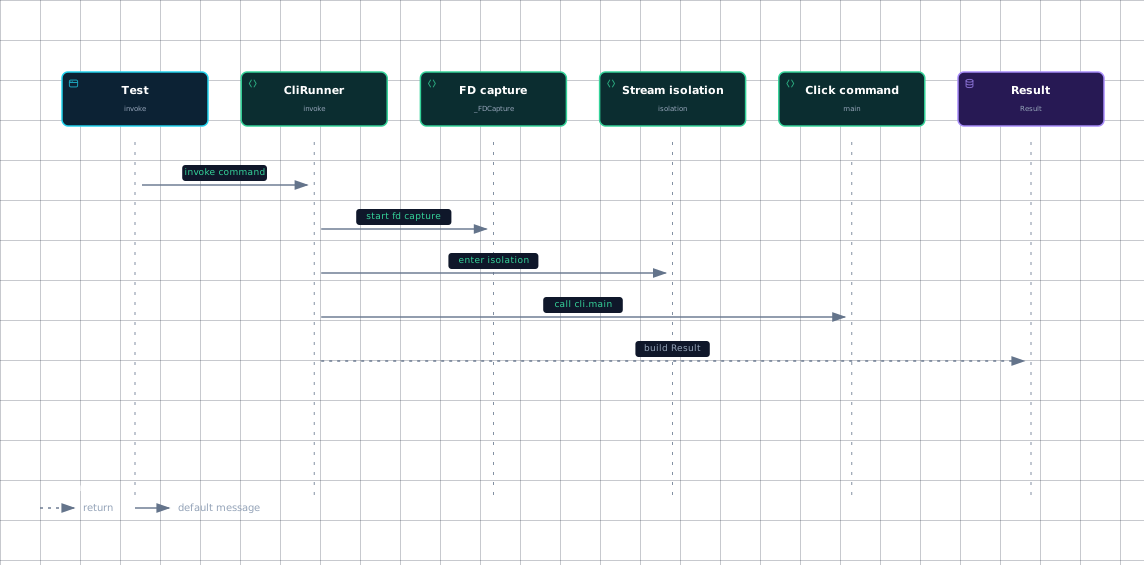
The call order below shows why invoke does not need a subprocess: it enters isolation, optionally starts file-descriptor capture, and then calls cli.main directly.
Evidence
- testsrc/click/testing.py:596
- runnersrc/click/testing.py:596
- fd-capturesrc/click/testing.py:80
- fd-capturesrc/click/testing.py:596
- isolationsrc/click/testing.py:399
- isolationsrc/click/testing.py:596
- commandsrc/click/testing.py:596
- resultsrc/click/testing.py:231
- resultsrc/click/testing.py:596
With the default capture="sys" mode, invoke enters isolation and calls cli.main(args=args or (), prog_name=prog_name, **extra). If args is a string, shlex.split converts it first; if no program name is supplied, get_default_prog_name supplies the command name or "root".
The command’s normal return value is stored in the result. SystemExit is interpreted as an exit code, while exception handling records exception information according to catch_exceptions.
Sources: src/click/testing.py:596-739, src/click/testing.py:231-314
How streams, prompts, and capture work
isolation converts supplied input into a binary stream, creates a StreamMixer, and replaces the three standard streams with named text wrappers. This is why code using Click’s normal stream access sees test-controlled streams rather than the test process’s terminal.
The input path is deliberately layered:
make_input_streamaccepts an existing readable stream, encodes string input using the runner charset, or creates an empty io.BytesIO stream forNone.- When
echo_stdinis enabled,EchoingStdinforwards reads to the input buffer and copies read bytes to the captured stdout buffer. visible_inputwrites the prompt, reads one line, echoes the entered value, and flushes stdout.hidden_inputwrites only the prompt and reads the value without echoing it._pause_echotemporarily pauses input echoing while prompt helpers perform their own visible or hidden behavior.
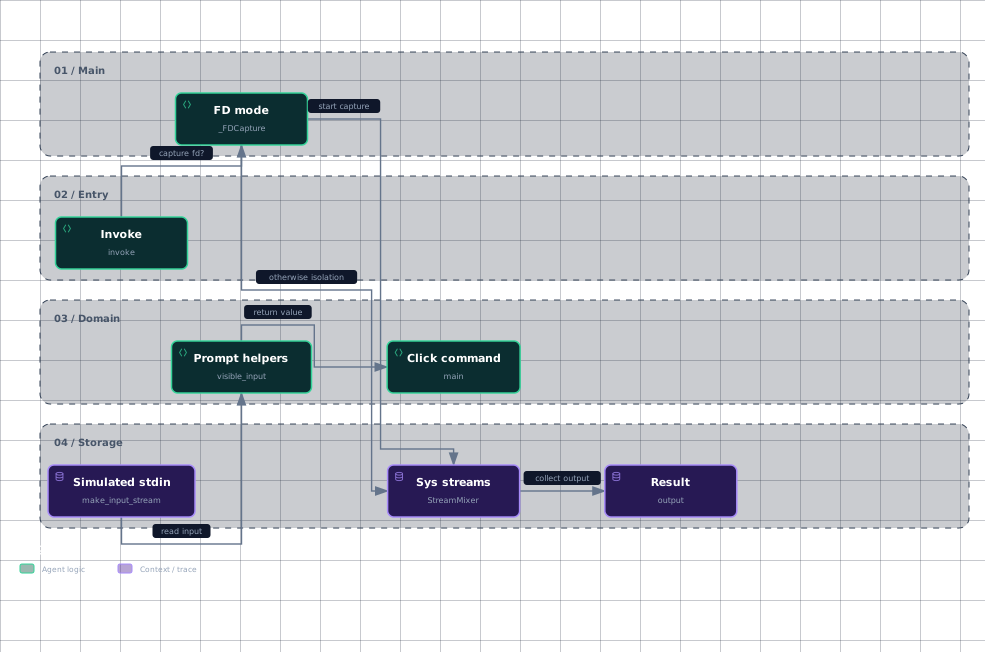
The workflow below captures the branch between Python-level capture and file-descriptor capture, plus the prompt input path.
Evidence
- invokesrc/click/testing.py:596
- fd-modesrc/click/testing.py:80
- fd-modesrc/click/testing.py:596
- sys-streamssrc/click/testing.py:138
- sys-streamssrc/click/testing.py:399
- stdinsrc/click/testing.py:211
- stdinsrc/click/testing.py:399
- promptsrc/click/testing.py:399
- commandsrc/click/testing.py:596
- resultsrc/click/testing.py:231
- resultsrc/click/testing.py:283
StreamMixer gives stdout and stderr separate BytesIOCopy buffers while copying both writes into one mixed output buffer. Therefore result.stdout and result.stderr can be asserted independently, while result.output preserves the terminal-facing order.
With capture="fd", invoke starts _FDCapture for file descriptors 1 and 2 before entering stream isolation. _FDCapture saves each descriptor with os.dup, redirects it with os.dup2, and restores it in stop, allowing output that bypasses Python’s stream objects to be captured.
Sources: src/click/testing.py:211-228, src/click/testing.py:399-594, src/click/testing.py:32-67, src/click/testing.py:71-77, src/click/testing.py:317-798, src/click/testing.py:596-739, src/click/testing.py:138-153, src/click/testing.py:231-314, src/click/testing.py:80-114
How filesystem fixtures isolate tests
For file-oriented tests, the preferred pattern is a test-owned directory such as pytest’s tmp_path, followed by an absolute path passed to the command. This avoids changing the process working directory and prevents files from leaking between tests.
Click’s test configuration exposes a runner fixture that returns a new CliRunner. Tests can then reuse the fixture while keeping invocation setup concise.
isolated_filesystem is a context manager rather than a subprocess boundary: it creates a temporary directory, changes the current working directory with os.chdir, yields the directory, and restores the original directory afterward. It is deprecated in Click 8.5.0 and will be removed in Click 9.0; new tests should use tmp_path or tempfile.TemporaryDirectory with absolute paths.
Because both invoke and isolated_filesystem mutate process-global state, concurrent invocations in threads can overwrite one another. Process-based parallelism gives each worker its own interpreter and global streams.
Sources: docs/testing.md:124-161, tests/conftest.py:7-8, src/click/testing.py:742-798, src/click/testing.py:317-798
How it connects
CliRunner hands command execution to Click’s Command.main, so understanding command dispatch and context construction is the next step: Commands and Groups and Context and Execution.
Its captured streams are the testing counterpart to Click’s normal output and prompt layers; use Echo and Output Handling and Prompts and Confirmation to interpret what the command writes and reads.
The runner fixture and filesystem patterns belong with the broader suite organization and repository setup described in Test Suite Organization and Patterns and Repository Layout and Dev Setup.
Sources: src/click/testing.py:596-739, src/click/testing.py:399-594, tests/conftest.py:7-8, docs/testing.md:124-161
Key takeaways
invokeruns cli.main inside the current interpreter after installing isolated streams.inputbecomes a binary stream, and prompt helpers read from it while controlling whether entered text is echoed.Resultseparates stdout and stderr while also exposing their mixed terminal order.capture="fd"adds OS-level descriptor capture for output that bypasses Python stream objects.- Prefer per-test absolute paths;
isolated_filesystemchanges process-global working-directory state and is deprecated.
Sources: src/click/testing.py:596-739, src/click/testing.py:211-228, src/click/testing.py:399-594, src/click/testing.py:231-314, src/click/testing.py:80-114, src/click/testing.py:742-798, docs/testing.md:124-161