Prompts and Confirmation
Interactive terminal input lets a command ask for values after it starts, validate those values, and retry when the input is invalid. Click provides this through prompt, while option handling can invoke prompt or confirm automatically.
Confirmation input is a specialized yes/no flow, while terminal styling adds ANSI color and text attributes without leaving escape codes in destinations that cannot display them.
Sources: docs/prompts.md:6-10, src/click/termui.py:289-345, src/click/termui.py:641-765, src/click/utils.py:247-268
Core concepts
Typed input prompt
An input prompt displays a question, reads a line, converts it, and repeats until the value is acceptable or the user aborts. The public prompt overloads describe either a string result or a type-narrowed result, and the implementation is prompt.
Sources: src/click/termui.py:139-150, src/click/termui.py:154-165, src/click/termui.py:168-286
Confirmation prompt
A confirmation prompt interprets a small set of yes/no answers and returns a boolean, optionally using a default when the user submits an empty line. The implementation is confirm.
Sources: src/click/termui.py:289-345
ANSI terminal styling
Terminal styling represents colors and text attributes as ANSI sequences, then removes those sequences when the output stream does not support them. The main APIs are style, unstyle, and secho.
The prompt API exposes these behaviors through a small set of parallel controls:
| Parameter | Plain-language purpose |
|---|---|
default | Value used when the user enters nothing; it can also help determine the conversion type. |
type | Type or ParamType used to validate and convert the entered text. |
value_proc | Callable that replaces the normal type conversion step. |
hide_input | Selects hidden input instead of visible input. |
confirmation_prompt | Requests the same value again before returning it. |
These controls are assembled into the implementation signature of prompt, which also supports custom suffixes, default display, error output, and choice display.
Sources: src/click/termui.py:641-765, src/click/termui.py:768-777, src/click/termui.py:780-811, src/click/utils.py:328-334, src/click/termui.py:168-286, docs/prompts.md:71-85
How an input prompt reads and validates
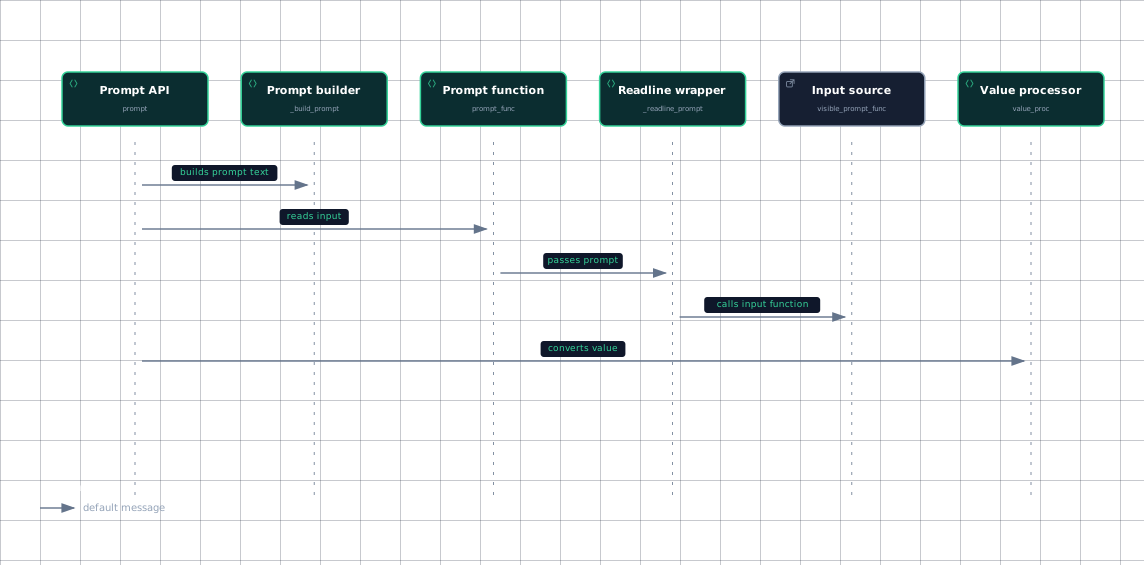
The implementation first chooses visible or hidden input. prompt_func selects hidden_prompt_func when hide_input is true and otherwise uses visible_prompt_func; both paths call _readline_prompt. hidden_prompt_func delegates to getpass.getpass, while visible_prompt_func is bound to input.
Before reading, prompt builds the displayed text with _build_prompt. That helper appends choices when the type is a Choice and show_choices is enabled, then appends a formatted default when requested. The default may be formatted specially by _format_default, including using a file-like object's name.
The prompt then reads until it has non-empty text or a usable default. If default is present, an empty response becomes the default; otherwise the inner loop asks again. The resulting text passes through value_proc, which is either supplied by the caller or derived from type and default.
Invalid conversion raises UsageError; the implementation prints an error and restarts the outer loop. When hidden input is enabled, _mask_hidden_input replaces the entered value in the error message with a fixed mask, including both its representation and bounded raw occurrences.
A confirmation prompt adds another read after successful conversion. The second value must match the first, except that two empty values are accepted; otherwise Click reports that the values do not match and retries.
Evidence
- prompt-apisrc/click/termui.py:168
- prompt-buildersrc/click/termui.py:168
- prompt-functionsrc/click/termui.py:168
- readline-wrappersrc/click/termui.py:85
- input-sourcesrc/click/termui.py:34
- input-sourcesrc/click/termui.py:168
- value-processorsrc/click/termui.py:168
The sequence follows the calls shown by prompt, prompt_func, _readline_prompt, and value_proc; retries remain inside prompt after conversion or confirmation errors.
Sources: src/click/termui.py:168-286, src/click/termui.py:79-82, src/click/termui.py:34, src/click/termui.py:108-125, src/click/termui.py:128-135, src/click/termui.py:61-76, src/click/termui.py:85-105
How confirmation chooses a result
confirm constructs its prompt with _build_prompt, displaying y/n when default is None, Y/n when the default is true, and y/N when it is false. It reads through _readline_prompt, lowercases and strips the response, and accepts y/yes or n/no.
An empty response selects default when the default is not None; an invalid response prints an error and repeats. If input is interrupted or reaches end-of-file, confirm raises Abort; if abort is true and the final result is false, it raises Abort as well.
Option prompts connect this standalone behavior to command parameters. An option can define a prompt string, and Click asks for input when the option was not supplied; prompt_required=False changes the condition so the prompt appears only when the option's flag is present. The option constructor stores prompt, confirmation_prompt, and prompt_required as prompt-related attributes.
Sources: src/click/termui.py:289-345, docs/prompts.md:21-28, docs/prompts.md:87-105, src/click/core.py:3085-3099
How styling survives different terminals
style converts non-string input with str, then builds ANSI sequences for requested foreground and background colors. It supports named colors, integer 256-color indexes, and RGB tuples when the terminal supports those modes. _interpret_color maps named colors through _ansi_colors, formats valid integer and RGB values, and raises ValueError for unknown values.
By default, styled text is self-contained because style adds the reset-all sequence represented by _ansi_reset_all; callers can disable that behavior with reset=False to compose styles. secho combines styling and output, while unstyle explicitly removes ANSI sequences.
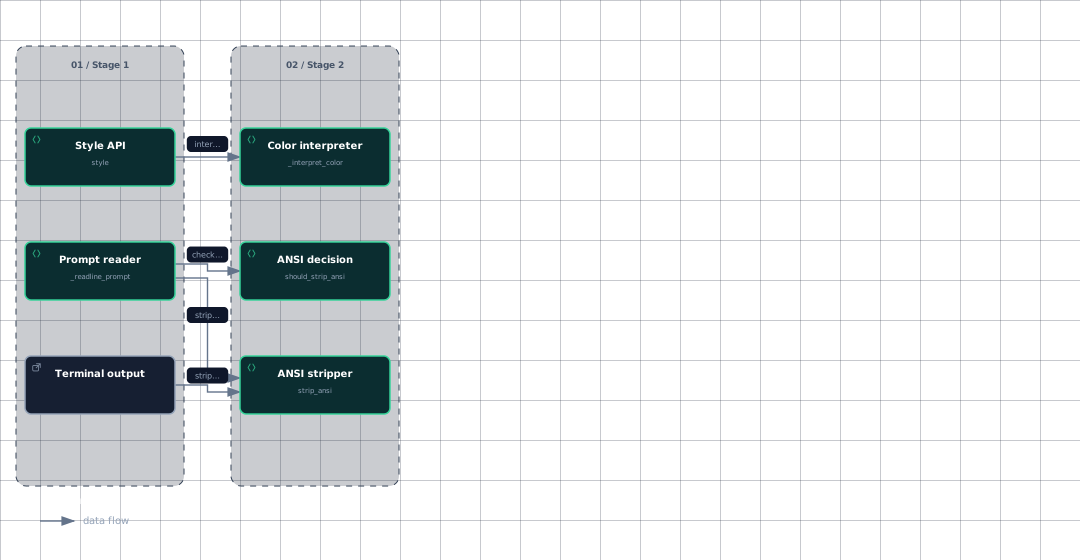
Prompt display uses the same compatibility boundary. _readline_prompt chooses stdout or stderr, asks the compatibility layer whether ANSI should be stripped, and calls strip_ansi before handing the complete prompt to the input function when necessary. This matters because the prompt is passed directly to the input function rather than written through echo, so it must perform its own stripping.
Normal output follows the corresponding echo path: when the destination should not receive color, it strips ANSI codes before writing and flushing. The output layer also accounts for encoding, Unicode console support, binary outputs, and non-interactive destinations, which is why styled output can be used across different stream types without requiring every terminal to understand ANSI sequences.
Evidence
- style-apisrc/click/termui.py:641
- color-interpretersrc/click/termui.py:616
- prompt-readersrc/click/termui.py:85
- ansi-decisionsrc/click/termui.py:85
- ansi-decisionsrc/click/utils.py:328
- ansi-strippersrc/click/termui.py:85
- ansi-strippersrc/click/termui.py:768
- terminal-outputsrc/click/utils.py:328
The boundary is deliberately applied both to prompts and ordinary output: styling can create ANSI sequences, but compatibility checks decide whether those sequences reach the destination.
Sources: src/click/termui.py:641-765, src/click/termui.py:616-638, src/click/termui.py:55, src/click/termui.py:780-811, src/click/termui.py:768-777, src/click/termui.py:85-105, src/click/utils.py:328-334, src/click/utils.py:247-268
How it connects
Option prompting is part of the parameter flow, where Option stores prompt configuration and the full-value processing path calculates a default before prompting. For that broader model, see The Parameter Model and Arguments and Options in Practice.
Prompt input depends on terminal reading and output compatibility, while command-level failures use Abort and UsageError during the retry paths. The surrounding command invocation and error behavior are covered by Context and Execution and Exceptions and Error Handling.
For testing, CliRunner patches prompt functions and ANSI decisions so interactive input and color behavior can be isolated. See Testing with CliRunner for that execution boundary.
Sources: src/click/core.py:3085-3099, src/click/core.py:3605-3619, src/click/termui.py:168-286, src/click/termui.py:289-345, src/click/testing.py:494-517
Key takeaways
promptbuilds a prompt, reads input, converts it, and retries on invalid values or mismatched confirmation input.confirmaccepts yes/no forms, applies an optional default to empty input, and can abort on a negative answer.stylecreates ANSI styling, while_readline_promptand output handling strip it when the destination does not support it.- Option prompting reuses these terminal UI functions through prompt-related option configuration.
Sources: src/click/termui.py:168-286, src/click/termui.py:289-345, src/click/termui.py:641-765, src/click/termui.py:85-105, src/click/utils.py:328-334, docs/prompts.md:21-28