Help Text Formatting
Click builds command help by sending usage, descriptive text, arguments, options, and epilog content through a HelpFormatter. The formatter keeps output in an internal buffer and returns the completed string when requested.
This separation exists so help can be wrapped consistently, aligned into readable columns, and customized for specialized output. HelpFormatter is also exposed for developers who need to write their own output formats.
Sources: src/click/core.py:1284-1301, src/click/formatting.py:110-299, src/click/formatting.py:297-299
Core concepts
The formatter
A HelpFormatter is the in-memory writer that tracks output width, indentation, and buffered text. It accepts an indentation increment, an optional width, and an optional maximum width; when no width is supplied, it uses the terminal width clamped by the maximum and a minimum of 50 columns.
Sources: src/click/formatting.py:110-299, src/click/formatting.py:127-144
Visible-width wrapping
wrap_text is the public formatting helper that wraps text and optionally preserves paragraphs. Its TextWrapper implementation measures visible characters, so ANSI escape sequences in styled text, prefixes, and placeholders do not consume the visible width budget.
Sources: src/click/formatting.py:31-107, src/click/_textwrap.py:38-188
Definition-list layout
A definition list is a sequence of term/value rows used for options and commands. The formatter measures both columns, limits the first column with col_max, and wraps the value column beside or below the term.
Sources: src/click/formatting.py:229-271
How a command becomes help
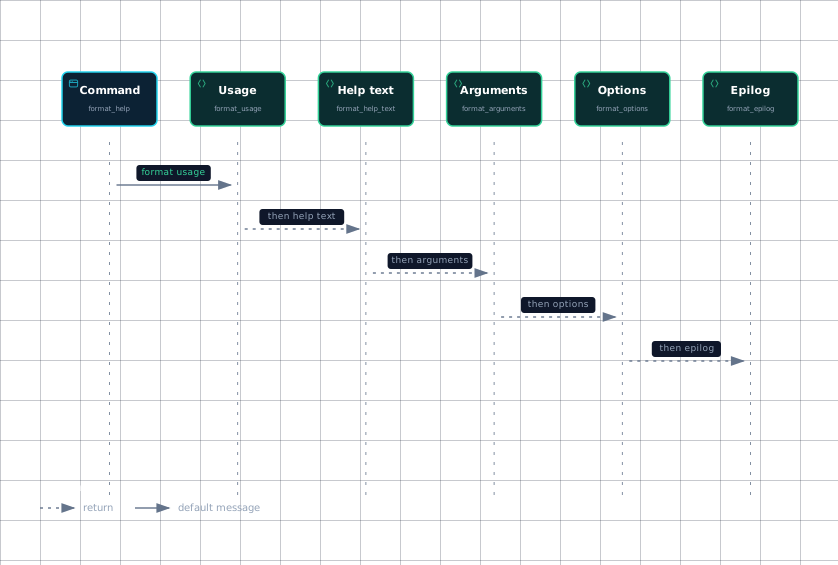
A command's low-level format_help method writes content in this order: usage, help text, arguments, options, and epilog. The help text is cleaned, truncated at the first form-feed character, optionally decorated with a deprecation label, and then written inside an indentation context.
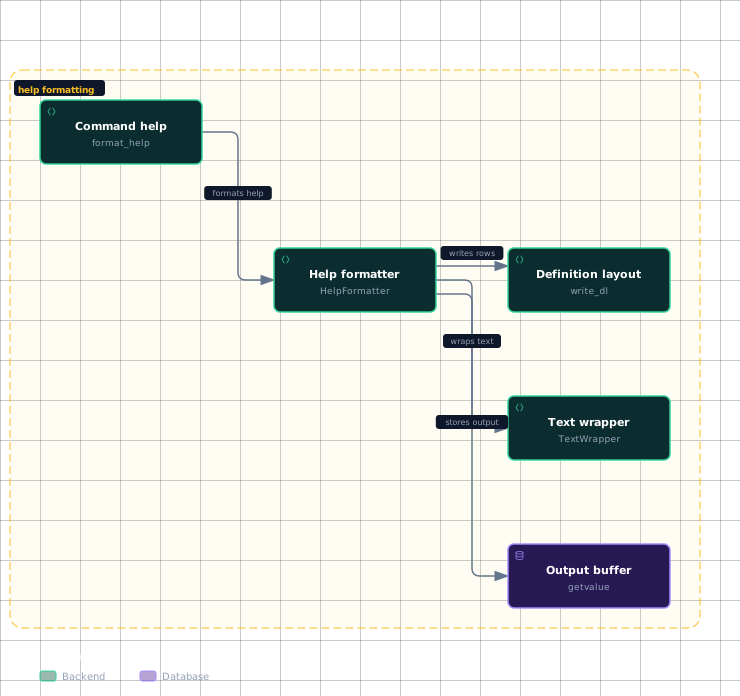
The overall architecture is a command formatter feeding layout helpers and finally the formatter buffer.
Evidence
- command-helpsrc/click/core.py:1284
- help-formattersrc/click/formatting.py:110
- text-wrappersrc/click/_textwrap.py:38
- definition-layoutsrc/click/formatting.py:229
- output-buffersrc/click/formatting.py:297
The call order is explicit in format_help; the individual formatting methods then delegate to HelpFormatter operations.
Evidence
- commandsrc/click/core.py:1284
- usagesrc/click/core.py:1284
- descriptionsrc/click/core.py:1284
- argumentssrc/click/core.py:1284
- optionssrc/click/core.py:1284
- epilogsrc/click/core.py:1284
Sources: src/click/core.py:1284-1301, src/click/core.py:1303-1319
How wrapping and alignment work
write_usage calculates the available width after the current indentation. If the usage prefix leaves at least 20 characters of room, arguments share the first line and subsequent lines align beneath them; otherwise, the arguments move to a new line with an additional indentation.
write_text uses the current indentation for both the first and subsequent lines and calls wrap_text with paragraph preservation enabled. wrap_text expands tabs, creates a TextWrapper, and either fills the complete text or separates paragraphs before wrapping them.
A paragraph beginning with the backspace marker is kept unwrapped. For ordinary paragraphs, lines are joined into a paragraph, while the original leading indentation is reapplied through extra_indent; raw blocks use indent_only instead of reflowing.
Long words are handled according to the wrapper's break_long_words setting. When breaking is enabled, _truncate_visible cuts only the visible prefix that fits and never cuts inside an ANSI escape sequence.
Options and command listings use write_dl as a two-column definition list.
| Element | Behavior |
|---|---|
measure_table | Measures each column using visible terminal width. |
iter_rows | Pads rows to the requested column count. |
col_max | Limits the measured first-column width; its default is 30. |
col_spacing | Adds the gap between the first and second columns; its default is 2. |
wrap_text | Wraps the second-column value while preserving paragraphs. |
If a term fits within the first column, its value starts on the same line. If it is too long, the value starts below the term at an indentation that includes the current formatter indentation. Subsequent wrapped value lines align with that value column.
Option names can be joined separately with join_options, which orders them by prefix length and reports whether any prefix is a slash.
Sources: src/click/formatting.py:158-202, src/click/formatting.py:213-227, src/click/formatting.py:31-107, src/click/_textwrap.py:48-64, src/click/_textwrap.py:11-35, src/click/formatting.py:24-28, src/click/formatting.py:229-271, src/click/formatting.py:302-320
How sections and indentation nest
HelpFormatter stores current_indent and changes it by indent_increment; indent increases the value and dedent decreases it. The default increment is two spaces.
section is a context manager for a named section: it writes a paragraph break, writes the heading, increases indentation for the body, and always restores the previous indentation afterward. indentation provides the same restoration behavior without writing a heading.
Headings are emitted with the current indentation and a trailing colon. Paragraph separation is emitted only when the buffer already contains content. The final help string is the concatenation of all buffered fragments.
Sources: src/click/formatting.py:110-299, src/click/formatting.py:127-144, src/click/formatting.py:274-286, src/click/formatting.py:289-295, src/click/formatting.py:204-206, src/click/formatting.py:208-211, src/click/formatting.py:297-299
How a command can customize its help
A command can provide help, epilog, and short_help values; the command documentation identifies help as the main help string, epilog as content printed at the end, and short_help as text shown in a parent command listing. These values remain unprocessed until help is output, and formatting happens even when the command was not created with the @command decorator.
For deeper customization, override the command's formatting methods such as format_help, format_help_text, format_arguments, format_options, or format_epilog, because format_help calls those methods in sequence. A custom implementation can also use the exposed HelpFormatter directly when it needs specialized output rather than the standard layout.
Sources: src/click/core.py:986-1007, src/click/core.py:1019-1021, src/click/core.py:1284-1301, src/click/formatting.py:110-299
How it connects
Command and group help share the same formatter machinery. A multi-command extends option formatting with format_commands, skips hidden commands, computes a help width from the formatter width, and writes visible subcommands as a definition list inside a Commands section.
For the surrounding command model, start with Commands and Groups. For the metadata created by decorators, see The Decorator API. For parameter rows that become option and argument help, see The Parameter Model.
Sources: src/click/core.py:2002-2021, src/click/core.py:2022-2032
Key takeaways
format_helpemits usage, help text, arguments, options, and epilog in that order.HelpFormattertracks width and nested indentation while buffering output.wrap_textandTextWrapperwrap by visible width, preserving styled text correctly.write_dlaligns option and command terms with wrapped descriptions.- Commands customize help through metadata or by overriding formatting methods.