The Low-Level Parser
The low-level parser turns a command-line token list into option values, positional values, and any remaining arguments before Click’s higher-level command and parameter machinery handles them. It is implemented by _OptionParser, an internal parser modeled after optparse but intentionally simpler.
It exists to keep token recognition separate from higher-level concerns such as type conversion and defaults. The parser records syntax and ordering; the higher layer can then interpret the resulting values and parameters.
Sources: src/click/parser.py:224-232
Core concepts
_OptionParser
An option parser owns registered options and positional arguments, then coordinates the complete parse through parse_args. It maintains separate short-option and long-option maps, the recognized option prefixes, and the registered positional arguments.
Sources: src/click/parser.py:224-500, src/click/parser.py:260-263
_ParsingState
Parsing state is the mutable workspace containing parsed option values, leftover positional-looking arguments, remaining input tokens, and the order in which parameters appeared.
Sources: src/click/parser.py:216-221
_Option
An option describes how one or more option spellings map to a destination and action. _Option separates short and long spellings, records prefixes, and knows whether its action consumes a value.
Sources: src/click/parser.py:127-167
_Argument
An argument represents a positional parameter with a destination and an nargs specification. Its process method writes the collected value into parsing state and records the parameter’s position in the input order.
Sources: src/click/parser.py:185-213
How parsing starts and separates token classes
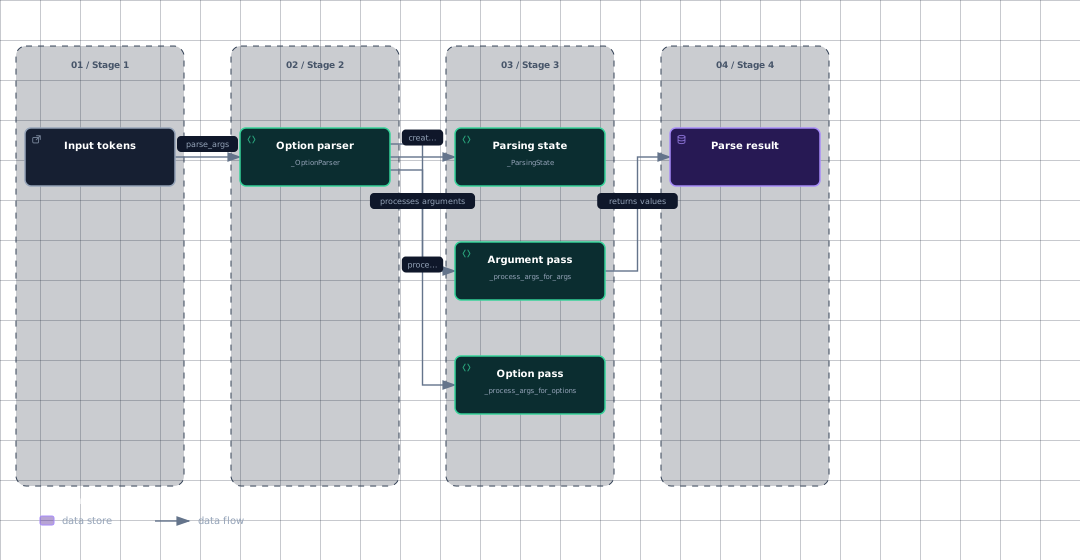
parse_args creates a _ParsingState, processes option-like tokens first, then assigns the remaining tokens to registered positional arguments. It returns the parsed values, leftovers, and parameter order as (values, args, order).
Evidence
- input-tokenssrc/click/parser.py:298
- parsersrc/click/parser.py:224
- statesrc/click/parser.py:216
- option-passsrc/click/parser.py:327
- argument-passsrc/click/parser.py:316
- parse-resultsrc/click/parser.py:298
The option pass removes tokens from state.rargs one at a time. A token equal to -- stops option processing; a token beginning with a recognized prefix is dispatched as an option; otherwise the token is placed in state.largs when interspersed arguments are allowed.
When interspersed arguments are disabled, the first non-option is put back into state.rargs and option processing stops. This supports boundaries such as nested subcommand parsing without consuming later tokens as options.
After option processing, _process_args_for_args combines state.largs and the remaining state.rargs, then calls _unpack_args using each registered argument’s nargs. _unpack_args fills missing positions with UNSET, supports fixed-width groups, and supports one wildcard position that consumes the remainder.
Sources: src/click/parser.py:298-314, src/click/parser.py:327-341, src/click/parser.py:245-249, src/click/parser.py:316-324, src/click/parser.py:51-108
How prefixes and option names are classified
_split_opt classifies an option spelling by examining its first character and whether the first two characters form a repeated prefix. A non-symbol start has no prefix, a repeated prefix becomes a two-character prefix, and all other prefixed spellings use their first character as the prefix.
_Option uses that split to classify one-character options such as -a as short options and longer or double-prefixed spellings such as --all as long options. It also records both the first prefix character and, for long options, the complete prefix.
When an option is registered, add_option normalizes its spellings, creates an _Option, updates the parser’s recognized prefixes, and inserts each short and long spelling into its corresponding lookup map. _normalize_opt preserves the prefix while applying the context’s token_normalize_func to the option name when one is configured.
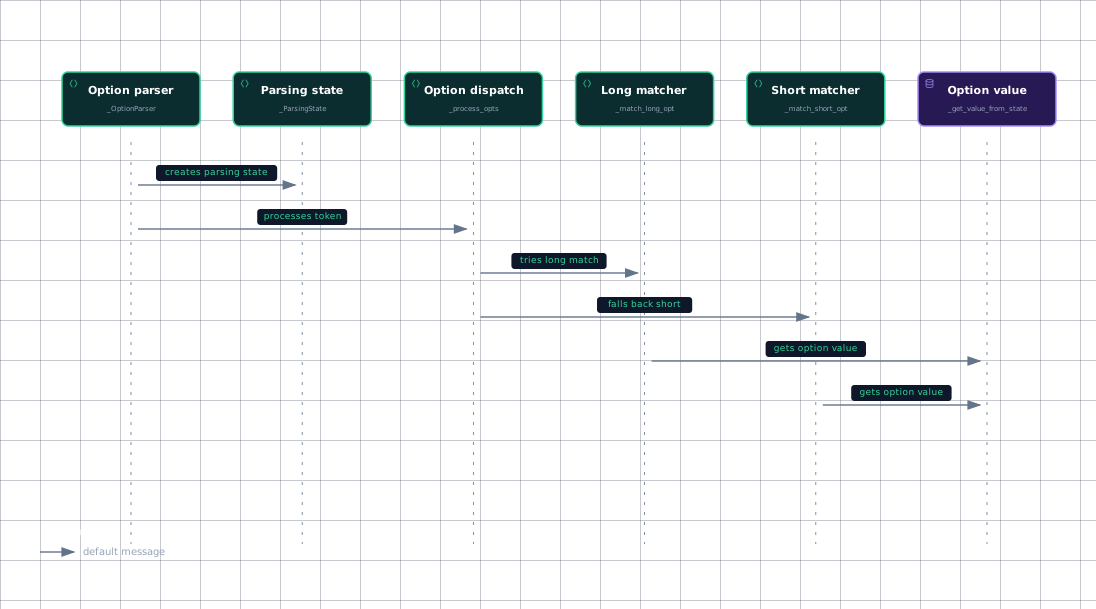
The parser first treats an option-like token as a long option. _process_opts separates an explicitly attached value after =, normalizes the option spelling, and calls _match_long_opt. If long matching fails and the token does not use a recognized two-character prefix, the parser falls back to _match_short_opt; otherwise it reports or preserves the unknown option according to ignore_unknown_options.
Sources: src/click/parser.py:111-117, src/click/parser.py:141-155, src/click/parser.py:265-288, src/click/parser.py:120-124, src/click/parser.py:470-485, src/click/parser.py:486-500
How values and short-option clusters are consumed
A matched long option uses _get_value_from_state when its action takes a value. An explicitly attached value is inserted at the front of state.rargs; otherwise the required number of following tokens is consumed, with a special check that prevents an option-looking token from being consumed as an optional value.
_match_short_opt scans the characters after the first prefix one by one, turning each character into a short spelling such as -a. A flag continues through the cluster, while an option that takes a value stops the cluster and treats any remaining characters as the value or as the next input token.
Evidence
- parsersrc/click/parser.py:224
- statesrc/click/parser.py:216
- dispatchsrc/click/parser.py:470
- long-matchsrc/click/parser.py:363
- short-matchsrc/click/parser.py:390
- option-valuesrc/click/parser.py:430
Once a value is selected, _Option.process applies the option action to state.opts: storing, appending, storing a constant, appending a constant, or incrementing a count. It also appends the option’s underlying object to state.order.
Positional values follow a similar finalization path. _Argument.process rejects partially missing multi-value arguments, converts an empty tuple to UNSET, stores the result under the argument destination, and records the argument object in order.
Sources: src/click/parser.py:363-388, src/click/parser.py:430-468, src/click/parser.py:390-418, src/click/parser.py:169-182, src/click/parser.py:191-213
How it connects
The parser is the syntax boundary beneath Click’s higher-level Command and Parameter layer: its own documentation says that those classes wrap it, while types and defaults are implemented above it. The resulting values can then enter parameter processing, where Click type-casts values, checks missingness, and invokes callbacks.
Registered options and arguments originate from the command’s parameter declarations; the decorator API attaches Option and Argument instances to a command’s parameter list. The low-level parser consumes their registered spellings and destinations, but does not itself perform the higher-level parameter interpretation.
For the broader command lifecycle, continue with Commands and Groups and The Parameter Model. For the user-facing distinction between positional arguments and options, see Arguments and Options in Practice.
Sources: src/click/parser.py:224-232, src/click/core.py:2709-2724, src/click/decorators.py:327-341, src/click/decorators.py:355-369, src/click/parser.py:265-296
Key takeaways
_OptionParserrecognizes command-line syntax before higher-level parameter processing._process_args_for_optionsdistinguishes--, option-prefixed tokens, and positional-looking tokens._split_optand_Optionclassify short and long option spellings._process_optstries long matching first, then short matching when the prefix permits it._match_short_optmakes combined short flags possible by consuming a cluster character by character.