Quickstart: Your First Command
Click turns ordinary Python functions into command-line tools through decorators. The smallest path is a function decorated with @click.command(), followed by a call to that resulting command when the file is run.
This page uses the documented hello example as the minimal command, then relates the same idea to the naval example, which is packaged as a standalone Click application with implemented commands.
Sources: docs/quickstart.md:39-60, docs/quickstart.md:16-27
Core concepts
A command is a callable CLI entry point
A command is the object Click creates from a decorated function, so the decorated name can be invoked as a command-line utility or attached to a group.
Sources: docs/quickstart.md:44-60, src/click/decorators.py:173-188
Decorators declare the interface
Decorators describe the command and its parameters next to the Python function; @click.command() creates the command, while @click.option and @click.argument add values that Click passes to the callback.
Sources: docs/quickstart.md:41-45, docs/quickstart.md:157-169
A callback is the work performed after parsing
A callback is the function body that runs for the command, such as hello printing a greeting or ship_move reporting a movement.
Sources: docs/quickstart.md:52-56, examples/naval/naval.py:32-34
Output belongs to the command’s user-facing behavior
click.echo writes the examples’ messages and is designed to behave robustly across differently configured environments.
Sources: docs/quickstart.md:73-85, examples/naval/naval.py:22-24, examples/naval/naval.py:32-34
How a function becomes a command
The minimal implementation has three parts: import Click, decorate a function, and invoke that command from the module entry point. The decorator converts the function into a Command, and the explicit call under if __name__ == '__main__': invokes it.
import click

@click.command()
def hello():
    click.echo('Hello World!')

if __name__ == '__main__':
    hello()
This example shows the smallest runnable shape: @click.command() is above the callback, click.echo produces output, and the __main__ block invokes the decorated command.
The important detail is that hello no longer remains only the original undecorated function: after decoration it is a Command instance that can be invoked as a CLI utility.
This workflow explains the transformation from declaration to execution:
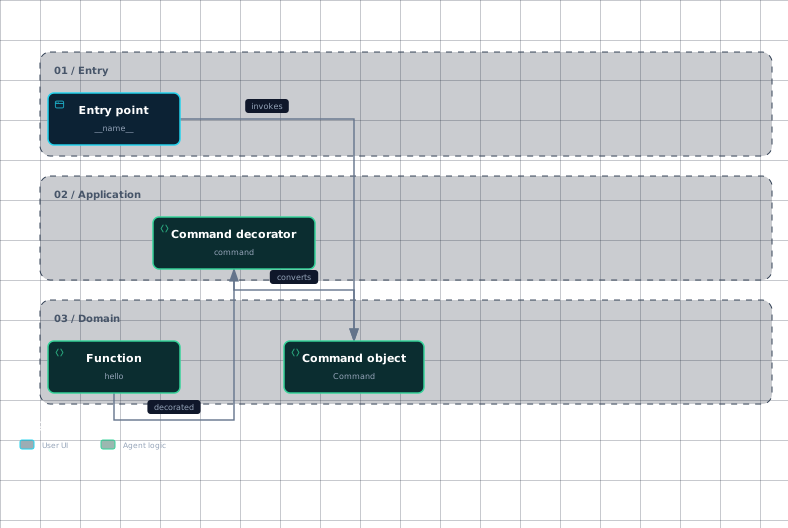
Evidence
- hello-functiondocs/quickstart.md:52
- command-decoratordocs/quickstart.md:44
- command-objectdocs/quickstart.md:56
- entry-pointdocs/quickstart.md:58
The decorator also derives a default command name from the function name: it lowercases the name, replaces underscores with dashes, and removes selected suffixes such as _command and _group.
Sources: docs/quickstart.md:44-60, docs/quickstart.md:52-60, src/click/decorators.py:186-188, src/click/decorators.py:177-180
How options and arguments reach the callback
Parameters are declared with decorators placed above the callback. In the documented example, @click.option('--count', default=1, help='number of greetings') declares an option, @click.argument('name') declares an argument, and the callback accepts matching count and name parameters.
A Command handles command-line parsing and can dispatch to nested commands; its registered parameters can be Option or Argument objects. The example therefore keeps the interface declaration beside the callback that consumes the resulting values.
@click.command()
@click.option('--count', default=1, help='number of greetings')
@click.argument('name')
def hello(count, name):
    for x in range(count):
        click.echo(f"Hello {name}!")
The option supplies count, the argument supplies name, and the callback uses those values to repeat the greeting.
The @click.command decorator automatically attaches decorated options and arguments as parameters to the command.
Sources: docs/quickstart.md:157-169, src/click/core.py:986-995, docs/quickstart.md:163-169, src/click/decorators.py:173-175
What happens when the script runs
A terminal run reaches the module entry point, invokes the decorated command, and executes the callback, which writes its result with click.echo. A separate invocation with --help produces the command’s help page instead of the normal greeting.
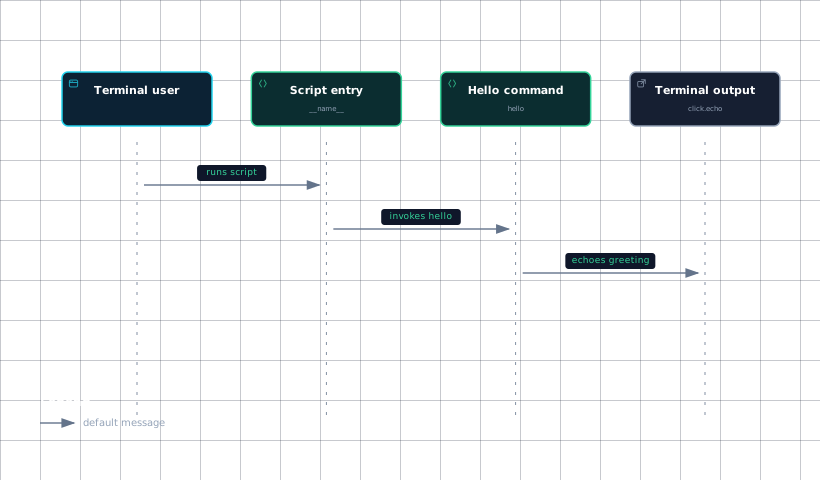
Evidence
- terminal-userdocs/quickstart.md:58
- script-entrydocs/quickstart.md:58
- hello-commanddocs/quickstart.md:52
- outputdocs/quickstart.md:54
The naval example applies the same callback pattern to several operations: ship_new reports creation, ship_move reports a destination and speed, ship_shoot reports a target, mine_set reports a mine coordinate and type, and mine_remove reports removal.
| Callback | User-facing operation | Values used by the callback |
|---|---|---|
ship_new | Creates a ship | name |
ship_move | Moves a ship | ship, x, y, speed |
ship_shoot | Fires at a coordinate | ship, x, y |
mine_set | Sets a mine | x, y, ty |
mine_remove | Removes a mine | x, y |
Each listed callback sends its result through click.echo, so the visible effect is the message printed by its function body.
Sources: docs/quickstart.md:56-71, examples/naval/naval.py:22-24, examples/naval/naval.py:32-34, examples/naval/naval.py:41-43, examples/naval/naval.py:62-64, examples/naval/naval.py:70-72
How it connects
For the conceptual model of Click’s decorator-first approach, see Click Overview.
For the construction rules behind @click.command, @click.option, and @click.argument, continue with The Decorator API.
For how declared options and arguments are parsed and resolved, see The Parameter Model and The Low-Level Parser.
For command nesting and dispatch, see Commands and Groups.
Sources: src/click/decorators.py:173-188, docs/quickstart.md:157-169, src/click/core.py:986-995
Key takeaways
@click.command()converts a function into an invokable Click command.- @click.option and @click.argument declare values used by matching callback parameters.
- The module entry point invokes the decorated command when the script runs.
- Naval callbacks perform their visible work with click.echo.
Sources: docs/quickstart.md:44-60, docs/quickstart.md:157-169, docs/quickstart.md:56-60, examples/naval/naval.py:22-24, examples/naval/naval.py:32-34, examples/naval/naval.py:41-43, examples/naval/naval.py:62-64, examples/naval/naval.py:70-72